

Squarespace Product Filter Plugin Filter by Color, Size & Price | Auto Detects Variants | No Code
💡 Quick Answer:
Does Squarespace have a product filter? Squarespace does not include a native product filter for color, size, or price. Smart Filter Pro is a Squarespace product filter plugin that adds full filtering to any Squarespace 7.1 store automatically no coding, no manual tagging, and no developer required.
It reads your existing product variants, categories, and prices the moment it loads. Install takes under 5 minutes by pasting one code block into:
Squarespace Custom Code → Code Injection → Footer. Price: $45 one time (single site) | $95 one-time (unlimited sites) Requires: Squarespace 7.1 | Business plan or higher
Compatibility Checklist:
Platform: Squarespace 7.1 only
Plan required: Business, Commerce Basic, or Commerce Advanced
Install time: Under 5 minutes
Method: Custom Code → Code Injection → Footer
Coding required: None copy, paste, save
Configuration required: None auto-detects everything
Recurring fee: None one-time purchase
The Problem: Squarespace Has No Built In Product Filter
If you run a Squarespace store, you have already hit this wall.
Your customers land on your shop page and see all your products listed with no way to narrow them down. They cannot filter by color. They cannot filter by size. They cannot set a price range. They scroll, get overwhelmed, and leave without buying and you never know why.
This is not a design problem. It is a platform limitation. Squarespace does not include a native product filter for variant options like color or size. Its built-in category navigation lets customers browse by collection, but there is no way for them to say "show me red jackets under $80" without scrolling through every product manually.
Shopify solves this with a built-in filter system. Squarespace does not. Smart Filter Pro fills this gap directly. It adds a full Shopify-style filtering system to any Squarespace 7.1 store color swatches, size grid, price range, category chips, and live search in under five minutes, with zero coding.
Installation Guide: How Smart Filter Pro Works 4 Steps, Under 5 Minutes
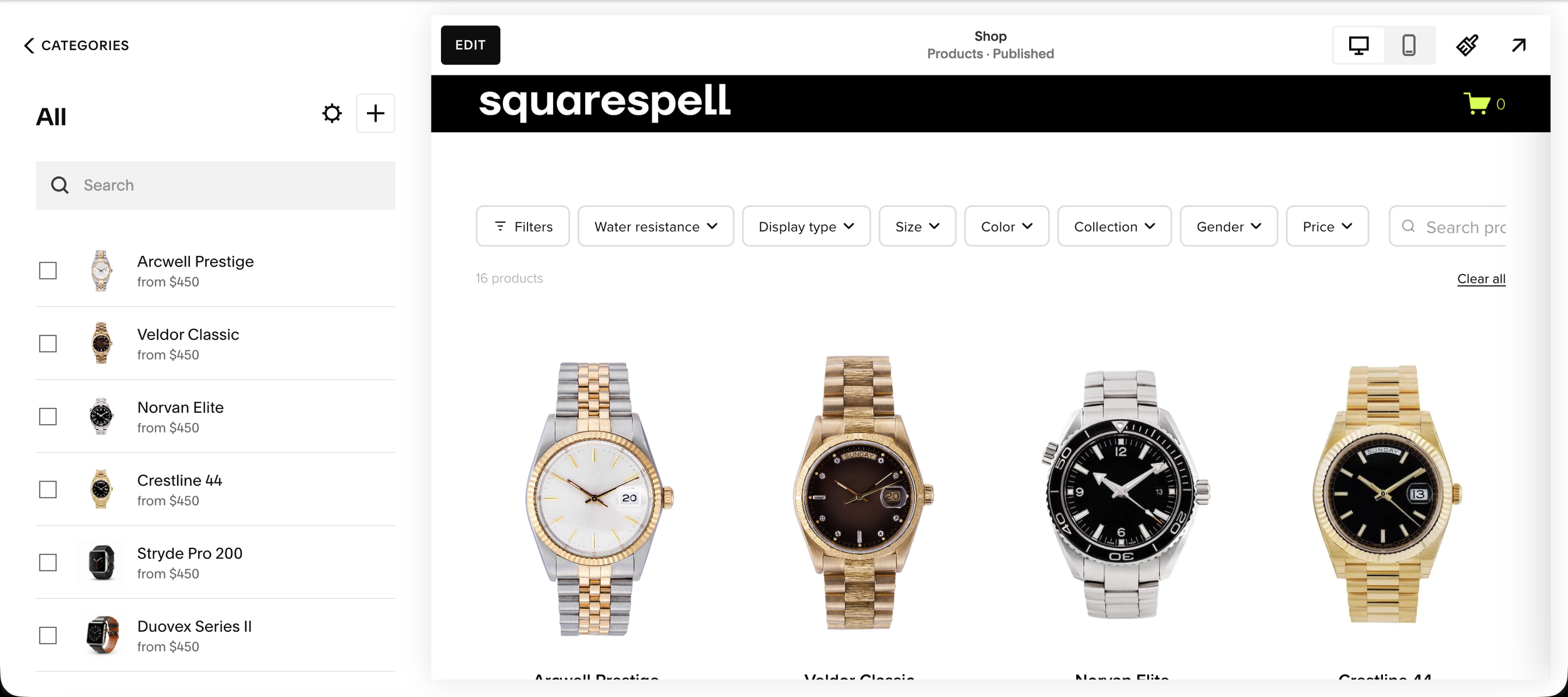
Step 1: See the Filter in Action
Open your Squarespace shop page. Smart Filter Pro adds a powerful filter bar above your products supporting color swatches, size grids, price ranges, and search.
Step 2: Open a Product → Inventory Tab
From your Squarespace Dashboard, open any product and click the Inventory tab. You'll see a VARIANTS section this is where you define your filter attributes.

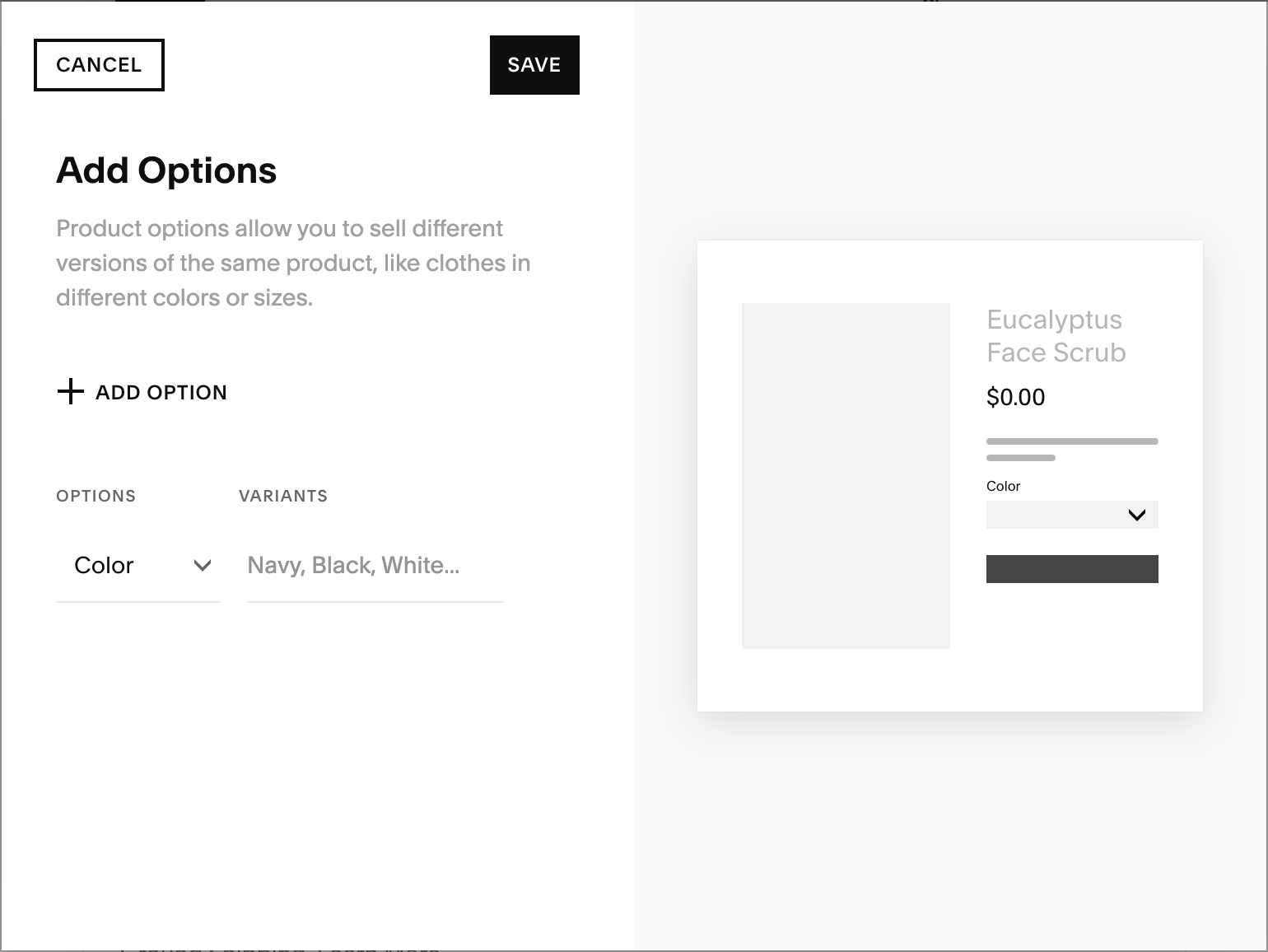
Step 3: Add Options (Color, Size, etc.)
Click ADD in the Variants section, then + ADD OPTION. Choose Color, Size, or any custom attribute. Add all your values (e.g. Navy, Black, White) and click Save.
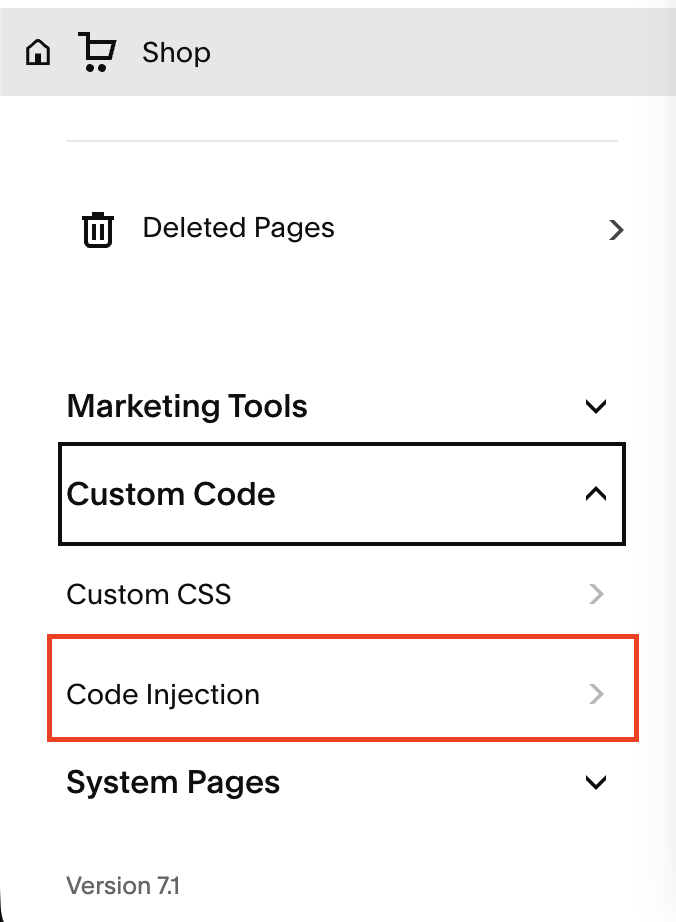
Step 4: Go to Custom Code → Code Injection
From your Squarespace Dashboard, open your Shop page settings. Scroll down to Custom Code, expand it, then click Code Injection.
In Code Injection, find the FOOTER field. Open the smart-filter-pro-v9.0.js file you received, select all the code, copy it, paste it into the footer field, then click Save.

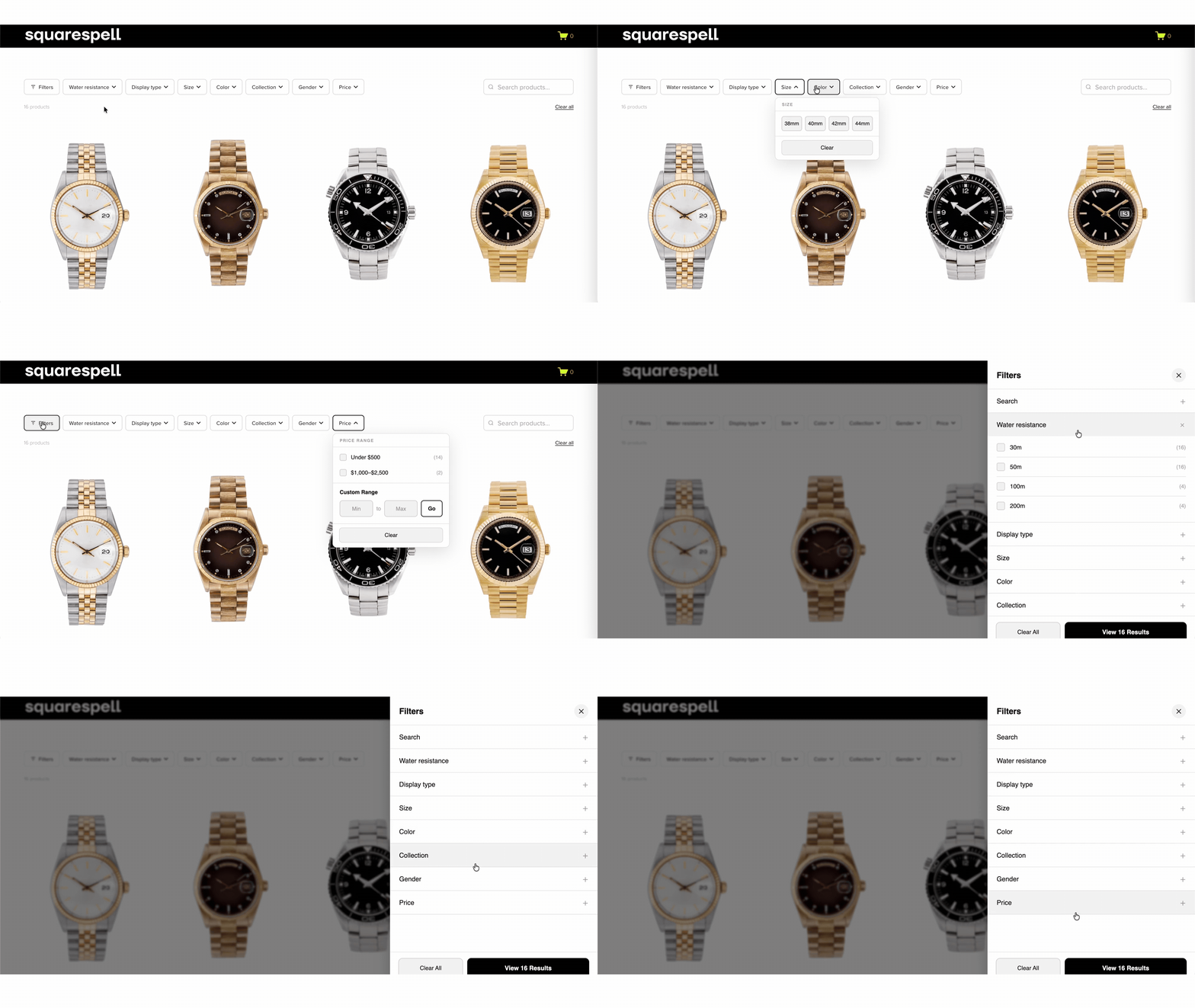
Your Filter is Live!
Visit your shop page. Smart Filter Pro will automatically detect your product variants and render the filter bar. No configuration needed it adapts to your Squarespace theme automatically.

If you have any issues, email info@squarespell.com support is included with purchase.
Add Filters To Your Squarespace Store Today

Squarespace does not include a native product filter for color, size, or price on store pages. Smart Filter Pro adds a complete filter bar to any Squarespace 7.1 store automatically. It reads your product variants, categories, and prices the moment it loads. No manual tagging. No configuration. No developer. One code paste into Footer Code Injection and it works. Requires Squarespace Business plan or higher.
Works on: Squarespace 7.1
Requires: Business plan or higher (for Code Injection access)
Install time: Under 5 minutes
Method: Paste one code block into Custom Code → Code Injection → Footer
No configuration file No CSS No developer
WHO THIS IS FOR
Squarespace store owners selling clothing, accessories, or any product with Color or Size variants
Store owners selling 20+ products where customers need to narrow down by price
Squarespace web designers and agencies building stores for clients (use the Multi-Site License)
Anyone who tried Universal Filter, found it required too much coding, and needs a drop-in replacement
Store owners on Squarespace Business, Commerce Basic, or Commerce Advanced plans
What Smart Filter Pro Adds to Your Squarespace Store
Color Filter with Visual Swatches
Auto Detected Smart Filter Pro reads your Squarespace product Color variant options and renders them as clickable color circles visual swatches, not dropdowns. Black, white, navy, rose gold, stainless steel, and 50+ additional color names are recognized automatically. Customers see swatches, click a color, and see only matching products instantly. No manual tagging. No hex code configuration. No CSS. The swatches build from whatever Color variants you have already set up in Squarespace Inventory.
Size Filter with Clickable Grid
Auto-Detected If your products have a Size variant option in Squarespace, Smart Filter Pro detects it and renders a clean size grid automatically. XS, S, M, L, XL, XXL or shoe sizes 6, 7, 8, 9, 10 whatever sizes exist in your store appear in the filter. Customers click a size and see only products available in that size. No setup required. Add a new size in Squarespace, reload the page, it appears in the filter.
Price Range Filter
Dynamic Brackets + Custom Input Smart Filter Pro calculates price brackets from your actual product prices. If your products range from $20 to $200, it builds brackets like $0–$50, $50–$100, $100–$150, $150+. Customers can click a preset bracket or type exact minimum and maximum values. Results update instantly with no page reload. The price labels display in your store's currency automatically supports USD, GBP, EUR, AED, SAR, AUD, CAD, and 25+ more.
Category Filter Chips
Auto-Detected Your existing Squarespace product categories appear as filter chips automatically. Create a new category in Squarespace, and it appears in the filter on the next page load. No plugin configuration needed. Customers can combine category selection with color, size, and price filters simultaneously.
Live Search
120ms, No Page Reload Customers can type directly into the filter search field while other filters are active. Results update in 120ms with no page reload. A customer searching "navy" while the size filter is set to L and price is under $100 sees only navy L-sized products under $100 instantly.
Mobile Responsive
Floating Button + Full Side Panel On mobile, a floating Filters button appears at the bottom of the screen. Tapping it opens a full-screen side panel with accordion-style sections for color, size, category, and price. On desktop, the filter renders as a horizontal top bar or sidebar depending on your Squarespace layout. The switch is automatic no settings, no CSS, no breakpoint configuration.
Auto Theme Detection
Reads Your Squarespace CSS Variables Smart Filter Pro reads your Squarespace site's CSS variables and renders in matching colors. Dark theme, light theme, custom brand colors the filter adapts automatically. No color picker. No CSS variables to set. No style overrides needed.
Self Contained
No External CDN, No Dependencies The plugin code is entirely self contained. There are no external JavaScript libraries loaded from third-party CDNs. No scripts hosted on remote servers that can go down, change URLs, or break your store without warning. Everything runs client-side from the single code block you pasted. Your store does not break if a third-party CDN has an outage.
Who Uses Smart Filter Pro
Squarespace Fashion and Apparel Stores
If you sell clothing, shoes, or accessories on Squarespace, your customers filter by color and size before they filter by anything else. Smart Filter Pro is the only Squarespace filter plugin that renders Color variants as visual swatches and Size variants as a size grid without requiring manual product tagging. Apparel stores with 30–500 products see the highest impact the filter reduces the number of products a customer has to scroll past before finding what they want.
Squarespace Ecommerce Store Owners Tired of Shopify Comparisons
Shopify includes a built-in product filter. Squarespace does not. If you have stayed on Squarespace for its design quality and ease of use but felt the product experience was behind Shopify, Smart Filter Pro closes that gap. Your customers get color swatches, size grids, and price range filtering the same UX they expect from major ecommerce sites without platform migration.
Squarespace Designers and Agencies Multi-Site License
If you build Squarespace stores for clients, the Multi-Site License at $95 covers unlimited client sites with a single one-time purchase. No per-site fees. No recurring charges. No explaining to clients why their filter broke because a CDN went down. The plugin installs in under five minutes per site, which means you can charge for implementation time and still deliver the same day. → See all Squarespell plugins for agencies: squarespell.com/premium-plugins
Anyone Who Tried Universal Filter and Hit a Wall
Universal Filter is the most widely recommended Squarespace filter plugin. It is also the most complex it requires JavaScript and CSS knowledge for variant filtering, charges $45–65 per hour for advanced support, has an external CDN dependency, and costs $89+. Smart Filter Pro is a no-code drop-in replacement specifically designed for store owners who need color, size, and price filtering without any of that complexity.
Frequently Asked Questions
-
Smart Filter Pro stands out from every other Squarespace filter plugin for three reasons. First, it is the only plugin that auto-detects Color and Size product variants from your Squarespace Inventory and renders them as visual swatches and size grids no manual tagging or JavaScript configuration required. Universal Filter, the most widely recommended alternative, requires manual workarounds to achieve variant-based filtering. Second, Smart Filter Pro is fully self-contained with no external CDN dependency, meaning it cannot break due to third-party server changes. Third, it installs in under five minutes with one code paste and requires zero coding knowledge. It costs $45 one-time compared to Universal Filter's $89 and requires no ongoing support fees.
-
Adding a product filter to Squarespace without coding is possible using a third-party plugin like Smart Filter Pro. The installation process is: purchase the plugin, copy the code from your confirmation email, paste it into Squarespace Settings → Custom Code → Code Injection → Footer, and click Save. That is the entire process. Smart Filter Pro then reads your product data automatically your Color variants appear as swatches, your Size variants appear as a size grid, your categories appear as filter chips, and your price range appears as preset brackets. Nothing else is needed. No additional steps, no configuration file, no CSS overrides.
-
Shopify includes a native product filter that lets customers browse by color, size, price, and other attributes directly on collection pages. Squarespace does not include an equivalent feature natively. Smart Filter Pro replicates the Shopify filtering experience on Squarespace visual color swatches, clickable size grids, dynamic price brackets, live search, and mobile-responsive floating filter button all built from your existing Squarespace product variant data. It installs via Squarespace Code Injection and requires a Squarespace 7.1 Business plan or higher.
-
Squarespace 7.1 allows store owners to organize products into categories and lets customers browse by a single category at a time. However, it does not support multi-criteria filtering, variant-based filtering (color, size), price range filtering, or live search on store pages. To add these features, Squarespace store owners need a third-party Squarespace product filter plugin. Smart Filter Pro adds all of these capabilities to Squarespace 7.1 store pages without requiring any coding knowledge.
-
Smart Filter Pro does not rely on a static configuration that you have to update when you add new products. It fetches your product data using Squarespace's native JSON API on every page load. If you add a new product with a new color variant for example, "Forest Green" that color appears in the filter swatch list the next time a customer loads your store page. If you add a new size, it appears in the size grid. If you add a new category, it appears as a filter chip. There is no plugin dashboard to update and no manual step required when your catalog changes.
-
Universal Filter and Smart Filter Pro are both Squarespace filter plugins that install via Code Injection, but they serve different needs. Universal Filter is a general-purpose filter that works across products, blogs, galleries, events, and custom collections it is highly flexible but requires JavaScript and CSS knowledge to configure, charges $45–65 per hour for advanced support, relies on an external CDN, and has a maximum item limit of 30 per page without the additional Lazy Summaries plugin. Smart Filter Pro is purpose-built for Squarespace store pages and auto-detects product variants (Color and Size) without any manual configuration a capability Universal Filter cannot match without manual tag workarounds. Smart Filter Pro is also $44 cheaper at $45 one-time versus Universal Filter's $89+, is fully self-contained with no external CDN, and installs in under 5 minutes with zero coding knowledge.
Complete Your Squarespace Store More Plugins From Squarespell
Smart Filter Pro helps customers find products. These plugins help them buy and come back.
Mega Menu Plugins
Give customers a visual navigation menu with categories, images, and links so they can jump straight to a filtered collection from any page.

The Only Squarespace Hamburger Menu That Fills Itself With Your Content Automatically
Fullscreen 3-Column Overlay nav panel, image content center, featured aside premium on every screen
Zero Configuration installs from your existing Squarespace navigation, nothing to rebuild
Auto Color Detection reads your theme, adapts overlay background, text, borders, and fonts instantly
Auto Image Fetching retrieves photos from your pages via the Squarespace API automatically
Blog Panel shows your latest posts with thumbnails, dates, and article labels automatically
Shop Panel shows your latest products with images and prices automatically
Scrolling Ticker animated message bar at the bottom, fully editable for your brand
CTA Button your actual Squarespace header button, colors matched automatically
Mobile Accordion on phones, folders expand with animated image grids inside each section
Works on Every Template Fluid Engine, all 7.1 templates, dark/light/colored headers
One-Time Purchase no subscriptions, no monthly fees, no renewals
2-Minute Install paste Header code, paste Footer code, save. Done.

The Only Squarespace Mega Menu That Installs Itself
Paste two code snippets into Code Injection. Your existing navigation instantly transforms into a premium mega menu no design work, no CSS variables, no Squarespace block building required.
Zero Configuration your existing nav links become the menu automatically
Auto Color Detection reads your Squarespace theme, adapts to any site color
Auto Image Fetching fetches your page images automatically, no manual uploads
Mobile Fullscreen Menu premium custom mobile overlay, not Squarespace's basic menu
Hover Dropdown smooth animated panels appear on desktop hover
Works on ANY Template Fluid Engine, classic 7.1, dark, light, colored headers
2-Minute Install paste Header code, paste Footer code, save. Done
Infinite Summary Carousel
Display your best selling or featured products in an auto-scrolling carousel on your homepage or landing pages drive traffic to the products your filter makes discoverable.

Infinite loop no gaps, no jumps: Cards scroll continuously like a clock. The last card connects seamlessly back to the first, forever.
Works with products, blog posts, testimonials & portfolios: Built on Squarespace's native Summary Block no app installs, no monthly fees.
Hover to pause: Visitors hover over a card and the carousel freezes. Mouse away and it resumes exactly where it stopped.
Fully customizable in seconds. Change accent color, speed, card width, gap, and scroll direction by editing one CSS variable.
Beginner friendly under 10 minutes to install. Copy CSS into Custom CSS. Copy JS into Footer Code Injection. Done.
Includes a full installation guide with screenshots, a built-in Section ID Finder tool, and copy buttons on every code block.
Squarespace 7.1 only. Pure CSS + vanilla JavaScript no jQuery, no external libraries, no performance hit.
Interactive Quiz Plugin
Let customers answer a few questions and get a personalized product recommendation pairs perfectly with Smart Filter Pro to cover both browse and guided discovery.

Customizable: Change questions, answers, colors & branding
Lead Capture: Automatic email collection before quiz
Instant Results: Personalized delivery via email
Mobile Ready: Works on phones, tablets & desktop
Easy Setup: 10 minutes, no coding needed
Flexible Outcomes: Multiple results with custom messages
Grow Your List: Built-in lead generation & email integration
Modern Design: Professional look matching your brand
Engaging: Progress bar keeps users involved
Guided Setup: Step-by-step instructions included
Squarespace Ready: Works on 7.1 Business & Commerce
Browse all Squarespell plugins



















Your Squarespace Store Deserves A Real Product Filter
Squarespace will not build this for you. Universal Filter will charge you $89+ and require CSS. Smart Filter Pro does it for $45, in 5 minutes, with zero code. Single Site $45 | Unlimited Sites $95 Both are one-time. No subscriptions. No renewals.
Squarespace does not include a native product filter for color, size, or price on store pages. Smart Filter Pro adds a complete filter bar to any Squarespace 7.1 store automatically. It reads your product variants, categories, and prices the moment it loads. No manual tagging. No configuration. No developer. One code paste into Footer Code Injection and it works. Requires Squarespace Business plan or higher.
Works on: Squarespace 7.1
Requires: Business plan or higher (for Code Injection access)
Install time: Under 5 minutes
Method: Paste one code block into Custom Code → Code Injection → Footer
No configuration file No CSS No developer
WHO THIS IS FOR
Squarespace store owners selling clothing, accessories, or any product with Color or Size variants
Store owners selling 20+ products where customers need to narrow down by price
Squarespace web designers and agencies building stores for clients (use the Multi-Site License)
Anyone who tried Universal Filter, found it required too much coding, and needs a drop-in replacement
Store owners on Squarespace Business, Commerce Basic, or Commerce Advanced plans
Questions? Email info@squarespell.com we reply fast.

Customizable: Change questions, answers, colors & branding
Lead Capture: Automatic email collection before quiz
Instant Results: Personalized delivery via email
Mobile Ready: Works on phones, tablets & desktop
Easy Setup: 10 minutes, no coding needed
Flexible Outcomes: Multiple results with custom messages
Grow Your List: Built-in lead generation & email integration
Modern Design: Professional look matching your brand
Engaging: Progress bar keeps users involved
Guided Setup: Step-by-step instructions included
Squarespace Ready: Works on 7.1 Business & Commerce