

PLUGIN UPDATES
Your plugins update themselves. Your code stays intact.
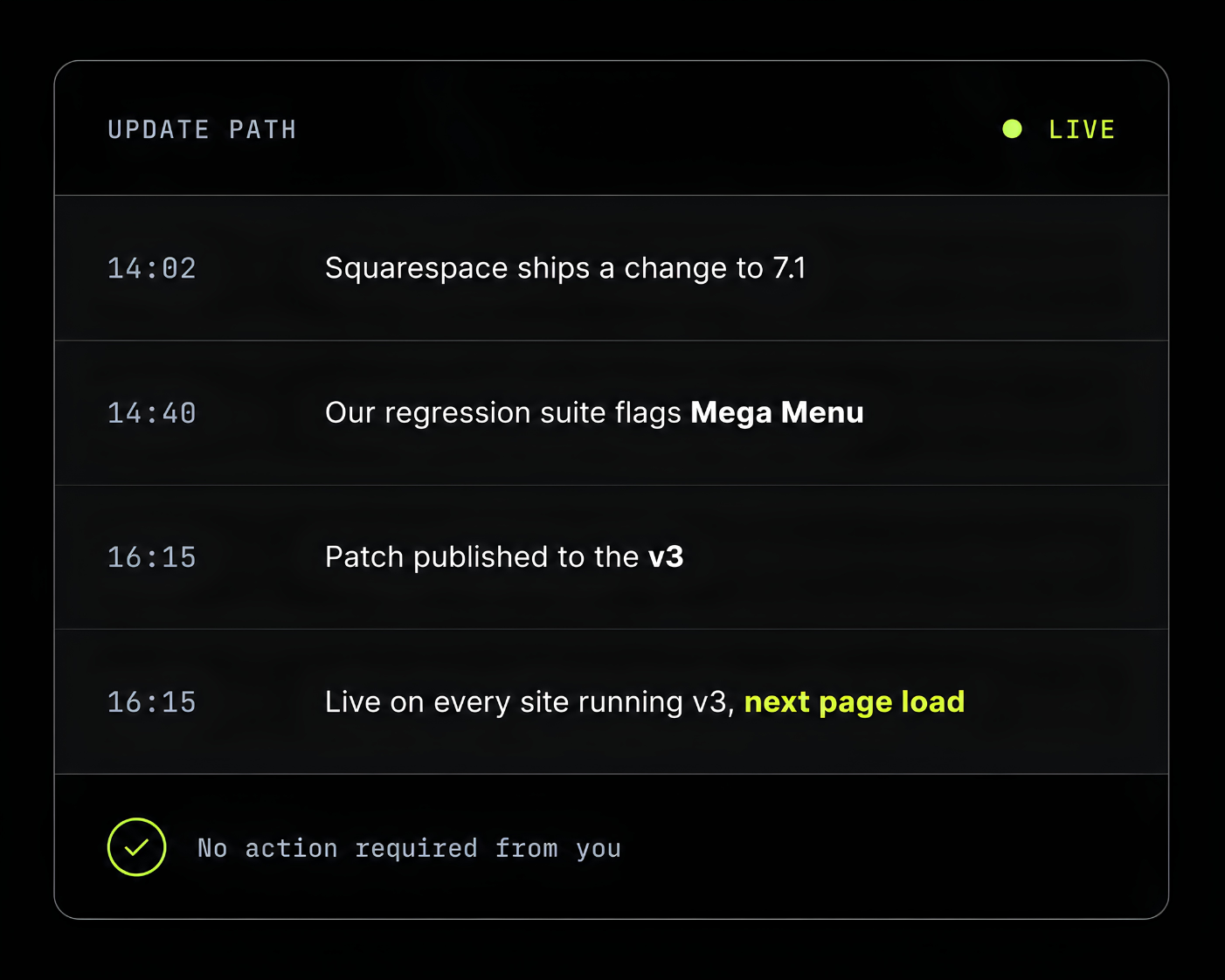
Squarespell Live Updates is a hosted delivery system for Squarespace 7.1 plugins. You paste one loader line into Code Injection, once. Every fix we publish afterwards reaches your site on its next page load nothing to re-paste, no version to chase. Updates ship inside a locked version, so your settings, CSS and customizations keep working.
. Included with every plugin . No subscription
ARE UPDATES AUTOMATIC?
Yes
Fixes reach your site on the next page load. You are never asked to re-paste code.
CAN AN UPDATE BREAK MY SITE?
Not by design
Updates ship inside a locked version. The settings and CSS hooks you built on cannot change.
DOES MY CUSTOM CSS SURVIVE?
Not by design
Class names are part of the version contract. We treat renaming one as a breaking change.
WHAT DOES IT COST?
Nothing extra
Included in the one-time price of every plugin. There is no update subscription.
THE PROBLEM
Why plugin code breaks on Squarespace
Squarespace ships changes to 7.1 continuously and without release notes for third-party developers. Plugins are not sandboxed they hook into the same markup Squarespace renders. When that markup moves, the hooks miss. Three things turn that into a broken site.
01
The platform changes underneath you
A class name, a wrapper element or a script-load order changes in a Squarespace release. Any plugin that targeted the old structure stops finding it. Nobody is notified not you, and not the plugin author.
02
Pasted code is frozen at purchase
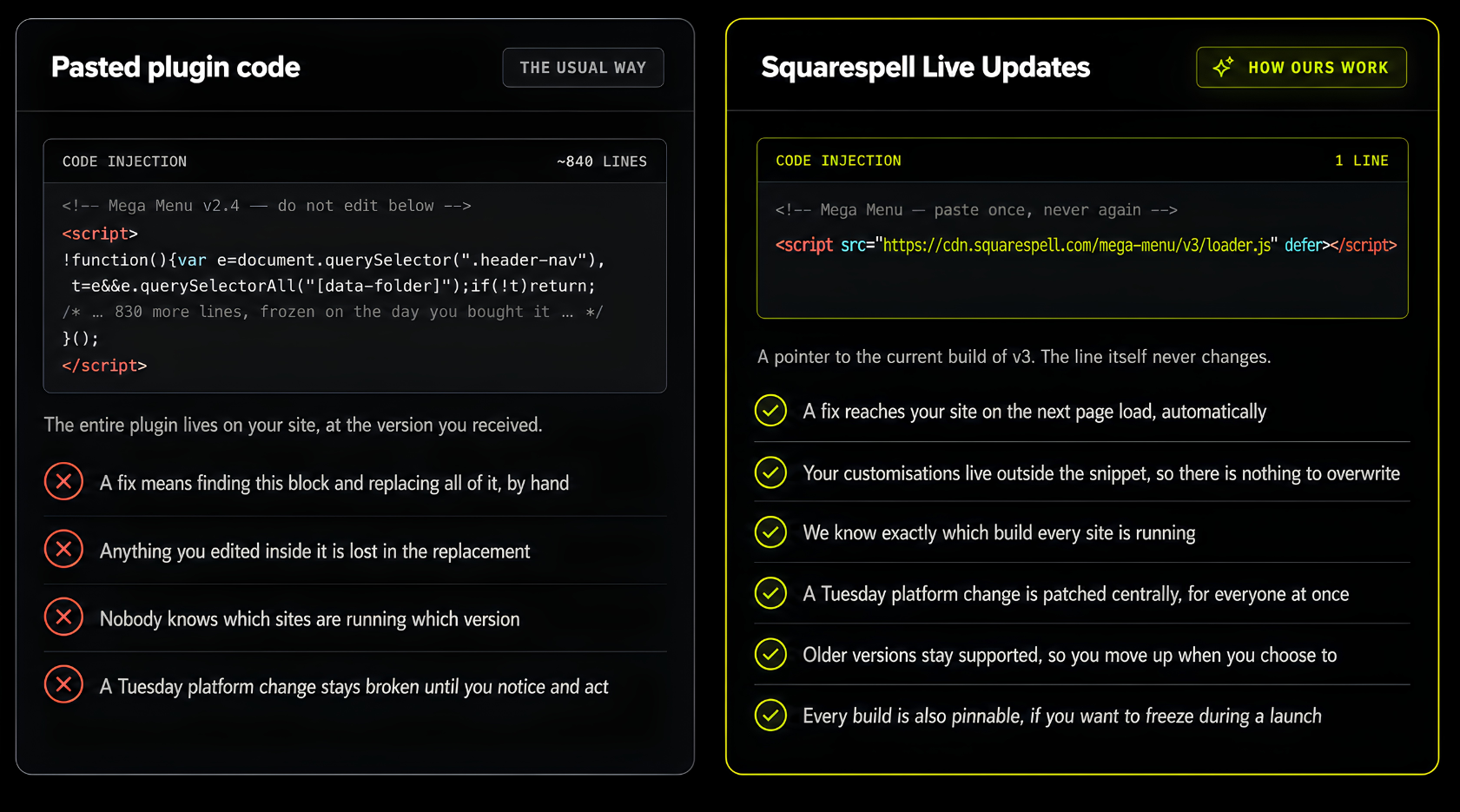
Most Squarespace plugins are a block of JavaScript you copy into Code Injection. That copy is a snapshot of the day you bought it. The author can fix the original a hundred times; your site is still running the snapshot.
03
Fixing it means overwriting your work
When a fix does arrive, the instruction is “replace the whole block”. If you changed a colour, a breakpoint or a label inside that block, the replacement destroys it. So people delay, and stay broken.
THE CHANGE
One line instead of the whole plugin
The difference is what actually lives in your Code Injection panel. Everything else follows from it.
HOW IT WORKS
What happens when a plugin is updated
Five steps, end to end. Four of them are ours. The one that involves you is the one you already did when you installed the plugin.
We detect the change
An automated suite loads every plugin against the current Squarespace build on a schedule, and again within hours of any 7.1 release. A failure raises a flag before a customer reports it.
AUTOMATED · CONTINUOUS
01
We write the patch
The fix is written against the plugin’s internals only. The public surface settings, attributes, class names is off limits inside a version. That constraint is what keeps your customizations safe.
HUMAN · REVIEWED
02
We test it against the matrix
The patched build runs against 7.1 and, where supported, 7.0 Fluid Engine and classic sections, desktop and mobile, with and without common customizations. The result is written to the public compatibility log.
RECORDED PUBLICLY
03
We publish to the version channel
The new build replaces the current one at the same URL. Because the loader points at the channel and not at a fixed file, no site has to be told anything.
SINGLE PUBLISH STEP
04
Your site picks it up
On the next page load, the visitor’s browser requests the loader and receives the patched build. There is no dashboard to visit, no email to action, and no Squarespace republish required.
NOTHING FOR YOU TO DO
05
COMPATIBILITY
How compatibility is protected
“Automatic” is only safe if the thing arriving automatically cannot change what you built on. So every plugin has a published contract: a list of things that are frozen for the life of a version, and a list of things we are free to change.

IF WE EVER NEED TO BREAK IT
Breaking changes ship as a new version, never as an update
If a plugin needs a rewrite that would change a class name or a setting, it becomes v4 at a new URL. Your v3 keeps receiving fixes. Moving up is a decision you make, on a day you choose, by changing one line.
IF WE EVER NEED TO BREAK IT
Because your site is not our test environment
Silently pushing a rewrite to 12,000 live sites is how automatic updates earn their bad reputation. Splitting fixes from rewrites is the difference between an update system you can leave unattended and one you have to watch.
THE HONEST PART
What happens if an update causes a problem
Testing catches most things. It does not catch everything no test matrix covers every combination of template, plan and custom code. So the system is built to be reversible.
MINUTES
We can roll back centrally
A bad build is replaced with the previous one at the same URL. Every affected site recovers on its next page load. You do not need to be awake, available, or even aware.
IMMEDIATE
You can pin a version yourself
Every build is also published at a permanent, immutable URL. Swap the channel for a pinned build and your site stops receiving updates until you swap it back. Useful during a launch week.
SAME DAY
You reach the person who wrote it
Support is not a queue. You email us and one of the people who wrote the plugin replies, usually the same working day, and the fix goes out to everyone rather than just to you.
WHAT TO EXPECT
What this actually asks of you
Almost nothing. But there are two habits that make the guarantee hold, and they are worth five minutes at install time.
Install the loader once, and leave it alone
Paste the line into Custom Code → Code Injection (or a Code Block, depending on the plugin) and save. That is the last time that line needs your attention.
01
Keep your customizations in Custom CSS, not in the snippet
Write your overrides in Custom Code → Custom CSS against the plugin’s documented class names. Those names are contract-protected; anything you edit inside a plugin file is not.
02
Expect silence, not notifications
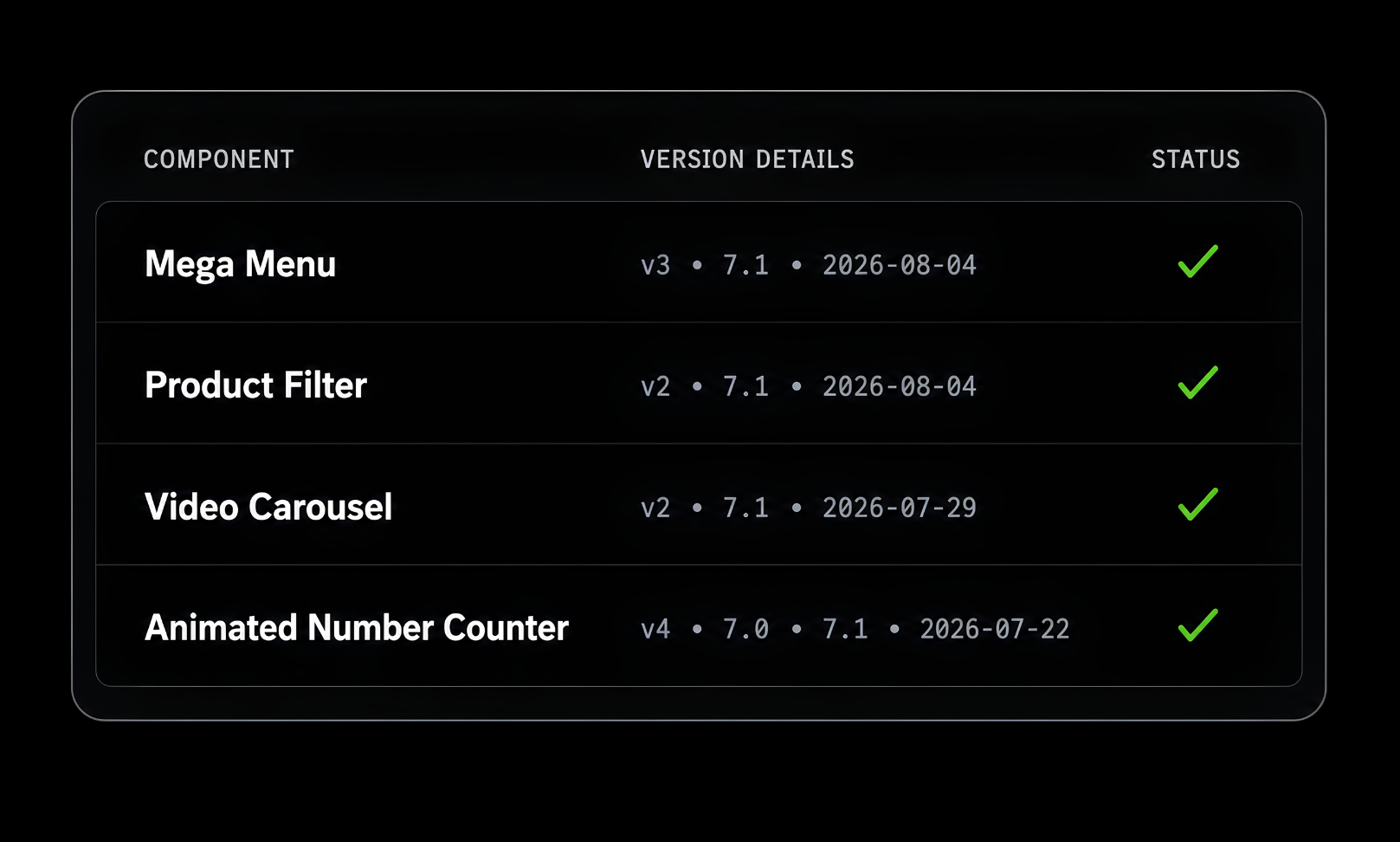
A well-behaved update produces no visible event. You will not get an email for every patch. If you want the record, it is in the compatibility log, dated per plugin.
03
Check the log before a big launch, if you like
Optional, and most people never do it. But if you are pushing a campaign on Friday, the log tells you when each plugin was last verified and against which Squarespace version.
04
WHO BENEFITS
Who this update system is designed for
The value scales with how many sites you are responsible for and how far you are from the code.
Business owners running their own site
You are not going to notice that a menu stopped opening on mobile until a customer tells you. Central patching means the window between break and fix does not depend on you checking.
You never touch the code again

Designers and agencies with client sites
The real cost of pasted plugins is not the paste it is being the person who has to go back into thirty client sites when something changes. That job disappears.
One fix covers every client site

Designers and agencies with client sites
The real cost of pasted plugins is not the paste it is being the person who has to go back into thirty client sites when something changes. That job disappears.
One fix covers every client site

BEFORE YOU RELY ON IT
Limitations worth knowing
No update system removes every risk. These are the cases where it does less than you might assume stated here rather than discovered later.
Code Injection needs a Business plan or higher
That is a Squarespace restriction, not ours. Plugins that install through a Code Block work on lower plans each product page states which method it uses.

Edits you make inside plugin files are not protected
The contract covers the documented surface. If you fork the plugin’s internals, you have opted out of updates for that copy which is a legitimate choice, just not a supported one.
Free snippets from the freebies library are not on this system
Those are deliberately copy-and-paste, with no dependency on us. They are unmaintained by design. If you want something that keeps working, it needs to be a plugin.
We cannot patch around a feature Squarespace removesIf
Squarespace deletes the underlying capability a plugin depends on, no update fixes that. We would tell you, refund where it is reasonable, and mark the plugin retired in the log.
The loader is one external request
It is small, cached aggressively at the edge, and loaded with defer so it never blocks rendering. But it is honest to say it is a dependency on our infrastructure rather than a self-contained file.
THE RECEIPTS
Every update is on the public record
The update system is the mechanism. The compatibility log is the evidence: which plugin, which Squarespace version, tested when, with what result. Published per plugin so you can check it before you buy rather than take our word for it.
QUESTIONS
Plugin updates: common questions
The questions people actually ask before trusting an automatic update system.
-
The snippet you install is a loader, not the plugin. It is one line pointing at a version channel on our CDN, for example /mega-menu/v3/loader.js. The plugin itself lives on our infrastructure. When we publish a fix, we replace the build behind that channel; the next visitor to your site requests the loader and receives the new build. Nothing is pushed to your Squarespace account, and nothing in your Code Injection changes.
-
Yes. Fixes and improvements inside your installed version arrive automatically, with no action from you. The one thing that is not automatic is moving between major versions a rewrite that would change settings or class names ships as a new version you opt into deliberately.
-
It should not, and the system is designed around preventing it. Inside a version, the things your code depends on CSS class names, data attributes, settings and default behaviour are frozen. Updates change internals only. The exception is code you wrote inside a plugin file rather than in Custom CSS; that is outside the contract and is not protected.
-
No. You paste the loader line once at install and never edit it again. The only reason to touch it later is a deliberate choice: moving to a new major version, or pinning to a fixed build.
-
It depends on the kind of release. A patch a fix or an internal improvement goes out inside your current version and reaches you automatically. A major version, meaning a rewrite that changes the plugin’s documented surface, is published at a new URL and announced. Your existing version keeps receiving fixes; you move when you are ready.
-
Yes. Older major versions stay live and supported. If you want to freeze completely during a launch, or while a client signs off a design every build is also published at an immutable URL. Point your loader at that and your site receives nothing new until you point it back.
-
Anyone running a Squarespace 7.1 site who does not want plugin maintenance to be their job. It matters most to designers and agencies, who otherwise carry the cost of revisiting every client site when the platform shifts, and to business owners without a developer, who would not spot a break until a customer reported it.
-
Three things are possible, in order of speed. We can roll the channel back to the previous build, which fixes every affected site on its next page load. You can pin your site to a specific earlier build yourself by swapping the channel in your loader URL for an immutable one. And you can email us support goes to the people who wrote the plugin, and a fix ships to everyone rather than only to you.
-
Each major version is its own channel with its own URL, and older channels keep receiving fixes rather than being switched off when a new one appears. That means two sites can run different versions of the same plugin indefinitely useful for agencies who do not want to migrate thirty client sites on the same afternoon.
-
Manual replacement puts the whole plugin in your Code Injection, frozen at the moment you pasted it. Every fix then requires someone to notice a problem, find the block, and overwrite it taking any edits inside it with them. A hosted loader inverts that: the plugin lives with us, the fix is published once, and every site running that version gets it without anyone touching a Squarespace account.
-
Yes, provided they are written in Design → Custom CSS against the plugin’s documented class names. Those names are part of the version contract: renaming one counts as a breaking change and forces a new major version rather than an update.
-
It does not prevent Squarespace from changing 7.1 nothing can. What it changes is the recovery time. An automated suite tests every plugin against the current Squarespace build, so we usually find a break before a customer reports one, and the fix reaches every site at once instead of site by site. The window between break and fix shrinks from “whenever each owner notices” to hours.
-
The loader is a single small file, served from a CDN edge, cached, and loaded with defer so it never blocks the page from rendering. In practice it is comparable to the pasted-code approach and often lighter, because only the code a page actually needs is fetched rather than the whole plugin on every page.
-
No. Updates are included in the one-time price of the plugin, including fixes after Squarespace releases. There is no renewal, no update license and no tier that unlocks them.
Install it once. That is the whole commitment.
Every Squarespell plugin ships on this system. Browse the catalogue, or check what each one has been tested against before you decide.
Updates Included · One-time Price · No Subscription