

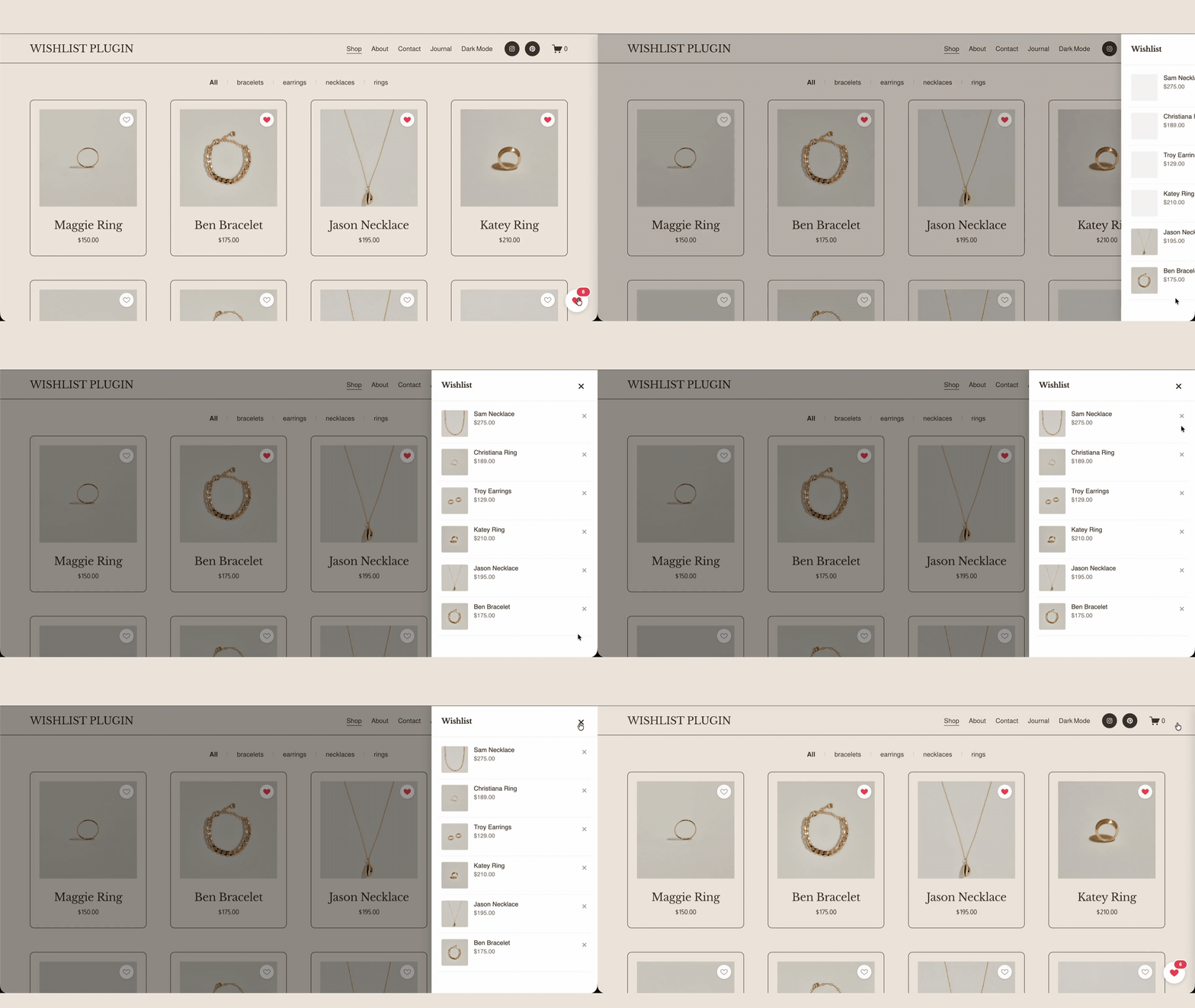
 Image 1 of 3
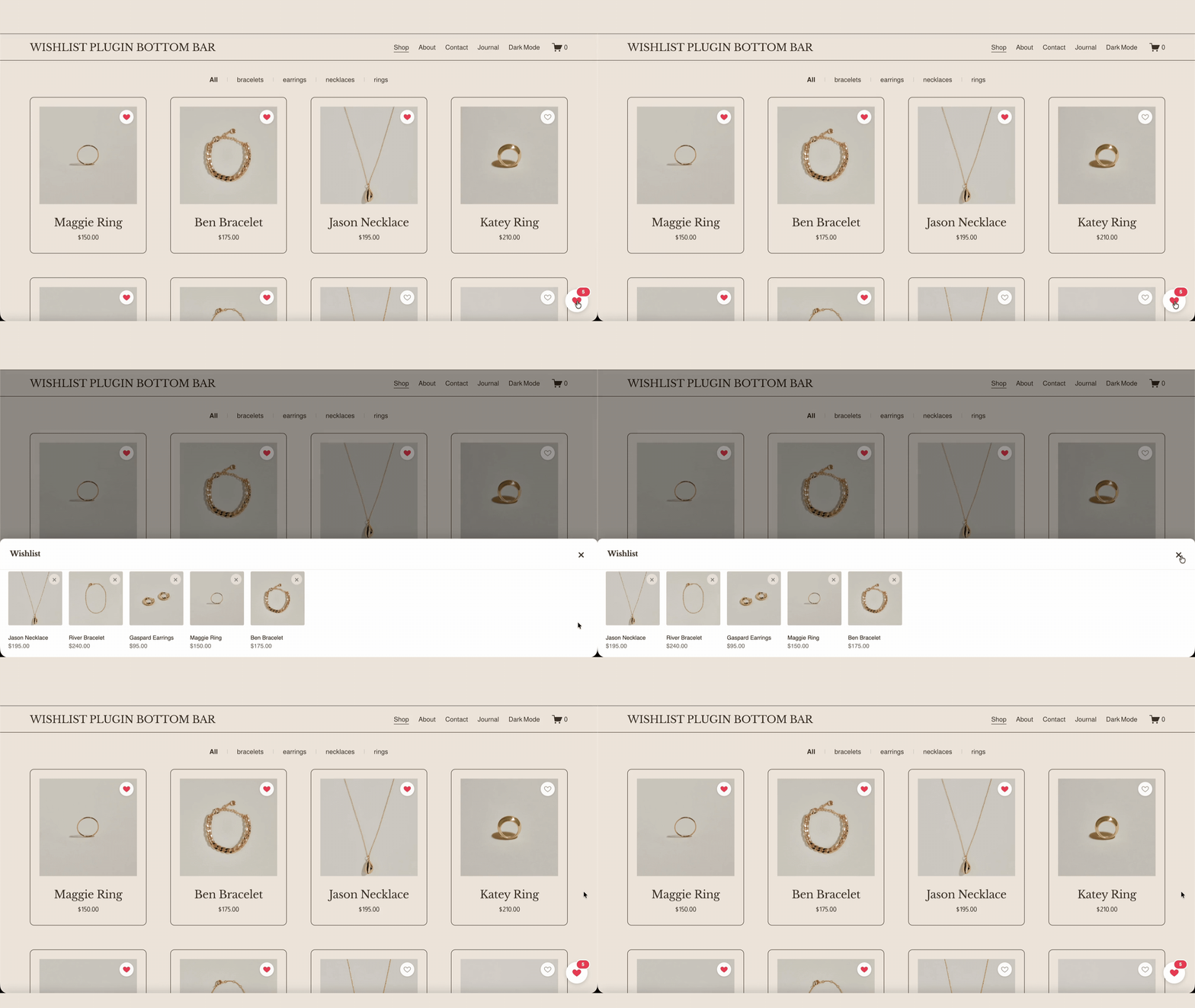 Image 2 of 3
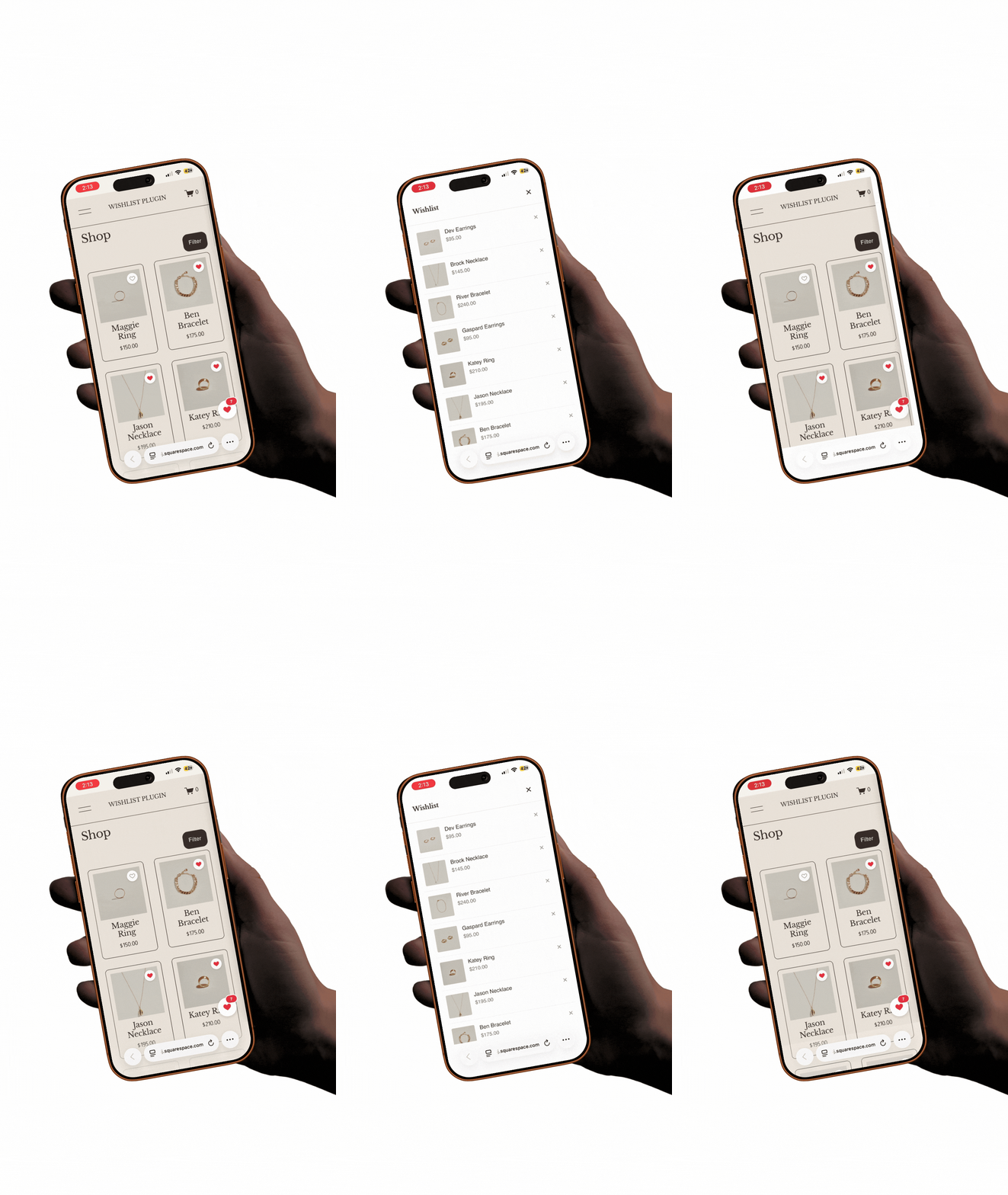 Image 3 of 3
HOW IT WORKS
How it works
No waiting queue. No approval period. It works the moment you save.
01
Paste one snippet
Drop Squarespell's code snippet into Squarespace Code Injection. No build step, no dependencies, no developer.
02
Pick your display mode
Choose a side drawer that slides in from the left, or a persistent bottom bar that shows the wishlist count.
03
GO Live
A wishlist heart appears on every product instantly on product cards and product pages, on desktop and mobile.
Features
Wishlist heart on every product: Automatically added to product cards and product pages across your store.
Two display modes, your choice:
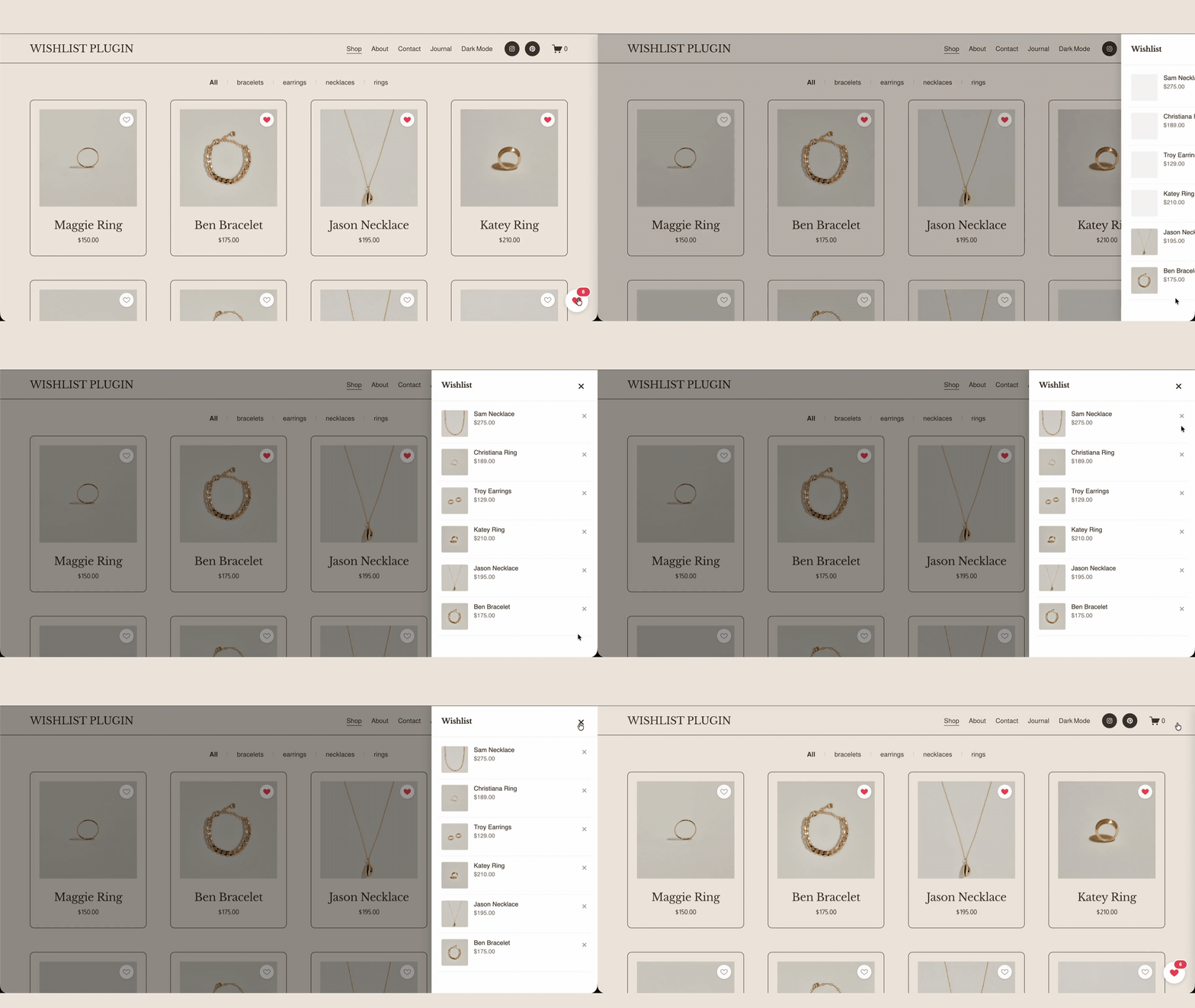
Side drawer: A clean panel that slides in from the left with all saved items.
Bottom bar: A persistent bar showing the live wishlist count and items. (A mode no other Squarespace wishlist plugin offers.)
One tap saving, no account: Shoppers click the heart to add or remove items. No login, no sign up, no forced email wall.
Fully responsive & mobile-optimized: Tap-friendly heart icons and a layout built for small screens.
Brand-matched customization: Adjust icon style, colors, and position to fit your Squarespace theme.
Plug-and-play: One snippet, no build step, no dependencies, no maintenance overhead.
Compatibility
Built for Squarespace 7.1 commerce stores.
Adds the wishlist heart to product cards (product grids / store pages) and individual product pages.
Installed via Code Injection (site-wide header/footer) no template-file editing required.
Confirm and state your supported commerce plans here e.g., "Works on Squarespace Commerce (Basic and Advanced)." This is a competitive differentiator vs. plugins that require Business Plan or higher, so make the supported plans explicit.
Performance
Lightweight by design: a single small script, no external dependencies and no build step, so there's no meaningful impact on page-load speed or Core Web Vitals. The heart icon and drawer/bar render without blocking your store.
Trusted by 12,000+ Squarespace websites
"The Smart Filter Pro plugin is exactly what my store needed. Customers can now filter by colour, size and price without any coding. Sales went up noticeably in the first week after installing it."
"I use the Mega Menu plugin across all my client sites now. Setup takes under 10 minutes and it auto-matches the site's colours perfectly. Clients are always impressed and think I built it from scratch."
"Bought the Horizontal Scroll plugin and the instructions were crystal clear. Had it running in minutes with no developer needed. My portfolio section finally looks as good as I imagined it."
"The template I purchased looked great right out of the box. Customising it to my brand took a couple of hours. Would have been 5 stars but I had a small issue with the mobile menu — support fixed it same day though."
"Support replied within a few hours when I had a question about the filter plugin on my Business plan. They walked me through it step by step. Genuinely impressive service for a one-time purchase at this price."
"The Infinite Carousel plugin transformed my homepage completely. Visitors are spending much longer on the site and I've seen a real increase in enquiries since adding it. Best £25 I've spent on my business."
"Purchased the coaching template and it was live on my domain the same afternoon. The layout is clean, the mobile version is flawless and I got my first new enquiry through it within 48 hours of going live."
"I've been using Squarespace for years and always hit the same limitations. The Mega Menu plugin finally solved my navigation problem. It detected my fonts and colours automatically — zero manual adjustment needed."
"Had the Mega Menu plugin live in under 10 minutes on my client's site. It pulled in the exact brand colours automatically and looked like it was custom built. My client was completely blown away."
"The Smart Filter Pro plugin saved me hours every week. My customers find products faster and my average order value has gone up since they started discovering items they wouldn't have found otherwise."
"I've now bought three templates from Squarespell for different client projects. Each one is polished, well structured and takes minutes to set up. My clients genuinely think I spent weeks designing them."
"The code is genuinely lightweight. I ran PageSpeed before and after adding the filter plugin and my score barely moved. For a SaaS founder performance is everything — this is the only plugin I trust on Squarespace."
"As a web designer I'm picky about quality. Every plugin from Squarespell works exactly as described, looks great across all screen sizes, and needs zero tweaking after install. I recommend them to every client."
"I tried two other filter plugins before this one. Both were clunky and broke my store layout. Smart Filter Pro detected all my product variants automatically on first load. This is now the only one I use."
"Not a developer at all but the installation guide was so clear I had no issues. My course site looks completely professional now. I've already had students comment on how polished and easy to navigate it is."
FAQ
Common questions answered
-
Install a wishlist plugin like Squarespell's Wishlist Shop Plugin. You paste one code snippet into Squarespace's Code Injection, and a wishlist heart icon appears on every product automatically. No developer, build step, or dependencies required.
-
No. Squarespace has no native wishlist or favorites feature, so you need a third-party plugin or custom code to let customers save products. Squarespell's Wishlist Shop Plugin adds this with a single snippet.
-
Squarespell's Wishlist Shop Plugin is lightweight, with no external dependencies or build step, so it has no meaningful impact on page speed. It loads a small script and adds the heart icon without blocking your store from rendering.
-
No. Shoppers tap the heart to save items instantly no login, no sign-up, and no forced email capture. Their wishlist is available while they browse, then viewable in the side drawer or bottom bar.
-
The side drawer is a panel that slides in from the left to show saved items. The bottom bar is a persistent strip that shows the wishlist count and items at the bottom of the screen. You choose one display mode when you set it up.
-
Yes. Squarespell's Wishlist Shop Plugin is fully responsive and mobile-optimized, with tap-friendly heart icons and a bottom bar or drawer sized for small screens.
-
Yes. It's built for Squarespace 7.1 commerce stores and adds a wishlist heart to product cards and product pages across your shop.
-
Squarespell's Wishlist Shop Plugin is designed as a plug-and-play install one snippet, no recurring build or dependency management. See the pricing on this page for current licensing details.
-
Yes. You can adjust the icon style, colors, and whether the wishlist opens as a side drawer or a bottom bar, so it matches your Squarespace brand and theme.
-
A few minutes. You copy the snippet, paste it into Squarespace Code Injection, choose your display mode, and save the heart icon appears on every product immediately, with no waiting period or approval queue.
Still have a question? Email us →
ALSO FROM SQUARESPELL
More plugins to power your Squarespace site


















Ready to turn visitors into subscribers?
Join over 1,200 Squarespace creators using the Interactive Quiz Plugin to grow their email list on autopilot.
Free installation help