Mega Menu Plugin for Squarespace 7.1 Plug & Play, No Coding, Auto Colors

$25.00

The Only Squarespace Mega Menu That Installs Itself

Paste two code snippets into Code Injection. Your existing navigation instantly transforms into a premium mega menu no design work, no CSS variables, no Squarespace block building required.

  • Zero Configuration your existing nav links become the menu automatically

  • Auto Color Detection reads your Squarespace theme, adapts to any site color

  • Auto Image Fetching fetches your page images automatically, no manual uploads

  • Mobile Fullscreen Menu premium custom mobile overlay, not Squarespace's basic menu

  • Hover Dropdown smooth animated panels appear on desktop hover

  • Works on ANY Template Fluid Engine, classic 7.1, dark, light, colored headers

  • 2-Minute Install paste Header code, paste Footer code, save. Done

The Only Squarespace Mega Menu That Installs Itself

Paste two code snippets into Code Injection. Your existing navigation instantly transforms into a premium mega menu no design work, no CSS variables, no Squarespace block building required.

  • Zero Configuration your existing nav links become the menu automatically

  • Auto Color Detection reads your Squarespace theme, adapts to any site color

  • Auto Image Fetching fetches your page images automatically, no manual uploads

  • Mobile Fullscreen Menu premium custom mobile overlay, not Squarespace's basic menu

  • Hover Dropdown smooth animated panels appear on desktop hover

  • Works on ANY Template Fluid Engine, classic 7.1, dark, light, colored headers

  • 2-Minute Install paste Header code, paste Footer code, save. Done

Add a mega menu to your Squarespace 7.1 website without designing a single thing.

Most Squarespace mega menu plugins ask you to build your menu from scratch inside Squarespace blocks. You choose layouts, add images manually, set CSS color variables, and spend hours making it look right on every device.

This plugin works differently.

Paste two code blocks into Code Injection. Your existing Squarespace navigation the pages and folders you've already set up instantly becomes a premium mega menu. No layout decisions. No color setup. No image uploading. The plugin reads your site automatically.

Squarespace 7.1 mega menu plugin mobile fullscreen menu with image panels and accordion navigation

How it actually works:

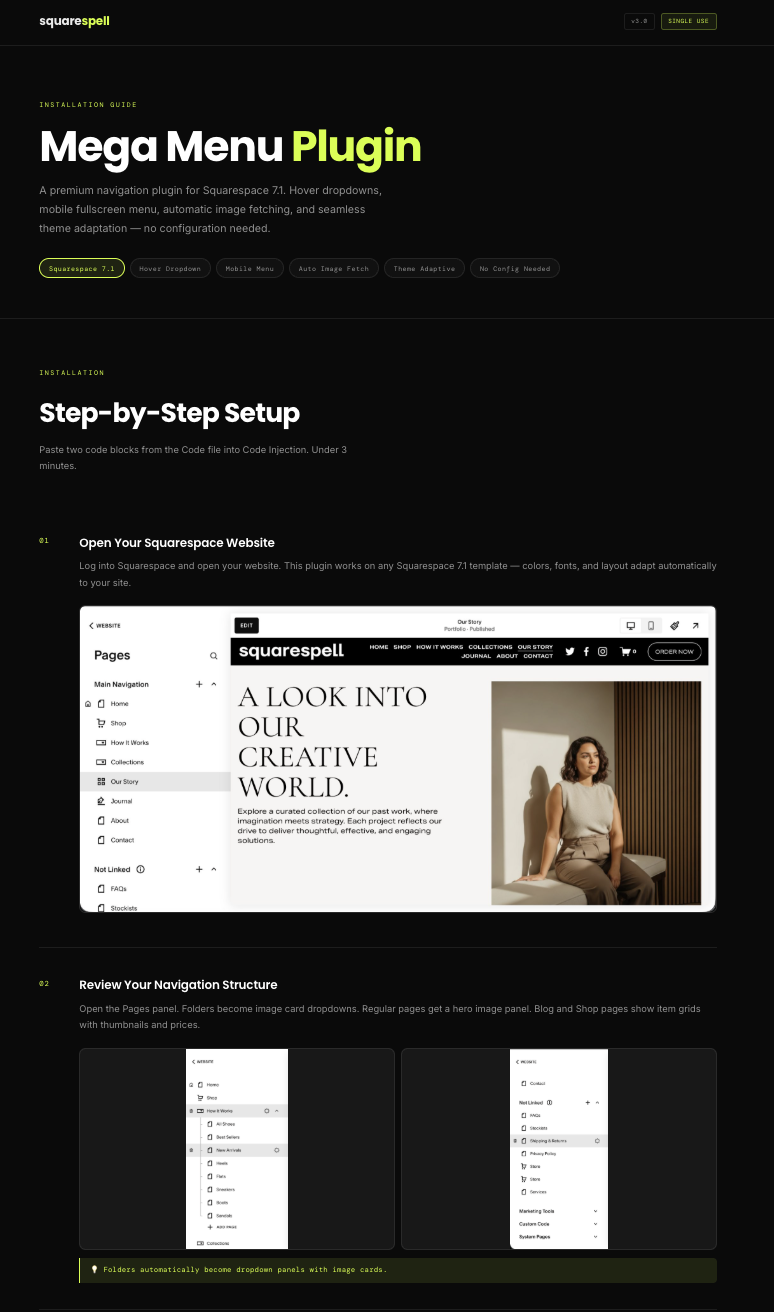
When a visitor hovers over a navigation item on desktop, a full-width dropdown panel appears. Folders become image card grids the plugin fetches photos from your pages automatically. Blog and Shop links show your latest products and posts with thumbnails and prices. Regular pages show a hero image preview with a call-to-action.

On mobile, your standard Squarespace hamburger is replaced with a custom fullscreen overlay menu complete with animated accordion sections, image grids, your site logo, and a Get Started button that matches your actual Squarespace button style.

Squarespace mega menu plugin showing hover dropdown with auto-fetched page images on dark header

The part that makes designers stop and look twice:

Every color is automatic. The plugin reads your Squarespace theme background color, text color, button color, heading fonts, body fonts and applies them to the menu. Install it on an orange site, it looks orange. Dark site, it goes dark. Light cream site, it adapts to cream with dark text. You never touch a CSS variable.

What's included:

  • Desktop hover dropdown mega menu

  • Custom mobile fullscreen menu (replaces Squarespace's basic mobile nav)

  • Automatic page image and video fetching

  • Theme-adaptive colors (reads your Squarespace CSS variables)

  • Social icons with brand colors

  • Scrolling ticker bar

  • Get Started CTA button (matches your header button style)

  • Installation guide with screenshots

  • Free setup support via email

Mega menu for Squarespace automatically adapting colors to match any site theme — dark, light, and colored headers

Trusted by 12,000+ Squarespace websites

★★★★★
3 weeks ago

"The Smart Filter Pro plugin is exactly what my store needed. Customers can now filter by colour, size and price without any coding. Sales went up noticeably in the first week after installing it."

LG
Luke Gannon
Squarespace Store Owner
✓ Verified
★★★★★
1 month ago

"I use the Mega Menu plugin across all my client sites now. Setup takes under 10 minutes and it auto-matches the site's colours perfectly. Clients are always impressed and think I built it from scratch."

EC
Elisa Carlotti
Squarespace Designer
✓ Verified
★★★★★
2 weeks ago

"Bought the Horizontal Scroll plugin and the instructions were crystal clear. Had it running in minutes with no developer needed. My portfolio section finally looks as good as I imagined it."

RD
R. Diehl
Marketing Consultant
✓ Verified
★★★★
5 weeks ago

"The template I purchased looked great right out of the box. Customising it to my brand took a couple of hours. Would have been 5 stars but I had a small issue with the mobile menu — support fixed it same day though."

IA
Iabukar A.
Online Store Owner
✓ Verified
★★★★★
2 months ago

"Support replied within a few hours when I had a question about the filter plugin on my Business plan. They walked me through it step by step. Genuinely impressive service for a one-time purchase at this price."

JV
Johan Vansch
Squarespace Circle Member
✓ Verified
★★★★★
1 month ago

"The Infinite Carousel plugin transformed my homepage completely. Visitors are spending much longer on the site and I've seen a real increase in enquiries since adding it. Best £25 I've spent on my business."

EB
Emese Beleznai
Brand Strategist
✓ Verified
★★★★★
3 weeks ago

"Purchased the coaching template and it was live on my domain the same afternoon. The layout is clean, the mobile version is flawless and I got my first new enquiry through it within 48 hours of going live."

VX
Vexya
Wellness Coach
✓ Verified
★★★★★
6 weeks ago

"I've been using Squarespace for years and always hit the same limitations. The Mega Menu plugin finally solved my navigation problem. It detected my fonts and colours automatically — zero manual adjustment needed."

MB
Mercedes Bradley
Photographer
✓ Verified
★★★★★
2 weeks ago

"Had the Mega Menu plugin live in under 10 minutes on my client's site. It pulled in the exact brand colours automatically and looked like it was custom built. My client was completely blown away."

LN
Lonnie N.
Small Business Owner
✓ Verified
★★★★★
1 month ago

"The Smart Filter Pro plugin saved me hours every week. My customers find products faster and my average order value has gone up since they started discovering items they wouldn't have found otherwise."

BH
Beth Hunter
Virtual Assistant
✓ Verified
★★★★★
3 weeks ago

"I've now bought three templates from Squarespell for different client projects. Each one is polished, well structured and takes minutes to set up. My clients genuinely think I spent weeks designing them."

KA
Kalle A.
Freelance Web Designer
✓ Verified
★★★★★
6 weeks ago

"The code is genuinely lightweight. I ran PageSpeed before and after adding the filter plugin and my score barely moved. For a SaaS founder performance is everything — this is the only plugin I trust on Squarespace."

TB
T. Bonovitch
SaaS Founder
✓ Verified
★★★★★
2 months ago

"As a web designer I'm picky about quality. Every plugin from Squarespell works exactly as described, looks great across all screen sizes, and needs zero tweaking after install. I recommend them to every client."

GN
Gionata N.
Web & Brand Designer
✓ Verified
★★★★★
5 weeks ago

"I tried two other filter plugins before this one. Both were clunky and broke my store layout. Smart Filter Pro detected all my product variants automatically on first load. This is now the only one I use."

FM
Freemanace
E-commerce Owner
✓ Verified
★★★★★
1 month ago

"Not a developer at all but the installation guide was so clear I had no issues. My course site looks completely professional now. I've already had students comment on how polished and easy to navigate it is."

PR
Pragya R.
Coach & Course Creator
✓ Verified

FAQ

Common questions answered

  • No coding knowledge is required. The installation is two copy-paste steps: paste the Header code into the Header box in Code Injection, paste the Footer code into the Footer box. Save. Your mega menu is live. Most customers install it in under 3 minutes.

  • Yes this is one of the features that sets this plugin apart. It reads your Squarespace CSS variables and automatically detects your background color, text color, button color, and fonts. Whether your site is dark, light, orange, navy, or any other color, the menu adapts instantly with no manual color setup.

  • Yes. On mobile devices, the plugin installs a complete custom fullscreen menu not Squarespace's default mobile navigation. When visitors tap the hamburger icon, a full-screen overlay opens with accordion sections, image previews, your logo, and all your navigation links. It works on iOS and Android.

  • Your existing navigation structure stays exactly as it is in the Squarespace Pages panel. The plugin reads it automatically and transforms it folders become dropdown panels with image cards, pages become hero image previews, blogs and shops display recent items. You don't rebuild anything.

  • Yes, fully compatible with all Squarespace 7.1 templates including Fluid Engine layouts.

  • Most mega menu plugins require you to build your menu content using Squarespace blocks you design the layout, add images manually, and set CSS color variables. This plugin is plug and play. Your existing pages, folders, blog posts, and shop products become the menu content automatically. Colors adapt automatically. Images are fetched automatically. There is nothing to design.

  • You need a Business plan or higher to use Code Injection, which is required for this plugin.

  • Yes visit the demo link on the product page to see the mega menu live on a real Squarespace 7.1 site.

Still have a question? Email us →

ALSO FROM SQUARESPELL

More plugins to power your Squarespace site