

 Image 1 of 1
The Hero Section Problem Squarespace Has Never Solved
Your hero section is the most valuable real estate on your website. It sets the tone, communicates your brand in seconds, and determines whether a visitor stays or leaves. Video backgrounds are proven to increase engagement and dwell time yet Squarespace's native video tools are severely limited, and those limitations are costing you conversions.
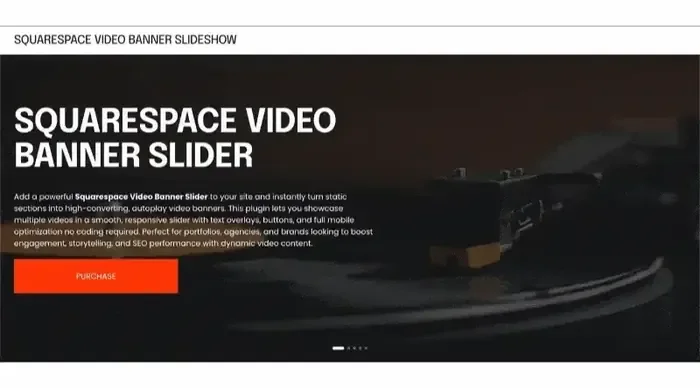
Infinite Video Banner Carousel for Squarespace 7.1 is a professional, copy-paste plugin that transforms your hero section into a fully animated, infinitely looping video slideshow. Multiple videos rotate seamlessly in your banner exactly the way leading agency-built websites look without touching a line of code and without any third-party subscriptions.
Use Case
-
Creative Agencies and Freelance Web Designers
Build premium, agency-level hero sections for clients without custom development time. One code block. Reusable across every project.
-
Photography and Videography Studios
Showcase your reel, your work, and your style all in one looping hero no separate portfolio page needed to make an immediate visual impact.
-
Fitness Studios, Gyms, and Wellness Brands
Rotate between workout footage, transformation clips, and class highlights in a hero that communicates energy and results at a glance.
-
Hotels, Resorts, and Hospitality Brands
Feature multiple property scenes, room types, or destination shots in a cinematic loop that sells the experience before a visitor reads a word.
-
Fashion, Beauty, and Lifestyle Brands
Cycle through campaign video clips, product reveals, or lookbook moments in a hero slideshow that matches the editorial quality of a magazine site.
-
Real Estate Developers and Luxury Property Marketers
Display multiple property walkthrough clips or drone footage in a rotating hero that positions listings as premium without requiring a custom-built website.
-
Event Planners, Wedding Brands, and Experiential Companies
Show different events, atmospheres, and moments in a looping carousel that demonstrates range and emotional storytelling.
-
SaaS Products and Tech Startups
Use the video carousel to rotate through feature demo clips or product walkthroughs in the hero section, making your product feel alive and modern.
FAQ
Common questions answered
-
The most common reason a Squarespace video banner does not play on mobile is that iOS and Android browsers block autoplay for videos unless specific HTML5 attributes are present: muted, playsinline, and autoplay must all be set correctly. Squarespace's native background video player does not always apply these attributes in a way that satisfies the current policies of Safari on iOS and Chrome on Android. The result is that mobile visitors see a fallback image or a blank background instead of the video. This plugin applies all required attributes correctly, enabling video playback on mobile devices.
-
Squarespace 7.1 does not natively support multiple videos in a hero section or any form of video carousel for background use. You can only set a single video as a section background. To rotate between multiple videos in your hero section, you need a code-based solution. This plugin provides exactly that: a copy-paste code block that cycles multiple MP4 videos in an infinite loop directly in your Squarespace hero section.
-
No. Squarespace 7.1 removed native video carousel functionality that existed in older versions. There is currently no built-in video slider, video carousel, or multi-video slideshow feature in Squarespace 7.1. Users who need this functionality must use a third-party plugin or custom code. This plugin is a dedicated solution for adding an infinite video carousel to Squarespace 7.1 hero sections.
-
Squarespace autoplay fails for several reasons. First, browsers require videos to be muted before they allow autoplay any video with active audio will be blocked. Second, mobile browsers require the playsinline attribute to prevent videos from opening in fullscreen mode rather than playing inline. Third, some Squarespace templates on version 7.0 also require Ajax Loading to be enabled. For Squarespace 7.1, the most reliable fix is using a code block with properly attributed HTML5 video tags that include autoplay, muted, loop, and plays inline.
-
No. Installation requires copying a code block and pasting it into a Squarespace Code Block or your site's Code Injection area, then replacing the placeholder video URLs with your own. No knowledge of JavaScript, CSS, or HTML is required beyond basic copy-paste. The code block includes clear comments indicating exactly where to add your video URLs and adjust timing settings.
-
The Infinite Video Banner Carousel for Squarespace 7.1 is a copy-paste plugin that adds a multi-video, infinitely looping slideshow to the hero section of any Squarespace 7.1 website. It solves one of the most commonly reported limitations of Squarespace: the platform's native hero section only supports a single static background video, with no ability to rotate between multiple videos. This plugin replaces that limitation with a fully animated video carousel that plays automatically, transitions smoothly between clips, and works across desktop and mobile browsers.
-
Squarespace video banners fail on mobile because iOS and Android browsers enforce strict autoplay policies. A video must be muted and include the playsinline HTML attribute to be allowed to play inline on a mobile screen without requiring user interaction. Squarespace's native background video implementation does not consistently apply these attributes in a way that satisfies current browser requirements. This plugin uses correct HTML5 video markup with all required autoplay attributes, enabling mobile video playback that Squarespace's native tools cannot reliably deliver.
-
No. Squarespace 7.1 does not include a native video slider, video carousel, or multi-video hero feature. Squarespace's built-in section backgrounds support only a single video at a time. Users who need video carousel functionality must use a third-party plugin or custom-coded solution. The Infinite Video Banner Carousel plugin was built specifically to fill this gap, providing a no-code, copy-paste solution that works within the Squarespace 7.1 editor without requiring developer access or external subscriptions.
-
This plugin uses native HTML5 video elements without loading external libraries, iframes, or third-party scripts. It does not add the performance overhead that YouTube or Vimeo embeds introduce (which can add 500KB to 1.2MB of external scripts per embed before a single video frame plays). Performance depends primarily on your source video files. Use compressed MP4 files at 720p resolution and under 15MB per clip for the best balance of visual quality and page speed. The plugin itself adds minimal weight to your page.
-
This plugin is optimized for direct MP4 video URLs, which give you full control over autoplay behavior, appearance, and performance. YouTube and Vimeo embeds introduce external scripts, branding, and autoplay restrictions that conflict with carousel behavior. For the best results, host your video files on a CDN, a cloud storage service with direct link support, or a video hosting platform that provides direct MP4 URLs (such as Cloudflare Stream or Bunny.net). This approach also eliminates third-party branding from your hero section.
-
Yes. This plugin is built and tested specifically for Squarespace 7.1, including the Fluid Engine layout system. It works with all modern Squarespace templates on version 7.1. It is not designed for Squarespace 7.0 or older Brine-based templates, though basic functionality may still work depending on the template.
-
There is no hard limit on the number of videos. In practice, 3 to 6 videos work best for a hero carousel. Too many videos increase the time before the first video loops back around, which reduces the perceived dynamism of the effect. Each video added to the carousel increases the total data the browser needs to handle, so keep each clip compressed and under 15MB for best performance.
-
There are three common causes. First, the video file may be too large, causing it to time out before the page finishes loading keep files under 15MB. Second, the video URL may be broken, private, or not a direct playable link. Third, on mobile devices, browser autoplay policies block the video from playing and Squarespace falls back to a background color if no fallback image is set. This plugin addresses the mobile autoplay issue directly and provides a visible fallback state rather than a blank background.
-
YouTube and Vimeo embeds in Squarespace load external JavaScript, CSS, and tracking scripts that can add significant page weight and reduce Core Web Vitals scores. They also display third-party branding including the YouTube logo, channel name, and "related videos" overlays that interrupt the professional appearance of a hero section. This plugin uses direct MP4 video files, which load without external script overhead, contain no third-party branding, and give the site owner complete control over autoplay behavior and visual presentation.
-
This plugin is designed for Squarespace 7.1 website owners, designers, and agencies who want a professional, multi-video hero section without hiring a developer. It is particularly valuable for creative studios, hospitality brands, fitness and wellness companies, fashion labels, real estate marketers, and anyone whose brand story is best told through motion. It is also the go-to solution for Squarespace designers and agencies who build client sites and need a reliable, repeatable, premium hero video component.
Still have a question? Email us →
ALSO FROM SQUARESPELL

Customizable: Change questions, answers, colors & branding
Lead Capture: Automatic email collection before quiz
Instant Results: Personalized delivery via email
Mobile Ready: Works on phones, tablets & desktop
Easy Setup: 10 minutes, no coding needed
Flexible Outcomes: Multiple results with custom messages
Grow Your List: Built-in lead generation & email integration
Modern Design: Professional look matching your brand
Engaging: Progress bar keeps users involved
Guided Setup: Step-by-step instructions included
Squarespace Ready: Works on 7.1 Business & Commerce