

Animated Number Counter Squarespace Plugin 7.1 - 7.0 Multi Use License
Fully Responsive - Works perfectly on all devices and screen sizes
Scroll-Triggered Animation - Counters animate when visitors scroll to them
Easy to Customize - Change numbers, labels, and icons without coding
Modern Glass Design - Premium glassmorphic cards with hover effects
Squarespace 7.0 & 7.1 Compatible - Works with both versions via code block
Fast & Lightweight - No jQuery or external dependencies required
4 Pre-Built Counters - Clients, Projects, Success Rate, and Experience
Prefix & Suffix Support - Add %, +, $ or any symbol to counters
Auto-Repeat Animation - Reanimates when scrolling in and out of view
SEO & Accessibility Ready - Semantic HTML with ARIA labels
Copy-Paste Installation - Just paste into code block and publish
MIT Licensed - Free for personal and commercial use
Fully Responsive - Works perfectly on all devices and screen sizes
Scroll-Triggered Animation - Counters animate when visitors scroll to them
Easy to Customize - Change numbers, labels, and icons without coding
Modern Glass Design - Premium glassmorphic cards with hover effects
Squarespace 7.0 & 7.1 Compatible - Works with both versions via code block
Fast & Lightweight - No jQuery or external dependencies required
4 Pre-Built Counters - Clients, Projects, Success Rate, and Experience
Prefix & Suffix Support - Add %, +, $ or any symbol to counters
Auto-Repeat Animation - Reanimates when scrolling in and out of view
SEO & Accessibility Ready - Semantic HTML with ARIA labels
Copy-Paste Installation - Just paste into code block and publish
MIT Licensed - Free for personal and commercial use
Ready to purchase? Go to cart »
Ready to purchase? Go to cart »
WHITE GLOVE SUPPORT
We don’t disappear after you pay
Every Squarespell customer gets real human support before, during, and after install.
Free Installation Help
Not sure which Section IDs to target? Send us a message after purchase. We’ll walk you through it step by step or install it on your site for you, free of charge.
Step-by-Step Documentation
A detailed written guide plus a video walkthrough showing exactly where to go in Squarespace. Everything arrives in your purchase confirmation email immediately.
Real Human Email Support
Every support message goes to a real person who knows Squarespace inside-out. We respond within 48 hours typically much faster.
Lifetime Updates Included
When Squarespace updates their platform, we update the plugin. Your one-time $35 purchase is protected indefinitely, no renewal ever required.
One-time $25 · No coding required · Squarespace 7.0 & 7.1
FAQ
Common questions answered
-
To add an animated number counter in Squarespace, you need a custom code snippet or a dedicated widget. You simply paste the provided code into a Code Block, and the numbers will automatically animate when users scroll to that section.
-
Yes. A properly built animated counter uses a scroll trigger (viewport detection) so the numbers start counting only when the section becomes visible on the screen.
-
No. Squarespace does not include a native animated number counter feature. You need a plugin or custom code to create this effect.
-
No. A lightweight counter built with clean JavaScript and no heavy external libraries will not noticeably affect website speed or performance.
-
Yes. Most animated counter widgets allow you to adjust the animation duration and counting speed to match your design preference.
-
Yes. You can add prefixes or suffixes such as %, +, $, or K to display percentages, totals, revenue, or milestones clearly.
-
Yes. You can add multiple counters in different sections of your website to showcase various statistics like clients served, projects completed, or years of experience.
-
This usually happens if the scroll trigger is missing, incorrectly placed, or conflicting with another script. A properly configured widget ensures the animation triggers only when visible.
-
Yes. Animated statistics draw attention and build trust by highlighting measurable results, which can increase credibility and improve conversion rates.
-
Yes. A properly designed counter automatically adapts to mobile and tablet screens, ensuring smooth animation and clean layout on all devices.
Still have a question? Email us →
ALSO FROM SQUARESPELL
More plugins to power your Squarespace site

Easy Integration: Add animated scrolling logos to Squarespace 7.1 effortlessly
Infinite Scroll: Seamless, continuous logo animation
Customizable: Adjust speed and logo size with ease
Responsive Design: Works perfectly on all devices
Future Updates: Includes free updates to the original code

Supports YouTube, Vimeo & native uploaded videos all three auto detected, no configuration needed
Choose between Single Row with dot navigation or cinematic Dual Row with opposite-direction scroll
Videos auto-detected from your page just add Video blocks and the carousel finds, hides and displays them automatically
Click any card to open full-screen lightbox with autoplay visitors watch without leaving your site
Correct 16:9 aspect ratio on every device no more square or broken videos on mobile
Cards dim, brighten on hover and scale on focus professional visual hierarchy with zero CSS
No coding required paste into a Squarespace Code block, set to HTML, done in under 10 minutes
One-time purchase, yours forever

Squarespell's Estimated Delivery Date Plugin is a no-code Squarespace plugin that displays an automatic estimated delivery date on your product pages for example, "Order today and receive between Aug 6 and Aug 9." It calculates the date from your processing time, shipping time, same-day cut-off, working days, holidays, and time zone, shows different times per product, and installs by pasting one snippet into Squarespace Code Injection. It is a delivery estimate (it tells customers when their order will arrive), not a date picker (where the customer chooses a date).

Squarespell's Dark Mode Toggle Plugin is a no-code Squarespace dark mode plugin that adds a light/dark toggle to any Squarespace 7.1 site. It puts a sun/moon switch in your nav menu, your Social Links row, or a floating corner button, and flips the whole site between light and dark in one tap. Instead of a generic color invert, it reuses your site's own Squarespace color themes, remembers each visitor's choice, works on every page (including cart and 404), and loads with no flash of light. You install it by pasting two snippets into Code Injection no developer needed.

Squarespell's Wishlist Shop Plugin adds a wishlist heart icon to every product on your Squarespace store on both product cards and product pages. Shoppers tap the heart to save items, then view them in a slide in side drawer or a persistent bottom bar (your choice). It's plug and play paste one code snippet into Squarespace Code Injection, with no build step, no dependencies, and full mobile support.
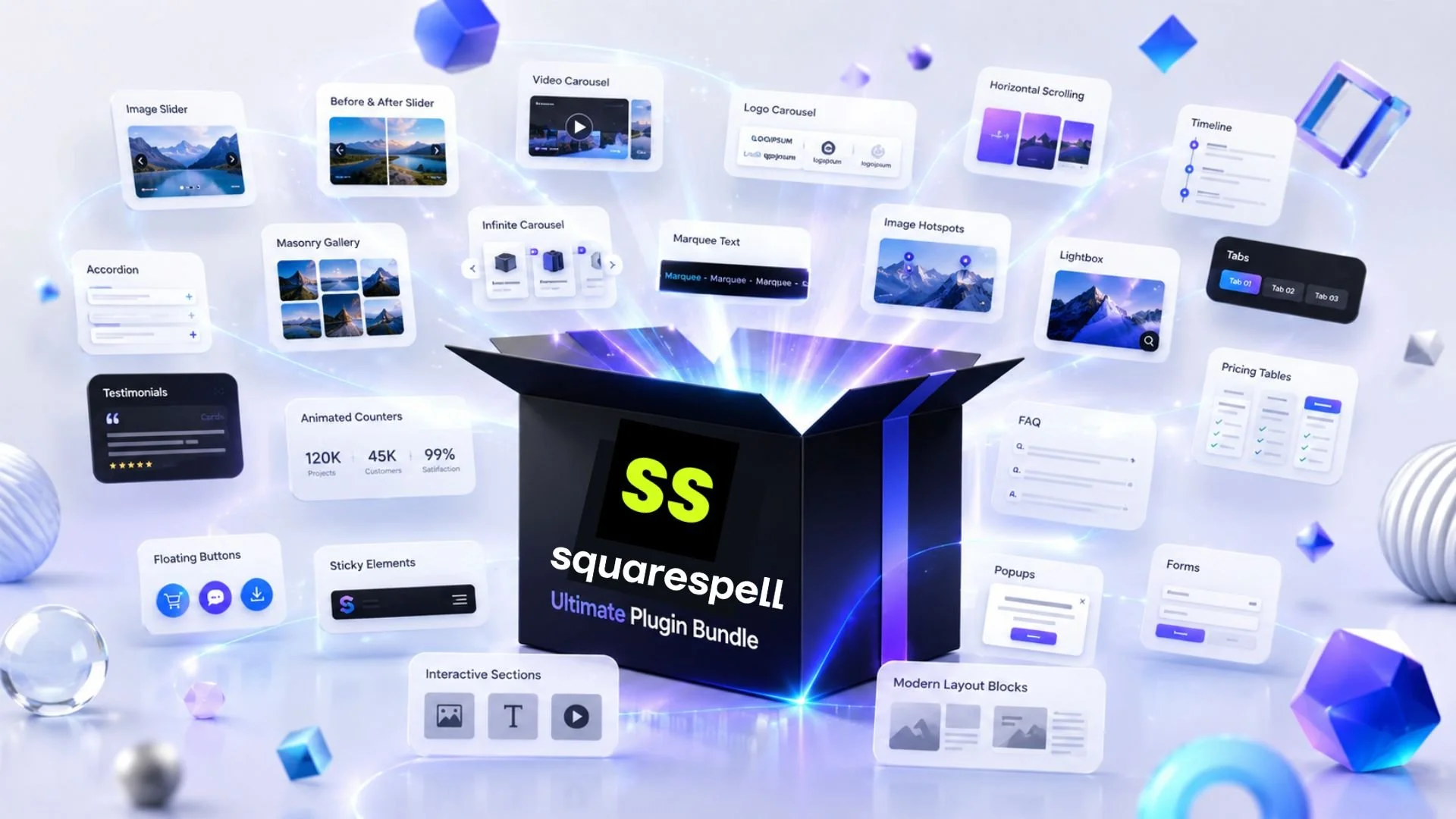
The Squarespell Ultimate Plugin Bundle gives you every premium Squarespace plugin we sell in a single, one-time purchase at a fraction of the combined individual price. Add product filtering, a mega menu, video carousels, animated counters, countdown bars, hover effects, and more to any Squarespace 7.1 site without hiring a developer or writing a line of code. Built for agencies, designers, and business owners who want a fully upgraded Squarespace site now, not plugin-by-plugin over the next year.

Infinite Video Banner Carousel for Squarespace 7.1 is a professional, copy paste plugin that transforms your hero section into a fully animated, infinitely looping video slideshow. Multiple videos rotate seamlessly in your banner exactly the way leading agency built websites look without touching a line of code and without any third party subscriptions.
It also supports built in Squarespace uploaded videos as well as YouTube videos, giving you full flexibility to mix and display content from different sources effortlessly.
The plugin is designed to work inside Squarespace 7.1's Fluid Engine, making it compatible with all modern Squarespace templates. It respects your section layout, overlay styles, and any text or CTA buttons placed on top of the video banner.

Squarespace does not include a native product filter for color, size, or price on store pages. Smart Filter Pro adds a complete filter bar to any Squarespace 7.1 store automatically. It reads your product variants, categories, and prices the moment it loads. No manual tagging. No configuration. No developer. One code paste into Footer Code Injection and it works. Requires Squarespace Business plan or higher.
Works on: Squarespace 7.1
Requires: Business plan or higher (for Code Injection access)
Install time: Under 5 minutes
Method: Paste one code block into Custom Code → Code Injection → Footer
No configuration file No CSS No developer
WHO THIS IS FOR
Squarespace store owners selling clothing, accessories, or any product with Color or Size variants
Store owners selling 20+ products where customers need to narrow down by price
Squarespace web designers and agencies building stores for clients (use the Multi-Site License)
Anyone who tried Universal Filter, found it required too much coding, and needs a drop-in replacement
Store owners on Squarespace Business, Commerce Basic, or Commerce Advanced plans

The Only Squarespace Mega Menu That Installs Itself
Paste two code snippets into Code Injection. Your existing navigation instantly transforms into a premium mega menu no design work, no CSS variables, no Squarespace block building required.
Zero Configuration your existing nav links become the menu automatically
Auto Color Detection reads your Squarespace theme, adapts to any site color
Auto Image Fetching fetches your page images automatically, no manual uploads
Mobile Fullscreen Menu premium custom mobile overlay, not Squarespace's basic menu
Hover Dropdown smooth animated panels appear on desktop hover
Works on ANY Template Fluid Engine, classic 7.1, dark, light, colored headers
2-Minute Install paste Header code, paste Footer code, save. Done

The Only Squarespace Hamburger Menu That Fills Itself With Your Content Automatically
Fullscreen 3-Column Overlay nav panel, image content center, featured aside premium on every screen
Zero Configuration installs from your existing Squarespace navigation, nothing to rebuild
Auto Color Detection reads your theme, adapts overlay background, text, borders, and fonts instantly
Auto Image Fetching retrieves photos from your pages via the Squarespace API automatically
Blog Panel shows your latest posts with thumbnails, dates, and article labels automatically
Shop Panel shows your latest products with images and prices automatically
Scrolling Ticker animated message bar at the bottom, fully editable for your brand
CTA Button your actual Squarespace header button, colors matched automatically
Mobile Accordion on phones, folders expand with animated image grids inside each section
Works on Every Template Fluid Engine, all 7.1 templates, dark/light/colored headers
One-Time Purchase no subscriptions, no monthly fees, no renewals
2-Minute Install paste Header code, paste Footer code, save. Done.

Instant horizontal scrolling: No plugins or extra costs
Copy-paste code: CSS + JavaScript included
Easy to edit : Effect only appears on live site (edit mode stays normal)
Lightweight : Won’t slow down your website
Save money : One-time solution, no monthly fees
Mobile Supported: Supported on mobile devices

Infinite loop no gaps, no jumps: Cards scroll continuously like a clock. The last card connects seamlessly back to the first, forever.
Works with products, blog posts, testimonials & portfolios: Built on Squarespace's native Summary Block no app installs, no monthly fees.
Hover to pause: Visitors hover over a card and the carousel freezes. Mouse away and it resumes exactly where it stopped.
Fully customizable in seconds. Change accent color, speed, card width, gap, and scroll direction by editing one CSS variable.
Beginner friendly under 10 minutes to install. Copy CSS into Custom CSS. Copy JS into Footer Code Injection. Done.
Includes a full installation guide with screenshots, a built-in Section ID Finder tool, and copy buttons on every code block.
Squarespace 7.1 only. Pure CSS + vanilla JavaScript no jQuery, no external libraries, no performance hit.

The Squarespace Infinite Scrolling Logo Carousel by squarespell is a smooth, no-code plugin that transforms your standard gallery into a circular, orbiting logo animation that runs infinitely.
Unlike basic sliders, this Squarespace circular logo animation creates a continuous loop where your client logos, partner logos, or brand logos rotate smoothly in a dynamic orbit. It’s designed specifically for users searching for a Squarespace logo wheel plugin or an auto scrolling logos Squarespace solution without dealing with complex code.
This plugin works directly with a native Squarespace Gallery block. Simply upload your images, paste one script, and your Squarespace infinite logo carousel starts running instantly.
Whether you're building a client logo showcase, a partner logos section, or an “as seen in” display, this smooth looping logo carousel for Squarespace helps your website feel modern and interactive while keeping performance fast.
No developer needed. No libraries. No subscriptions.

Auto-detects your section color adapts perfectly to light, dark, orange, or any background
Smooth animated image transitions with glassmorphism text overlays
Works on any Squarespace 7.1 page no theme restrictions
Zero coding required copy, paste, replace placeholders, save
Fully responsive stacks into a clean horizontal pill row on mobile
Automatically inherits your site's heading and body fonts
Add unlimited pills, images, and feature overlays
Animated progress bar and slide counter included
Lightweight no external libraries, no page speed impact
Mobile Responsive

Responsive Design: The Squarespace Before After Image Slider looks stunning on desktop, tablet, and mobile devices
Smooth Effect: Enjoy seamless transitions with the Squarespace Before After Image Slider for effortless comparisons
Cross-Browser Compatible: Works perfectly on Chrome, Firefox, Safari, and Edge, ensuring your Squarespace slider is accessible to all
Customizable Options: Easily adjust styles to ensure your Squarespace Before After Image Slider matches your site’s branding

Fully Responsive - Works perfectly on all devices and screen sizes
Scroll-Triggered Animation - Counters animate when visitors scroll to them
Easy to Customize - Change numbers, labels, and icons without coding
Modern Glass Design - Premium glassmorphic cards with hover effects
Squarespace 7.0 & 7.1 Compatible - Works with both versions via code block
Fast & Lightweight - No jQuery or external dependencies required
4 Pre-Built Counters - Clients, Projects, Success Rate, and Experience
Prefix & Suffix Support - Add %, +, $ or any symbol to counters
Auto-Repeat Animation - Reanimates when scrolling in and out of view
SEO & Accessibility Ready - Semantic HTML with ARIA labels
Copy-Paste Installation - Just paste into code block and publish
MIT Licensed - Free for personal and commercial use

Fully customizable mega announcement bar for Squarespace websites
Showcase products, discounts, or announcements with ease
Mobile-responsive and SEO-optimized for faster loading times
Easily integrated into Squarespace via footer section
Designed for non-technical users—no coding experience required
Increase conversions by highlighting promotions or key products
Step-by-step guide included for smooth setup.
Compatible with Squarespace 7.1 and 7.0.

Step-by-step guide to turning a List section into a timeline in Squarespace
Includes fully customizable CSS and JS code
Ideal for portfolios, history timelines, project milestones, and more
No coding experience required – simply follow the instructions and paste the code
Compatible with Squarespace 7.1 templates
Easy to apply and personalize based on your brand’s style
Downloadable file with all necessary code and setup instructions

Works with Squarespace 7.1
Fully responsive (mobile-friendly)
Easy setup copy, paste & launch
Customizable colors, styles, and end time
Lightweight & clean design
No third-party apps needed

A simple plugin to enable fade transitions (no developer skills needed)
Step-by-step instructions compatible with Squarespace 7.1
Pro tips to customize fade speed and timing
Troubleshooting help in case anything goes wrong

Adds a sleek, reverse animation effect to your Squarespace mobile menu
Menu loads from the bottom up with a smooth fade-up animation
Works seamlessly on both desktop and mobile views
Ideal for e-commerce, blogs, and portfolio websites looking for a modern navigation experience
Fully customizable menu colors to match your site’s branding
Responsive, burger-style mobile menu for an elegant user interface
Quick installation and easy-to-follow setup guide included

Easily expand your Squarespace list sections with customizable styles
Increase user engagement with a clean, responsive list design
Step-by-step guide included for seamless integration
Simple list customization, size & space adjustments for unique layouts
Perfect for showcasing lists, services, products, or any structured content
No coding experience needed – just paste and go!

Add stunning video light boxes to your Squarespace website
Seamlessly integrate YouTube and Vimeo videos with just a few clicks
Works with text links, buttons, icons, and video blocks
Requires no coding skills—easy to follow step-by-step guide included
Fully customizable for embedding video links in different elements
Perfect for portfolios, product showcases, and client presentations
Only supports video links from YouTube or Vimeo (does not support Squarespace-hosted videos)

41 languages supported (full names + codes)
4 RTL languages supported
~50,000 words/day via MyMemory API + unlimited Lingva fallback
3-provider waterfall (MyMemory → Lingva → Backup)
Instant cache loads (<16ms, localStorage)
Carousel-aware (Squarespace compatible)
SPA navigation support (pushState/popState patched)
Auto geo-detection & language switching
One-time purchase, fully self-hosted
Add animated rotating words to your Squarespace site with ease.
Customize animations, including speed, colors, and styles.
Boost engagement with eye-catching rotating text animations.
Seamlessly integrate the plugin into your Squarespace design.

One-Click Copy to Clipboard: Simplify text copying for users with a single click
Customizable Plugin Design: Match button styles seamlessly to your website
Lightweight & Fast: Boost site performance with this efficient plugin
Compatible with All Browsers: Works smoothly on Chrome, Firefox, Safari, and more

Fully customizable design to match your website's style
Advanced features, including multiple timers on one page
Seamless integration with Squarespace 7.1
Responsive and mobile-friendly countdown display
Perfect for sales, events, and product launches
Easy-to-install with step-by-step instructions
Instant horizontal scrolling: No plugins or extra costs
Copy-paste code: CSS + JavaScript included
Easy to edit : Effect only appears on live site (edit mode stays normal)
Lightweight : Won’t slow down your website
Save money : One-time solution, no monthly fees
Mobile Supported: Supported on mobile devices
Infinite loop no gaps, no jumps: Cards scroll continuously like a clock. The last card connects seamlessly back to the first, forever.
Works with products, blog posts, testimonials & portfolios: Built on Squarespace's native Summary Block no app installs, no monthly fees.
Hover to pause: Visitors hover over a card and the carousel freezes. Mouse away and it resumes exactly where it stopped.
Fully customizable in seconds. Change accent color, speed, card width, gap, and scroll direction by editing one CSS variable.
Beginner friendly under 10 minutes to install. Copy CSS into Custom CSS. Copy JS into Footer Code Injection. Done.
Includes a full installation guide with screenshots, a built-in Section ID Finder tool, and copy buttons on every code block.
Squarespace 7.1 only. Pure CSS + vanilla JavaScript no jQuery, no external libraries, no performance hit.
Customizable: Change questions, answers, colors & branding
Lead Capture: Automatic email collection before quiz
Instant Results: Personalized delivery via email
Mobile Ready: Works on phones, tablets & desktop
Easy Setup: 10 minutes, no coding needed
Flexible Outcomes: Multiple results with custom messages
Grow Your List: Built-in lead generation & email integration
Modern Design: Professional look matching your brand
Engaging: Progress bar keeps users involved
Guided Setup: Step-by-step instructions included
Squarespace Ready: Works on 7.1 Business & Commerce