

How to Add a Video Banner Carousel to Squarespace 7.1 (The Complete 2026 Guide)
💡 QUICK ANSWER
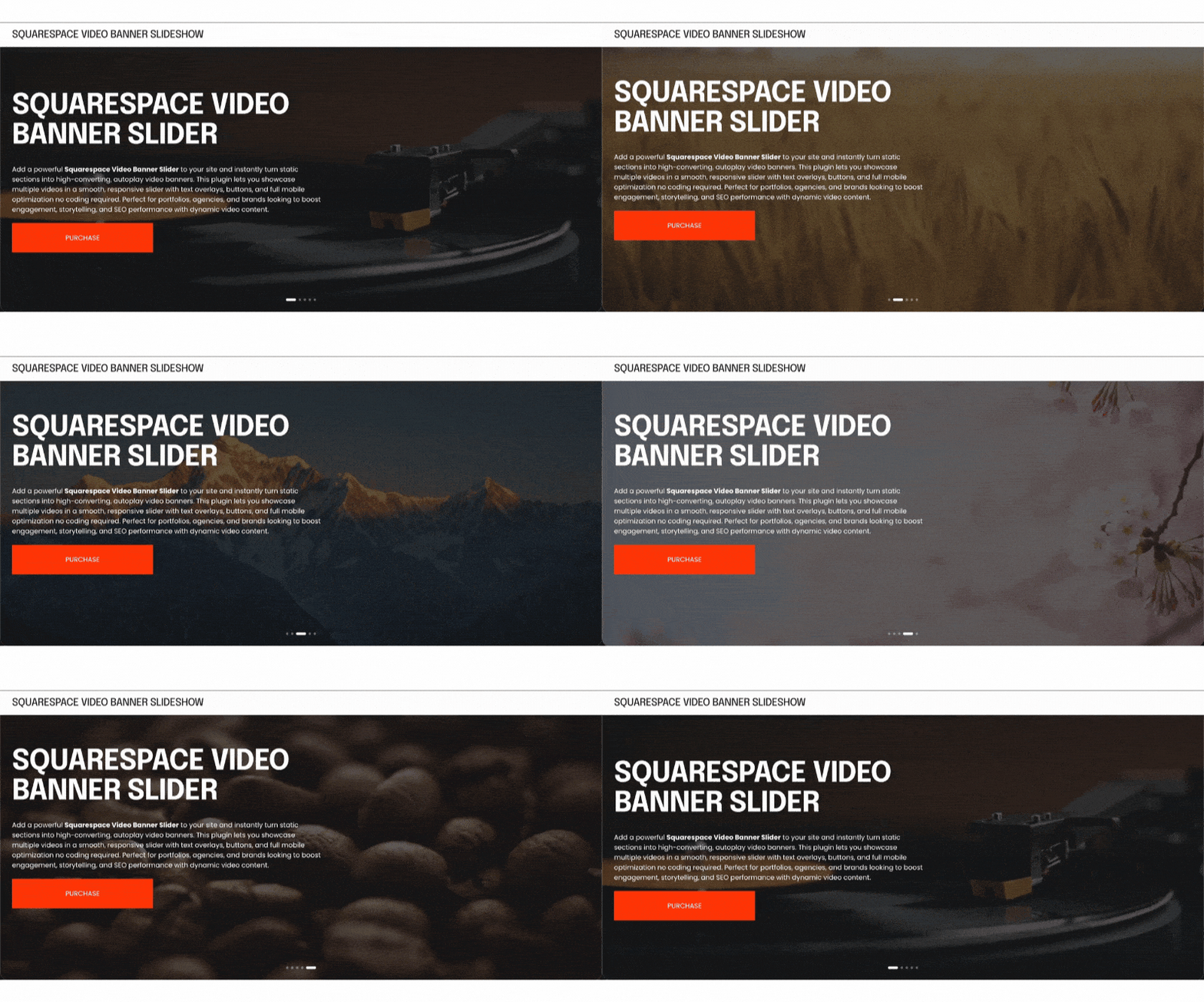
Squarespace does not have a native video banner carousel: Version 7.1 allows only a single static video as a hero background there is no built-in way to rotate between multiple videos, and that video silently fails on most mobile devices. The Squarespell Infinite Video Banner Carousel plugin ($25, one-time) solves both problems: it adds an infinitely looping multi-video slideshow to your Squarespace hero section, with correct HTML5 autoplay attributes that actually work on iOS and Android no developer needed, no subscription, copy-paste install.
If you've tried to add multiple autoplay videos to your Squarespace hero section, you've already run into the wall. Squarespace 7.1 supports exactly one background video per section. There is no video slider, no video carousel, and no native way to cycle between clips. And on mobile? That single video doesn't play at all on a significant portion of iOS and Android devices.
This guide covers why the limitation exists, what actually fixes it, and how to get a professional infinite video carousel live on your Squarespace 7.1 site in under ten minutes.
Why Squarespace Video Banners Don't Work on Mobile
This is the most searched complaint in the Squarespace community and the answer isn't obvious.
The Squarespace forum thread titled "Banner videos not displaying on mobile" has collected thousands of views and has been active since 2020, with new replies still appearing in 2025. The reason it keeps resurfacing: Squarespace's official answer is that mobile display depends on "connection speed and browser version." That explanation misses the real issue entirely.
The actual reason is browser-level autoplay policy. iOS Safari and Android Chrome block video autoplay unless the video is explicitly marked with three HTML5 attributes: autoplay, muted, and plays inline. All three must be present. If any one is missing or improperly applied, the browser silently blocks playback and Squarespace falls back to a plain background color or a fallback image.
Squarespace's native video background player does not consistently apply all three attributes in a way that satisfies current browser requirements. The result: mobile visitors see a blank section where your video should be playing.
This is not a file size issue. This is not a connection issue. It is an HTML attribute issue and it's fixable.
Why Squarespace 7.1 Has No Video Carousel
Squarespace 7.1 launched with the Fluid Engine layout system, which brought genuine improvements to page flexibility. What it removed quietly was any form of video carousel in section backgrounds. Older Squarespace versions had more flexibility here. Version 7.1 does not.
A Squarespace forum thread asking "How to add a carousel video + image on Squarespace 7.1" accumulated over 13,800 views and no native solution was ever offered. Another thread, "Section background video carousel possible?", generated the same response: it requires a lot of custom code, and the example shown required significant developer knowledge to replicate.
The Squarespace Auto Layout feature, added in late 2024, does allow rotating hero banners but only for images, not for video. For video, you are still limited to one clip.
This is a hard platform gap, not a settings issue. No amount of clicking in the Squarespace editor will give you a multi-video hero. You need a code-based solution.
What a Video Banner Carousel Actually Looks Like in 2026
Leading agency-built websites use multi-video hero sections as a standard pattern. A hospitality brand cycles through lobby, room, and restaurant footage. A fitness studio rotates between class clips and testimonial moments. A fashion label loops campaign videos from different collections. The effect communicates range and energy in a way a single static video cannot.
On a properly implemented video carousel:
Videos transition smoothly, with a crossfade rather than a hard cut
The loop is truly infinite no end state, no blank frame, no restart flash
Mobile visitors see video, not a static placeholder
Your brand's text, overlay, and CTA sit cleanly above the moving background
No YouTube logo, no Vimeo watermark, no "watch next" panel
This is the standard that the Squarespell Infinite Video Banner Carousel is built to. It replaces the single native background with a fully managed carousel and it fixes the mobile autoplay issue that Squarespace's native player does not solve.
How to Add a Video Carousel to Squarespace 7.1
Here is the complete installation process. No developer required. No npm. No build tools.
What you need before you start:
A Squarespace 7.1 site on a Business plan or higher (for Code Blocks on individual pages) Personal plan users can use Code Injection under Settings, which applies the carousel site-wide
Your MP4 video files hosted at direct, publicly accessible URLs (see hosting recommendations below)
The Squarespell Video Banner Carousel plugin code
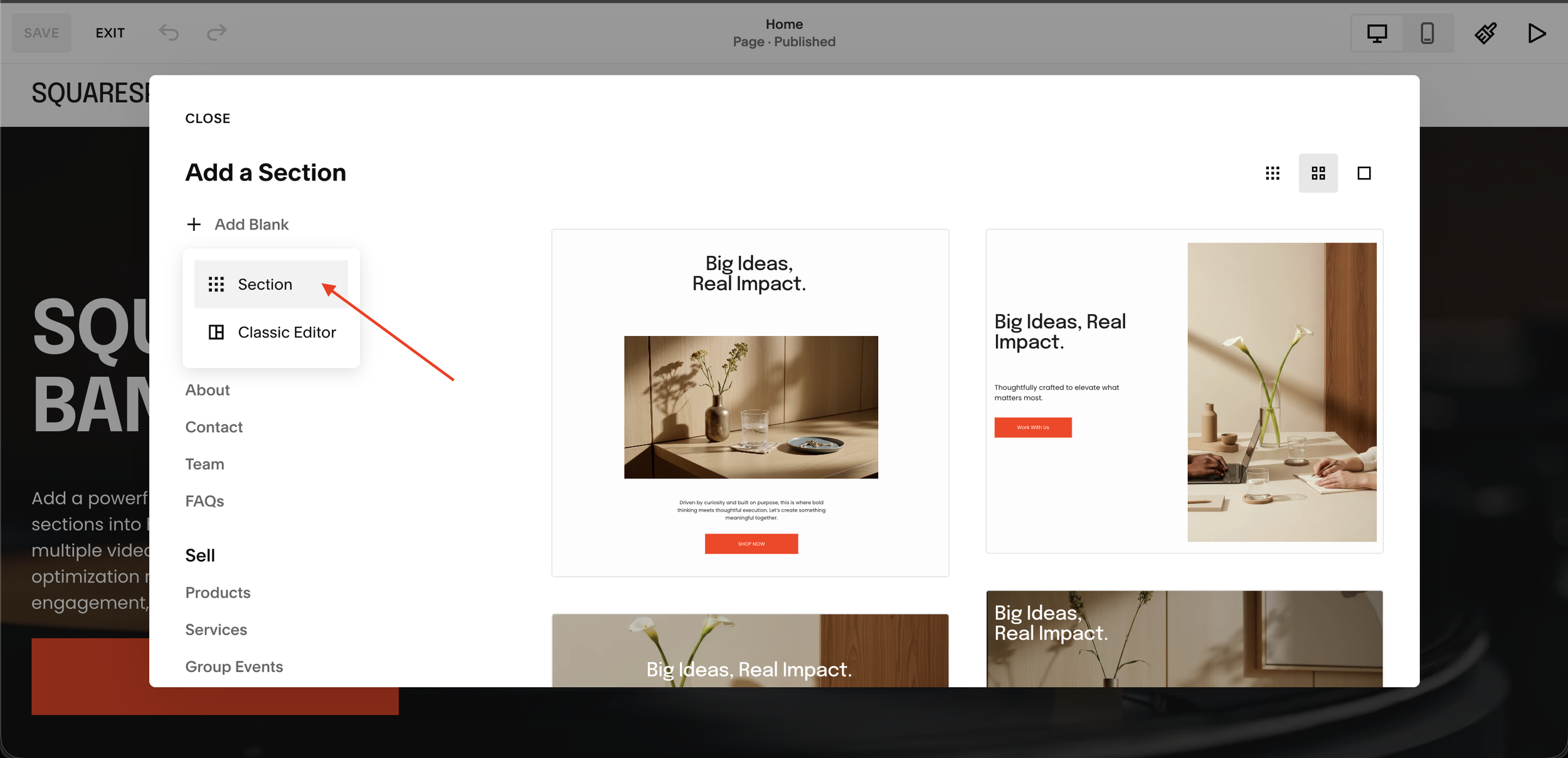
01 Add as Many Sections as You Want
In your Squarespace editor, click Add Section. Select Section not Classic Editor. Add one blank section per slide. You can add as many sections as you like there is no limit.
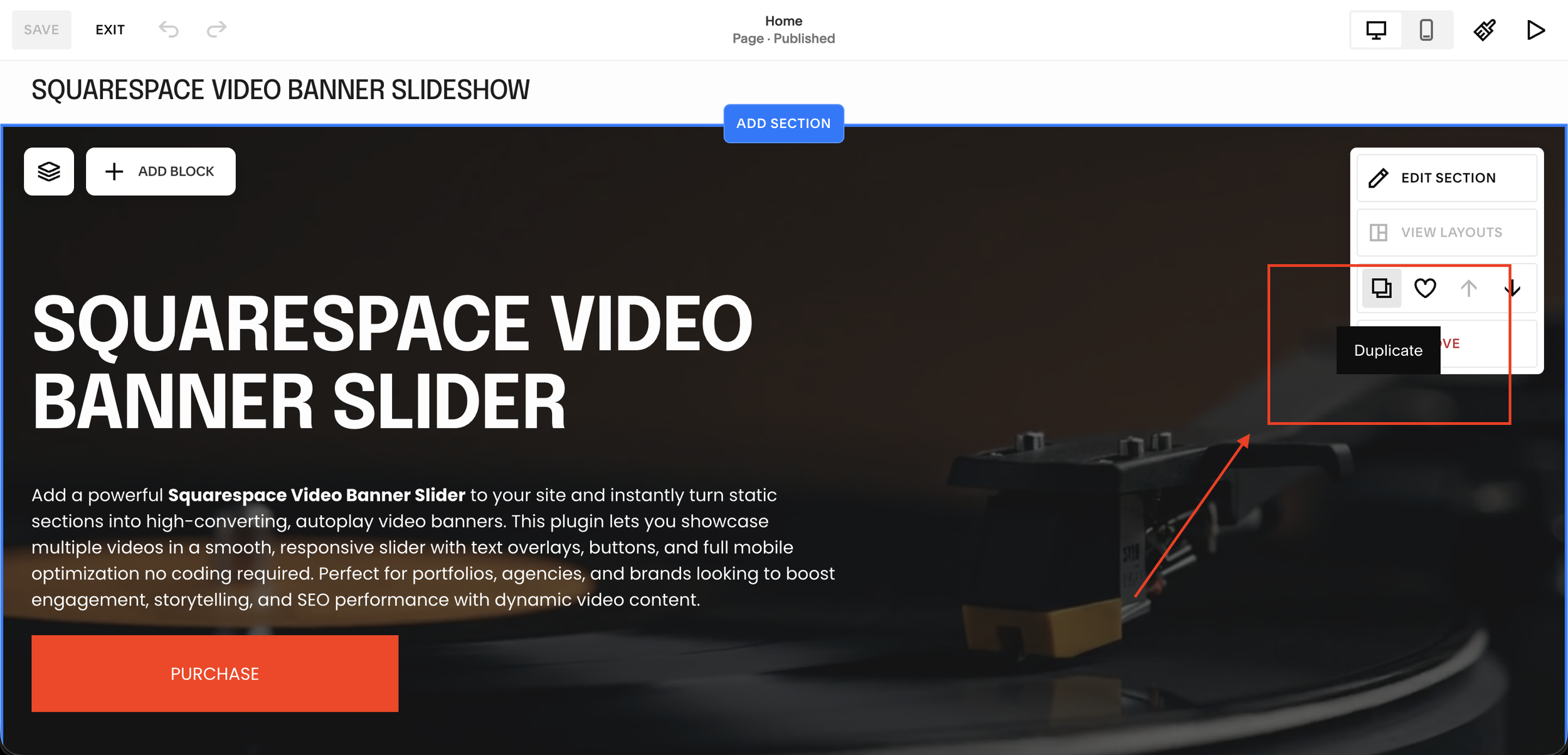
03 Duplicate Sections to Create More Slides
Hover over your section to reveal the toolbar. Click the Duplicate icon. Repeat for as many slides as you need. Customise each one independently with different content and videos.
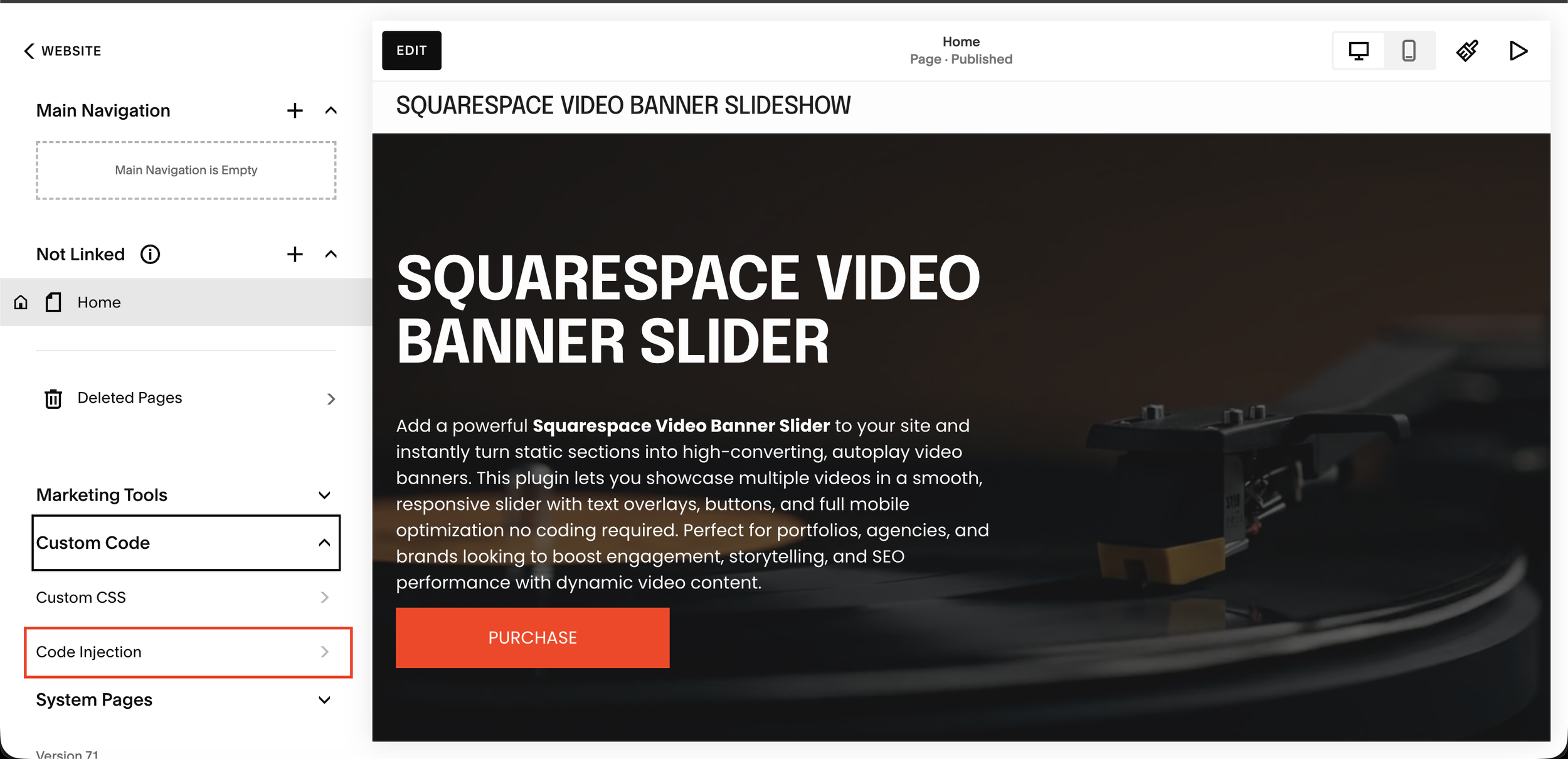
05 Open Code Injection in Squarespace
From your Squarespace dashboard go to Custom Code → Code Injection → Footer in the left sidebar.
02 Set a Background Video on Each Section
Click your section to select it, then open the Background tab in the right panel. Choose Video and upload your video file. Each section gets its own unique video background.
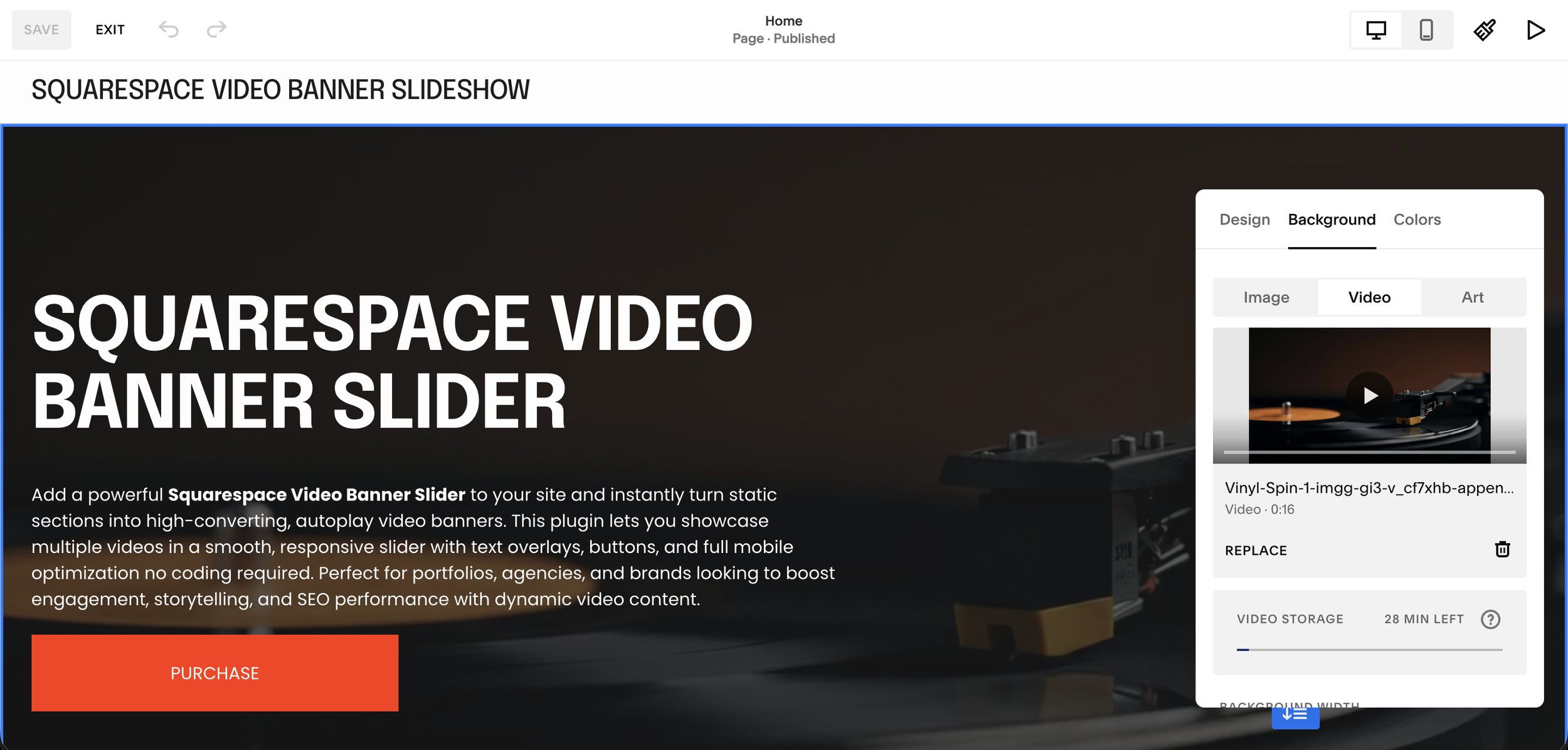
04 Copy Each Section's data-section-id
Right-click on a section and open browser DevTools (Inspect). Find the data-section-id attribute on the <section> element. Copy the full value. Repeat for every slide section you created.
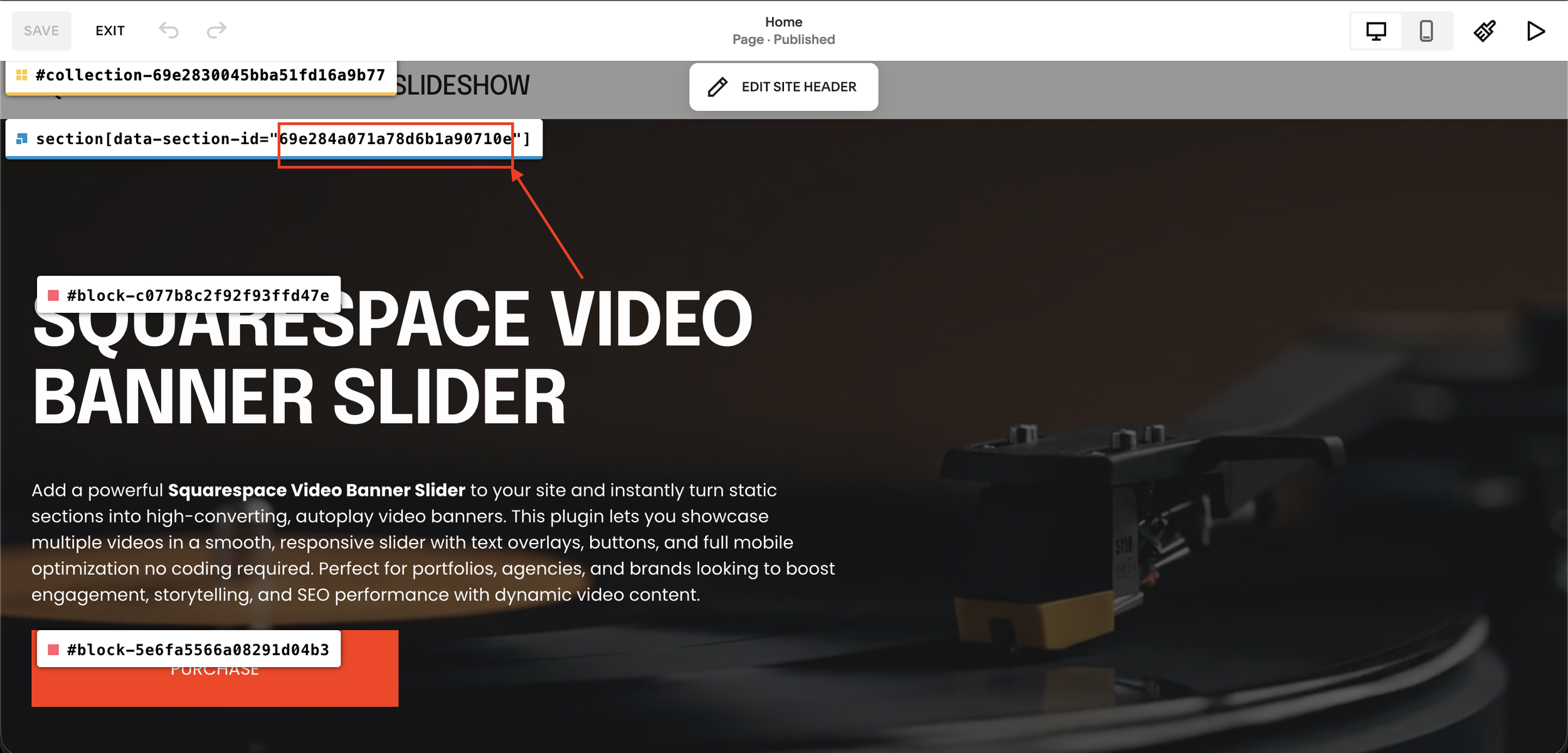
06 Paste Script and Add All Your Section IDs
Paste the plugin script into the Footer code injection. Array accepts as many IDs as you have slides just add each one as a new quoted string in the SECTION_IDS, separated by commas.

07 Save and Preview All Slides Working
Click Save and preview your page. All sections slide automatically every 5 seconds with smooth transitions, dot navigation, and full drag and touch support. The more sections you add the more slides appear.
Video Sources: What Works
The plugin supports three video source types use whichever fits your setup, or mix them in the same carousel.
YouTube links:
Paste the standard YouTube video URL (e.g. youtube.com/watch?v=...) directly into the plugin. No embed code, no API key, no video ID extraction. The plugin handles the rest. Best for brands that already have content on YouTube and don't want to re-host files.
Vimeo links:
Paste the standard Vimeo video URL directly same process as YouTube. Works with standard Vimeo accounts. Best for agencies and studios already using Vimeo for client work.
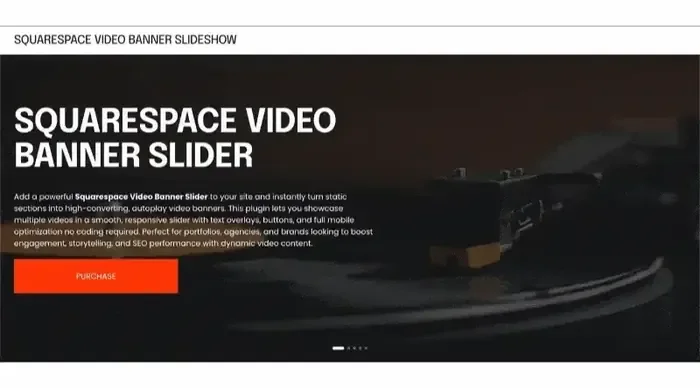
Infinite Video Banner Carousel for Squarespace 7.1 is a professional, copy paste plugin that transforms your hero section into a fully animated, infinitely looping video slideshow. Multiple videos rotate seamlessly in your banner exactly the way leading agency built websites look without touching a line of code and without any third party subscriptions.
It also supports built in Squarespace uploaded videos as well as YouTube videos, giving you full flexibility to mix and display content from different sources effortlessly.
The plugin is designed to work inside Squarespace 7.1's Fluid Engine, making it compatible with all modern Squarespace templates. It respects your section layout, overlay styles, and any text or CTA buttons placed on top of the video banner.
Want a YouTube Video Carousel in a Content Section Too?
The Video Banner Carousel handles your hero it rotates MP4 files, YouTube links, and Vimeo links as a full-bleed looping background. But if you also want a dedicated YouTube video carousel further down the page (a showreel row, a testimonials section, a content hub), that's a different tool purpose-built for that layout.
The Squarespell YouTube Video Carousel plugin adds a smooth horizontal-scrolling YouTube video carousel to any section of your Squarespace 7.1 page. It pulls thumbnails automatically, works on all devices, and installs the same way one copy-paste code block, no coding required.
The two plugins cover opposite ends of the video experience: the Banner Carousel owns the hero, the YouTube Carousel owns your video content sections. Many designers and agencies deploy both.

Supports YouTube, Vimeo & native uploaded videos all three auto detected, no configuration needed
Choose between Single Row with dot navigation or cinematic Dual Row with opposite-direction scroll
Videos auto-detected from your page just add Video blocks and the carousel finds, hides and displays them automatically
Click any card to open full-screen lightbox with autoplay visitors watch without leaving your site
Correct 16:9 aspect ratio on every device no more square or broken videos on mobile
Cards dim, brighten on hover and scale on focus professional visual hierarchy with zero CSS
No coding required paste into a Squarespace Code block, set to HTML, done in under 10 minutes
One-time purchase, yours forever
Want to scroll through products or blog posts instead of video? See our guide to the Infinite Summary Carousel for Squarespace, built for Shop and Blog content.

Infinite loop no gaps, no jumps: Cards scroll continuously like a clock. The last card connects seamlessly back to the first, forever.
Works with products, blog posts, testimonials & portfolios: Built on Squarespace's native Summary Block no app installs, no monthly fees.
Hover to pause: Visitors hover over a card and the carousel freezes. Mouse away and it resumes exactly where it stopped.
Fully customizable in seconds. Change accent color, speed, card width, gap, and scroll direction by editing one CSS variable.
Beginner friendly under 10 minutes to install. Copy CSS into Custom CSS. Copy JS into Footer Code Injection. Done.
Includes a full installation guide with screenshots, a built-in Section ID Finder tool, and copy buttons on every code block.
Squarespace 7.1 only. Pure CSS + vanilla JavaScript no jQuery, no external libraries, no performance hit.
Performance: Will This Slow Down My Squarespace Site?
The short answer: the plugin itself adds almost nothing to your page weight. The videos determine your performance.
The plugin uses native HTML5 video elements no external JavaScript libraries, no iframe overhead, no third-party scripts loading before a frame of video appears. Compare that to a YouTube embed, which loads several hundred kilobytes of Google JavaScript before anything plays.
What actually affects your Core Web Vitals score is your video file size and the CDN serving them. Keep each clip under 15MB, compress to H.264 at 720p with a bitrate between 1.5Mbps and 3Mbps, and serve from a fast CDN. Free tools like HandBrake or Clideo handle the compression. With that setup, your hero section delivers full motion without dragging down your PageSpeed score.
Who Should Use the Squarespell Video Banner Carousel
Creative agencies and freelance Squarespace designers:
One purchase, reusable across unlimited client sites with the multi-use license. Deploy in ten minutes, charge for the premium result.
Hotels, resorts, and hospitality brands:
Cycle through property footage, dining scenes, and location shots in a hero that sells the experience before a visitor reads a single word.
Fitness studios and wellness brands:
Rotate class footage, instructor clips, and transformation moments in a hero that communicates energy at a glance.
Photography and videography studios:
Replace the standard single-hero video with a reel loop that shows range and style from the first second on the page.
Fashion, beauty, and lifestyle brands:
Run campaign clips in a cinematic loop that matches the editorial quality of a premium magazine site.
Real estate developers:
Show multiple property walkthroughs, drone footage, and interior tours in a rotating hero that positions listings as premium without a custom-built site.
Frequently Asked Questions
-
No. Squarespace 7.1 does not include a native video banner carousel or any way to cycle between multiple videos in a hero section. The platform supports one background video per section, and that video does not reliably play on mobile. The Squarespell Infinite Video Banner Carousel is a copy-paste plugin built specifically to solve both problems for Squarespace 7.1 sites.
-
Squarespace video banners fail on mobile because iOS and Android browsers require three specific HTML5 attributes before they allow autoplay: muted, playsinline, and autoplay. Squarespace's native video background player does not consistently apply all three attributes in a way that satisfies current browser policy, so mobile visitors see a blank background or fallback image instead of video. The Squarespell Video Banner Carousel applies all required attributes correctly, enabling inline video playback on iOS Safari and Android Chrome.
-
Squarespace 7.1 does not support multiple videos in a hero section natively. To rotate between multiple video clips in your banner, you need a code-based plugin. The Squarespell Infinite Video Banner Carousel is a single copy-paste code block that cycles multiple videos MP4 files, YouTube links, or Vimeo links in an infinite loop with smooth crossfade transitions. No coding knowledge required, no monthly subscription.
-
Only if your video files are too large. The Squarespell plugin uses native HTML5 video elements with no external JavaScript libraries far lighter than a YouTube or Vimeo iframe embed.
-
Yes. The Squarespell Infinite Video Banner Carousel supports MP4 files, YouTube video links, and Vimeo video links and you can mix all three in the same carousel. Paste a standard YouTube or Vimeo URL directly into the plugin code alongside any MP4 links. No embed codes, no API keys, no video ID extraction needed.
-
There is no hard limit, but 3 to 6 videos work best for a hero carousel in practice. Too many clips increase the time before the first video loops back around, which reduces the sense of dynamic motion. Keep each clip between 5 and 20 seconds and compressed under 15MB for smooth performance.
-
No. Installation is a copy-paste operation. Paste the code block into a Squarespace Code Block or the Code Injection area in Settings, replace the placeholder URLs with your own direct video links, and the carousel is live. The code includes clearly labeled comment lines that show exactly where to make each change.
-
The Squarespell Video Banner Carousel is designed for your hero section it rotates MP4 video files as a full-bleed looping background behind your headline and CTA. The YouTube Video Carousel is designed for content sections further down your page it displays YouTube videos in a smooth horizontal-scrolling row with auto-loaded thumbnails. They solve different problems and most professional Squarespace sites benefit from both.








Section Builder by Common Ninja. Easily create and customize website sections with Section Builder. Multiple layouts and designs.
Get This Plugin →