

How to Add an Infinite Summary Carousel for Squarespace Auto Scrolling Products & Blog Plugin
Updated July 2026


Quick Free Method: Basic Auto-Scroll (No Plugin Needed)
If you just want the Summary Block to advance on its own without the seamless infinite loop, hover-pause, and image-fix handling described below you can trigger Squarespace's own carousel arrow automatically:
<!-- Paste into Settings → Advanced → Code Injection → Footer -->
<script>
window.addEventListener('load', function() {
  var nextArrow = document.querySelector('.summary-carousel-pager-next');
  if (nextArrow) {
    setInterval(function() {
      nextArrow.click();
    }, 3000);
  }
});
</script>
This clicks the built-in "next" arrow every 3 seconds. It's a real starting point, but it isn't seamless it stops and jumps at the last card instead of looping, and it doesn't fix Squarespace's lazy-loaded images on repeat passes. The full method below builds a genuinely infinite, gapless loop with hover-to-pause and automatic image fixing that's what the plugin packages up so you don't have to hand-build and maintain it yourself.
An infinite scrolling carousel in Squarespace is created by adding a Summary Block set to Grid layout, then using custom CSS to convert it into a continuous horizontal strip and JavaScript to clone the cards so the animation loops seamlessly with no gaps. This technique works on Squarespace 7.1 for products, blog posts, testimonials, and portfolios without requiring any third-party plugin or app.
If you've been searching for a way to make your Squarespace website feel more dynamic, more modern, and more engaging you've found it. In this guide, we'll walk through exactly how to build a fully infinite, auto-scrolling carousel inside Squarespace using only custom CSS and JavaScript. No monthly subscription. No app installs. No compromises.
By the end of this article, you'll know how to transform Squarespace's built-in Summary Block into a polished, continuous carousel that scrolls your products or blog posts like a clock endlessly, smoothly, and beautifully.
What Is an Infinite Summary Carousel in Squarespace?
A Squarespace infinite summary carousel is a horizontal strip of content cards that scrolls automatically from right to left in a continuous, never-ending loop. Unlike a standard slider that stops at the last slide and requires a user to click "next," an infinite carousel keeps moving on its own the moment the last card disappears off the left edge, the first card reappears on the right.
Think of it like a conveyor belt, or the ticker tape at the bottom of a news channel. Content flows continuously, visitors absorb it passively, and the visual movement draws the eye without demanding any action.
In Squarespace specifically, this effect is built on top of the native Summary Block a block that already pulls content from your Shop or Blog pages. The CSS and JavaScript layer transforms how that block renders and animates, without touching the actual content structure.
Why the Default Squarespace Summary Block Falls Short
Squarespace's Summary Block is genuinely useful. It lets you display products, blog posts, events, and portfolio items from other pages anywhere on your site. But out of the box, it has significant limitations that frustrate designers and business owners alike:
It only renders as a static grid or list Items sit in rows and columns with no movement.
Visitors must scroll down to see more content Most won't bother.
It takes up significant vertical space on the page, pushing other content further down.
There is no native carousel or scrolling option in Squarespace 7.1's Summary Block settings.
The built-in Squarespace carousel block (the separate Gallery Slider) can't display products or blog posts it only shows images.
The result is that business owners who want to display their shop or blog content in an engaging, space-efficient carousel have no native option. They either leave the content in a static grid that nobody engages with, or they spend hours searching for a workaround.
This is exactly the gap that the Infinite Summary Carousel for Squarespace plugin fills.
How an Infinite Scrolling Carousel Works on Squarespace
The technique behind a seamless infinite scroll carousel is elegantly simple once you understand it. Here's what happens under the hood:
The Doubling Trick
Imagine you have 6 product cards: 1 — 2 — 3 — 4 — 5 — 6. JavaScript clones all 6 and appends the clones to the end of the row, giving you: 1 — 2 — 3 — 4 — 5 — 6 — 1 — 2 — 3 — 4 — 5 — 6. The list is now exactly twice as long as the original.
The CSS animation then moves this entire row left by exactly 50% of its total width. At the moment the animation completes when card 6 exits the left edge you're back at card 1 again. The browser loops the animation instantly, and it appears completely seamless. No jump. No gap. Infinite.
Why Images Need Special Handling
Squarespace uses lazy loading a technique where images don't download until they scroll into the browser's visible area. This saves bandwidth but creates a problem for carousels: when JavaScript clones the cards, those cloned images haven't loaded yet, so they appear blank.
The solution is to read the real image URL from Squarespace's hidden data-src attribute and write it into the actual src attribute before cloning. This forces every image original and clone to load immediately and display correctly.
Why the Animation Starts After Cloning
A common mistake in carousel implementations is starting the CSS animation before the JavaScript has finished cloning the cards. If the list only has 6 cards when the animation starts, the second half of the scroll will be blank before the cards loop around.
The correct approach used in the Squarespell plugin is to hold the animation back using a CSS class (.sq-ready) that the JavaScript only adds after all cloning and image-fixing is complete. The animation literally cannot start until the list is ready.
Step by Step: How to Add an Infinite Carousel to Squarespace
Here is a high-level overview of the installation process. For the complete code and full instructions, see the Infinite Summary Carousel plugin page.

Infinite loop no gaps, no jumps: Cards scroll continuously like a clock. The last card connects seamlessly back to the first, forever.
Works with products, blog posts, testimonials & portfolios: Built on Squarespace's native Summary Block no app installs, no monthly fees.
Hover to pause: Visitors hover over a card and the carousel freezes. Mouse away and it resumes exactly where it stopped.
Fully customizable in seconds. Change accent color, speed, card width, gap, and scroll direction by editing one CSS variable.
Beginner friendly under 10 minutes to install. Copy CSS into Custom CSS. Copy JS into Footer Code Injection. Done.
Includes a full installation guide with screenshots, a built-in Section ID Finder tool, and copy buttons on every code block.
Squarespace 7.1 only. Pure CSS + vanilla JavaScript no jQuery, no external libraries, no performance hit.
Step 1 — Set Up Your Summary Block
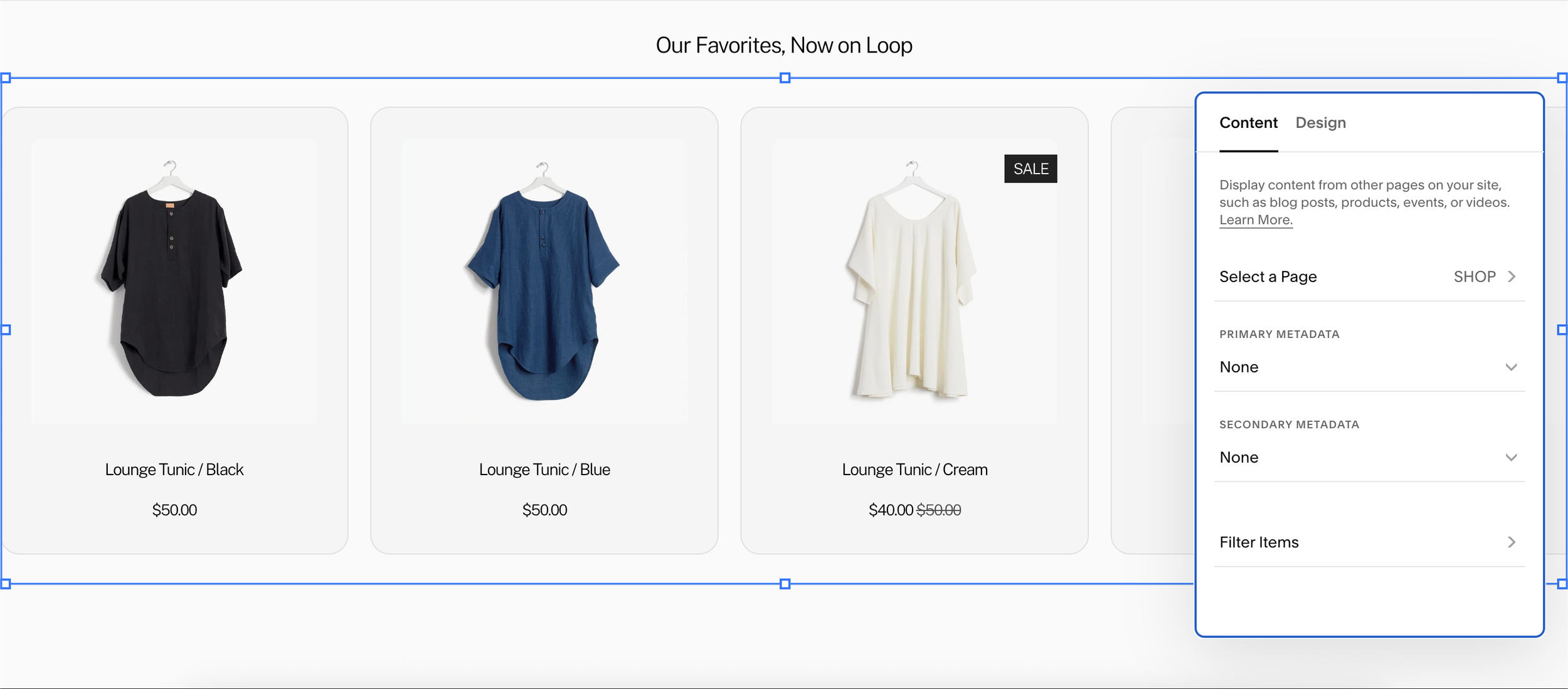
Add a Summary Block to your Squarespace page. In the Design tab, set the layout to Grid and the number of items to 30. In the Content tab, connect it to your Shop or Blog page. Make sure Featured Image is toggled on in the Elements section.
Crucially: turn off the built-in Background and Stroke options in the Design tab. The plugin provides its own card styling, and Squarespace's defaults will conflict with it.
Step 2 — Find Your Section ID
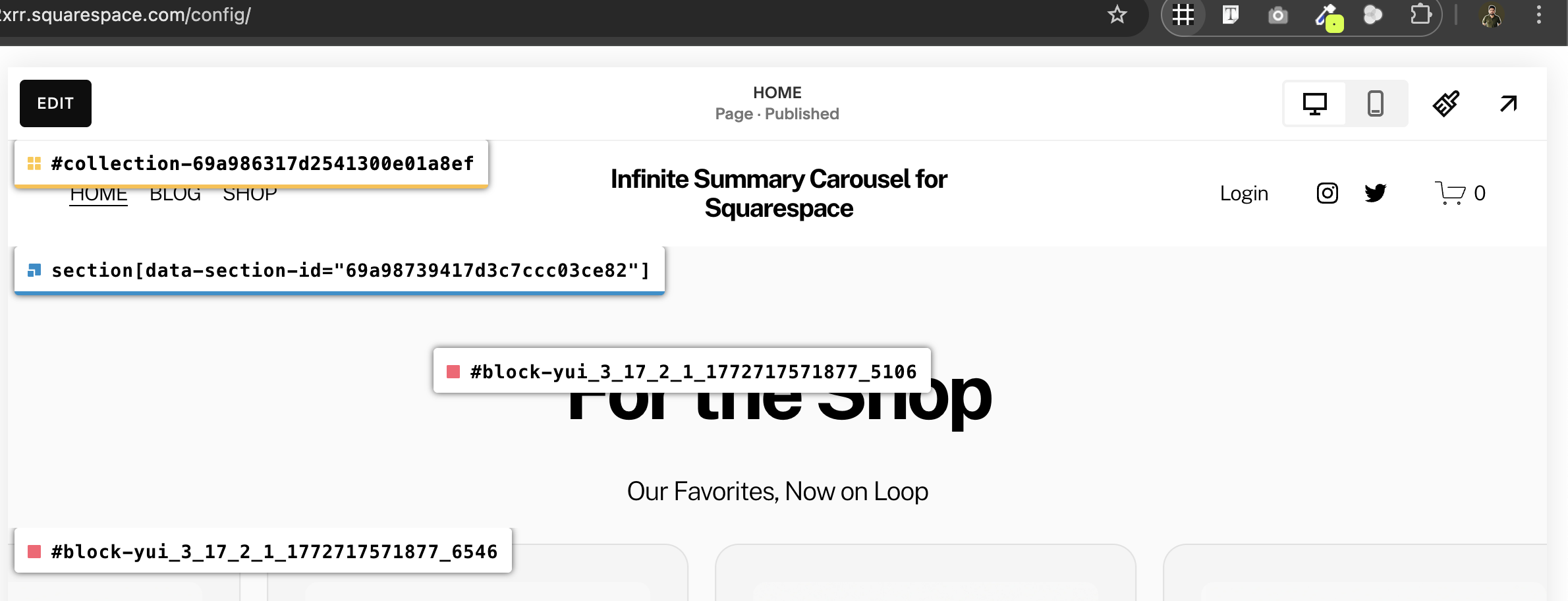
The CSS is scoped to each section using Squarespace's unique section ID this ensures that if you have multiple carousels on the same page (e.g., one for Shop and one for Blog), they never affect each other.
The easiest way to find your section ID is with the free Chrome extension "Find Squarespace Ids". Install it, open your live page, and click the extension icon. It will overlay every element's ID directly on your page. Look for the blue label that reads section[data-section-id="..."] that value is your section ID.
Step 3 — Add the CSS
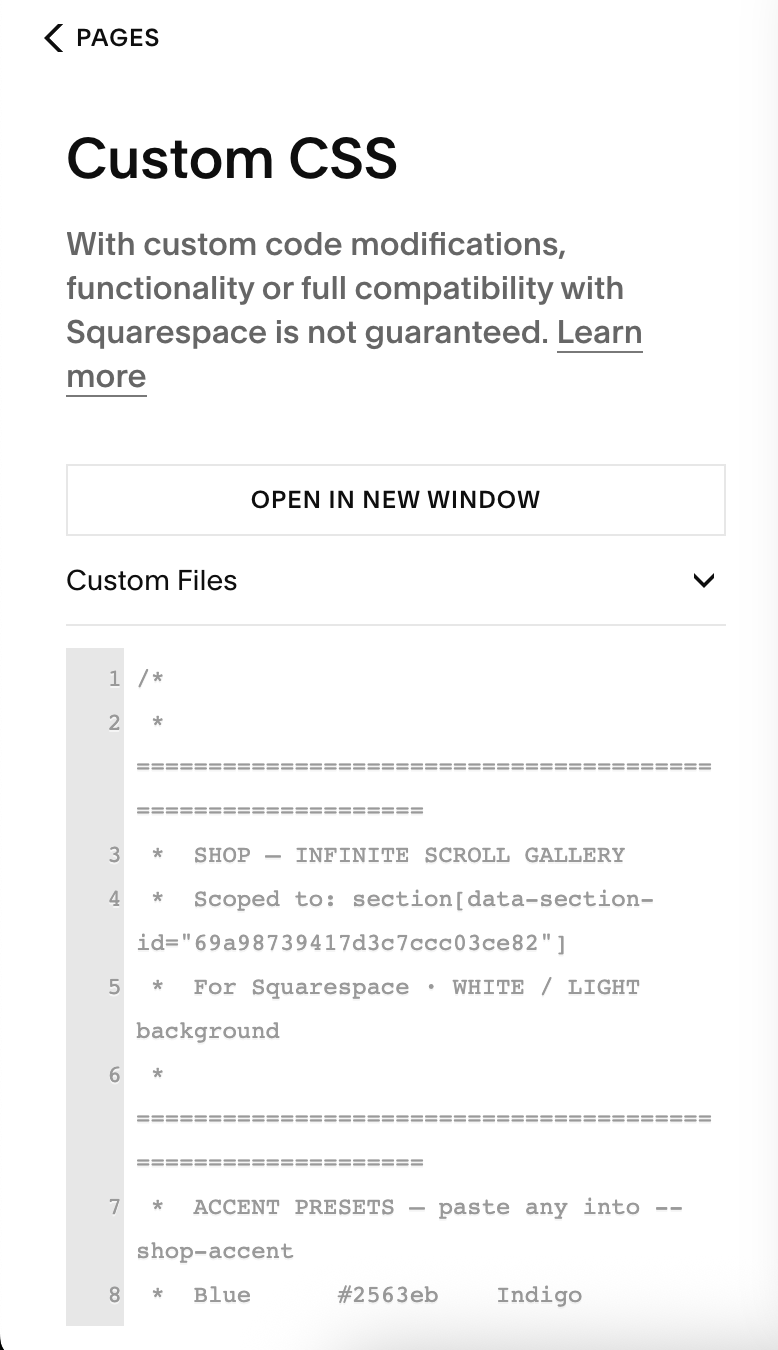
Go to Website → Pages → Custom Code → Custom CSS in your Squarespace sidebar. Paste in the plugin CSS, replacing the placeholder section ID with your own. The CSS handles card dimensions, borders, hover effects, the shine line animation, and the scrolling keyframes.
Step 4 — Add the JavaScript
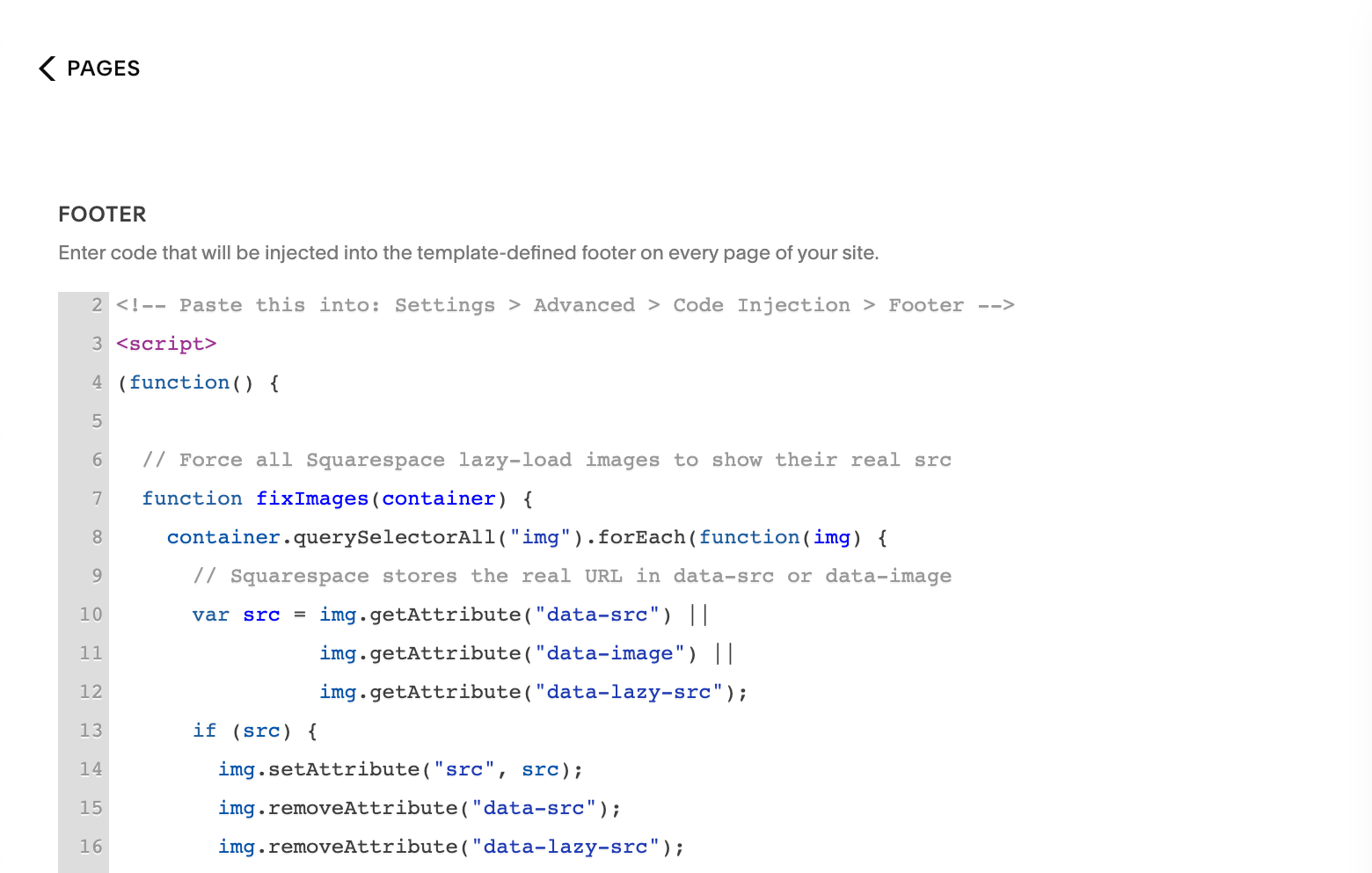
Go to Pages → Custom Code → Code Injection → Footer. Paste the plugin script into the Footer box. This script runs after the page loads, clones all cards, fixes lazy-loaded images, and then triggers the animation. It must go in the Footer not the Header and not a Code Block to ensure it runs after the page content has rendered.
Best Use Cases for Infinite Summary Carousels on Squarespace
An infinite scrolling carousel isn't just visually impressive it's strategically useful. Here are the best ways to use it on a Squarespace website:
Product Showcases
Display your best-selling or featured products in a continuous loop on your homepage. The hover-to-pause feature lets customers read product names and prices without the card rushing away. This is significantly more engaging than a static product grid and keeps visitors on your homepage longer.
Blog Post Feeds
Pull your latest articles into a carousel on the homepage. Instead of a static blog preview section that takes up half the page, a single carousel row displays everything in a dynamic, space-efficient strip. Great for content-heavy sites that want to surface articles without overwhelming the page layout.
Testimonials and Reviews
Create a blog page where each post is a customer testimonial. Connect it to a Summary Block carousel. Visitors see an endless stream of social proof scrolling across the screen one of the most effective trust-building patterns in modern web design.
Client Logos
Use a blog or portfolio page where each item has a client logo as the featured image. Combine this with the Infinite Scrolling Logo Plugin from Squarespell or use the Summary Block carousel with the image-only layout for a clean, professional logo strip.
Portfolio Previews
For creative agencies, photographers, and designers: display portfolio work in a scrolling preview strip. The image focused card design lets work speak for itself in a continuous flow that feels editorial and premium.
Services
List your services as blog posts with custom featured images. The carousel presents them in a compact, flowing layout that feels interactive rather than like a static list.
How to Customize Your Squarespace Carousel
One of the biggest advantages of the Squarespell Infinite Summary Carousel is how simple it is to customize. All color settings are stored in CSS variables at the top of the code change one value and the entire look updates.
Change Scroll Speed
Find the animation line in the CSS and change the duration. The default is 40 seconds per loop. Lower numbers are faster, higher numbers are slower:
Fast: animation: shopScroll 20s linear infinite;
Default: animation: shopScroll 40s linear infinite;
Slow: animation: shopScroll 80s linear infinite;
Change the Accent Color
Update the --shop-accent or --blog-accent variable in the CSS. This single value controls the hover glow, the shine line on top of the card, and the border highlight on hover. Popular choices: #2563eb (blue), #e11d48 (rose), #0d9488 (teal), #D2FF1D (lime ideal for dark backgrounds).
Change Card Size and Spacing
Card width is controlled by width: 320px and gap by margin-right: 20px. Adjust both to fit your design.
Reverse the Scroll Direction
Add reverse to the animation shorthand: animation: shopScroll 40s linear infinite reverse;
Performance and Mobile Optimization
A carousel that performs poorly is worse than no carousel at all. Here's how the Squarespell Infinite Summary Carousel is built for performance:
GPU-accelerated animation. The will-change: transform property is included in the CSS, telling the browser to offload the animation to the GPU. This means the scroll is smooth even on older devices.
No external dependencies. Pure CSS and vanilla JavaScript no jQuery, no libraries, no extra HTTP requests.
Lazy load compatible. The image-fixing function resolves Squarespace's lazy loading so images display correctly in both original and cloned cards without causing layout shifts.
Accessible. Cloned cards are hidden from screen readers using aria-hidden="true" and links in clones have tabindex="-1" so keyboard navigation isn't affected.
For mobile, you can add a media query to reduce card width on smaller screens:
@media screen and (max-width: 767px) { width: 220px !important; padding: 16px !important; }
Why This Approach Beats Squarespace's Built In Carousels
Squarespace does include some carousel like features the Gallery Slider and Gallery Grid but they have fundamental limitations compared to a custom Summary Block carousel:
| Feature | Squarespace Gallery Slider | Infinite Summary Carousel |
|---|---|---|
| Displays products | No | Yes |
| Displays blog posts | No | Yes |
| Infinite loop (no gaps) | No — stops at end | Yes — seamless |
| Auto-scrolls continuously | No | Yes |
| Hover to pause | No | Yes |
| Shows price | No | Yes |
| Custom card styling | Limited | Full control via CSS |
| Multiple carousels, no conflict | N/A | Yes — section-scoped |
Frequently Asked Questions
-
No. Squarespace 7.1 does not include a native infinite scrolling carousel for summary content. The Gallery Slider block stops at the last slide and requires user interaction. Creating an infinite auto-scrolling carousel requires custom CSS and JavaScript added through the Custom CSS editor and Code Injection footer.
-
To make a Squarespace Summary Block scroll automatically: (1) Set the block to Grid layout, (2) Add CSS that converts the grid to a flex row with flex-wrap: nowrap and adds a translateX(-50%) animation, (3) Add JavaScript that doubles the cards by cloning them so the 50% animation loops seamlessly.
-
Yes. The carousel works with any content type that the Summary Block supports products, blog posts, events, portfolio items, and more. The Squarespell plugin includes separate CSS blocks for a Shop carousel (light background) and a Blog carousel (dark background), both independently scoped to their own section.
-
Squarespace's built-in Gallery Slider only displays images — it cannot show products, blog posts, or any content with titles and prices. It also stops at the last slide and requires user interaction to advance. An infinite summary carousel built on the Summary Block displays any content type (products, posts, events), auto-scrolls continuously without stopping, and loops seamlessly without user input.
-
To change the scroll speed of a Squarespace infinite carousel, find the CSS animation property and change the duration value. For example: animation: shopScroll 40s linear infinite change 40s to a lower number for faster scrolling or a higher number for slower scrolling. 20s is fast, 80s is slow.
-
Squarespace uses lazy loading images don't load until they scroll into view. When cards are cloned before the images have loaded, the clones have no image source. The fix is to read the real URL from the data-src attribute and write it into src before cloning. This is handled automatically by the Squarespell plugin's JavaScript.
-
Yes. The carousel works on mobile devices. For best results on small screens, add a CSS media query to reduce card width to around 220px. The animation uses GPU acceleration (will-change: transform) for smooth performance across devices.
-
No coding knowledge is required. The plugin comes with complete copy paste CSS and JavaScript, and the installation guide walks through each step with screenshots. The only customization needed is replacing two section IDs in the CSS with your own which takes less than 2 minutes using the free "Find Squarespace Ids" Chrome extension.
-
For Summary Block content (products, blog posts, testimonials), the Squarespell Infinite Summary Carousel is a highly effective solution. It uses native Squarespace blocks no app installs and includes CSS and JavaScript that create a seamless, GPU-accelerated infinite loop with hover-to-pause, image lazy-load fixing, and independent scoping for multiple carousels on the same page.
-
To create an infinite carousel in Squarespace: (1) Add a Summary Block and set it to Grid layout. (2) Find your section's unique ID using the "Find Squarespace Ids" Chrome extension. (3) Add CSS that converts the grid to a flex row and defines a translateX(-50%) scroll animation. (4) Add JavaScript in Footer Code Injection that clones all cards to double the list length, fixes lazy-loaded images, and triggers the animation after cloning is complete.
-
Yes. Multiple carousels can run on the same Squarespace page without conflicting if each carousel's CSS is scoped to its section's unique data-section-id attribute. The Squarespell plugin includes separate CSS blocks for each section, and the JavaScript targets all Summary Block lists on the page automatically.
Related Squarespace Plugins from Squarespell
If you're building a professional Squarespace website, the Infinite Summary Carousel pairs perfectly with other Squarespell plugins designed for the same platform:
















This guide is maintained by the Squarespell team, based on hands-on testing across Squarespace 7.1. Squarespell has built and supports the Infinite Summary Carousel plugin used by hundreds of live sites.

Section Builder by Common Ninja. Easily create and customize website sections with Section Builder. Multiple layouts and designs.
Get This Plugin →