Kava: Free Multi-Purpose WordPress ThemeFree
 WordPress · Theme
Browse by platform
View allBrowse by goal
View allFresh inventory
Kava: Free Multi-Purpose WordPress ThemeFreeWordPress · Theme CrocoBuilder: AI-Native Dynamic Frontend Builder for WordPress$79WordPress · PluginAffiliate link
 WordPress Form Builder Plugin for Gutenberg, Elementor, and Bricks$49WordPress · PluginAffiliate link
 JetStyleManager – Gutenberg Block Styles PluginFreeWordPress · Plugin
 JetGridBuilder – FREE Elementor Grid PluginFreeWordPress · Plugin
 JetBlog Plugin for Elementor$43WordPress · PluginAffiliate link
Search results
Listing checked checked Aug 2026 How verification works We checked the creator, the product page, the platform and the pricing. We have not installed it ourselves.
 By SEOSpace
, see everything SEOSpace publishes
By SEOSpace
, see everything SEOSpace publishes
 Squarespace
A Chrome extension and dashboard built only for Squarespace: it audits every page, scores it, and tells you in plain English what to change.

Overview
Squarespace gives you the fields search engines care about — an SEO title, a meta description, image alt text, a URL slug — and almost no indication of whether what you typed into them is any good. Most Squarespace sites are therefore not badly optimised so much as un-optimised: the boxes are empty, or still hold whatever the page was called on the day it was created.
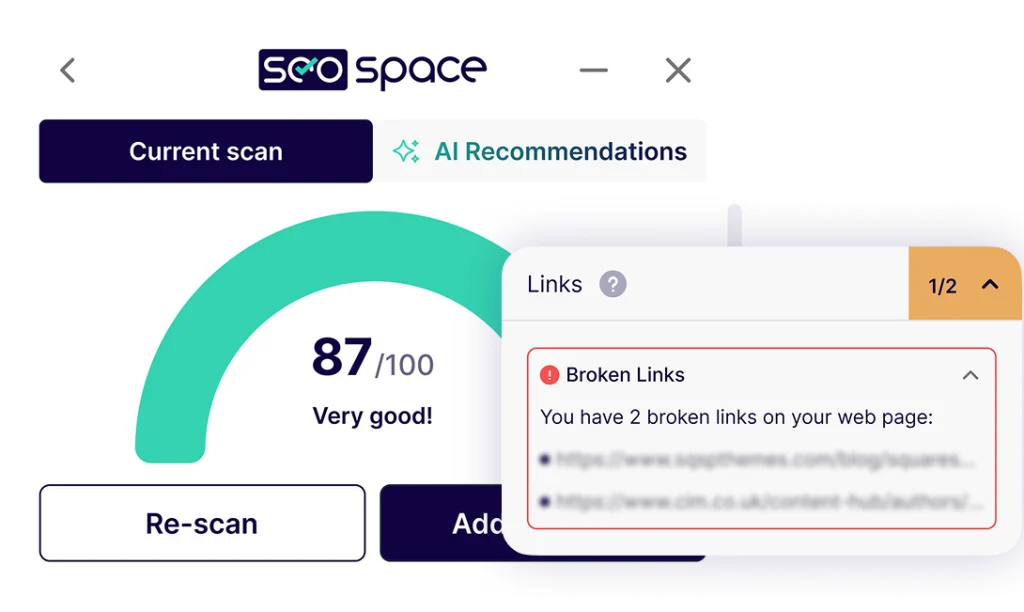
SEOSpace is two halves of one tool. A dashboard crawls the site, scores every page and produces a queue of specific things to fix. A Chrome extension then sits over the Squarespace editor showing that page's findings, so the fix happens in the panel that flagged it rather than in a report you read in one window and act on in another.
The important structural point is that it does not touch your site. Squarespace does not let outside tools edit page content or meta tags, so SEOSpace writes the change and you apply it. That also means cancelling cannot break anything — there is no code injected into your site to remove.
How it works
SEOSpace's own setup sequence. Nothing here needs code, and nothing is added to your Squarespace site.
Sign up from any SEOSpace page. The free tier needs no card.
Installed from the SEOSpace dashboard once your account exists.
Add a URL in the dashboard, or open the extension on any live Squarespace page or inside the editor and run a scan.
Optional, but it is what turns generic advice into recommendations based on how your site is actually performing.
Work through the findings in the Squarespace editor, save, then refresh and rescan the page.
Monthly, weekly or daily depending on plan, so a site that drifts gets caught rather than discovered a year later.
What is in it
SEOSpace started as a page auditor. It is now closer to a small SEO suite with a Squarespace-shaped opinion, and every paid plan includes all of it — the plans differ on limits, not on features.
Every page crawled and scored, with the specific problem named: weak title, missing alt text, broken link, thin description, a slug nobody would search for.
A keyword explorer, competitor analysis and blog post ideas, so the thing you optimise for is something people actually search.
Position, volume, estimated traffic, device and country for each tracked keyword, updated on your monitoring schedule.
Whether ChatGPT, Perplexity, Gemini, DeepSeek and Copilot cite your site, scored as a percentage and set against competitors you name.
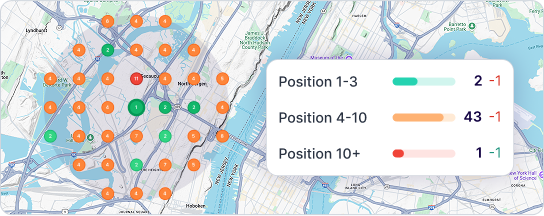
Map-grid rank tracking across a service area, Google Business Profile health scored across eight components, review replies and scheduled posts.
PDF exports, white-label PDF reports and an embeddable audit tool — the parts an agency needs to show a client what changed.
AI visibility
A growing share of the questions your customers ask never reach a results page: they are answered inside ChatGPT, Perplexity, Gemini or Google's own AI overviews. Ranking third for a term matters rather less if the person asking never scrolls to a list of links.
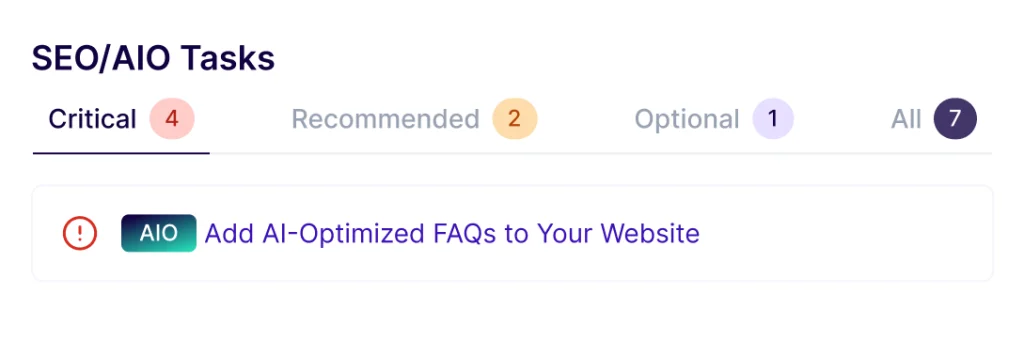
SEOSpace's AI Visibility tracks whether those systems use your content when they answer questions in your subject area, gives it a percentage score broken down by model, and puts the same figure next to competitors you name. Its task list then flags the concrete things that make a site legible to them — AI-optimised FAQs, clean structure, current content.
Treat this as directional. Nobody can guarantee an AI citation, and SEOSpace say so themselves — what the tool can do is keep the foundation clean enough to be readable.
Orbit AI
Orbit is SEOSpace's newer, separately priced layer: five scheduled AI agents that re-run on every audit and hand back finished work for approval. $119/mo on top of your plan, with all five included.
| Agent | What it does | How far it goes |
|---|---|---|
| Keyword Assist | Finds pages competing for the same term and rewrites the losing one; returns titles and metadata written | Writes the fix, you paste it in |
| Blog Generation | Returns ten article blueprints per run, then drafts the post | Writes the post, you publish it |
| Local SEO | Scores your Google Business Profile out of 100 across eight components and ranks the gaps | Finds and prioritises, you apply |
| Review Automation | Replies to Google reviews in one of six tones, with a keyword avoid list | Fully automated — but 1★ and 2★ reviews wait for a human |
| Content Strategy | Reads the whole site and returns uncovered topic clusters with search volume and intent | Recommends, you choose |
From SEOSpace's Orbit AI page, 27 August 2026. The right-hand column is their own statement of how far each agent goes without you.
What is unusually good here is that SEOSpace publish the boundary rather than leaving it vague. Orbit never edits, publishes or overwrites anything on your Squarespace site, never auto-publishes a blog post it wrote, and never replies to a one- or two-star review without a human first. On a client site that line matters more than the demo does.
Orbit is an add-on, not part of the base plans. If you are weighing the cost, note that $119/mo is more than most of the plans it sits on top of.
Pricing
Read from the live pricing table in SEOSpace's own page source on 27 August 2026. Their plan is chosen by how many websites you need, and every paid plan includes every feature — the tiers differ on limits. Annual billing is roughly four months free.
$0
No card required
$18.99/mo
or $151.92/yr · 1 website
$49.99/mo
or $399.92/yr · 3 websites
Most popular
$74.99/mo
or $599.99/yr · 5 websites
| Plan | Price | Sites | Pages | Keywords | Monitoring |
|---|---|---|---|---|---|
| Starter | $18.99/mo · $151.92/yr | 1 | 100 | 25 | Monthly |
| Pro | $49.99/mo · $399.92/yr | 3 | 500 | 100 | Monthly |
| Pro | $74.99/mo · $599.99/yr | 5 | 500 | 100 | Weekly |
| Expert | $129.99/mo · $1,039.92/yr | 10 | Unlimited | 500 | Daily |
| Expert | $219.99/mo · $1,759.92/yr | 20 | Unlimited | 500 | Daily |
| Unlimited | Quoted | Unlimited | Unlimited | 500 | Daily |
| SEOSpace Local — add-on | $39.99/mo · $29.99/mo yearly | 3 Google profiles | — | 50 | — |
| Orbit AI — add-on | $119/mo | Per site | — | — | Weekly or monthly |
AI credits run 50/mo on Starter, 200/mo on Pro and 500/mo from Expert up. Reseller pricing is quoted rather than published.
Before any of that there is a free tier that needs no card — a 50-page automatic audit plus access to the extension — and a 7-day free trial on the paid plans. Plans can be changed or cancelled from the dashboard at any time with no lock-in.
Watch the page limit rather than the site count. Starter covers 100 pages, which a blog of any age passes quickly, and unlimited pages do not arrive until Expert at $129.99/mo.
Comparison
SEOSpace is narrow on purpose, and the narrowness cuts both ways. It is the comparison they draw themselves, and it is a fair one.
| SEOSpace | Ahrefs | Semrush | |
|---|---|---|---|
| From | $18.99/mo | ~$129/mo | ~$139/mo |
| Built for Squarespace | Yes — only Squarespace | No | No |
| Works in the Squarespace editor | Yes, via Chrome extension | No | No |
| Covers other platforms | No | Yes | Yes |
| Depth of general SEO data | Moderate | Very high | Very high |
| Learning curve | Low | High | High |
Entry prices as published by each vendor and recorded by SEOSpace on their own comparison, 27 August 2026. Ahrefs and Semrush pricing changes often — check before deciding.
The practical reading: because SEOSpace only knows Squarespace, nothing it tells you to do requires a feature Squarespace does not have — which is the usual failure mode of running a general audit against a Squarespace site and being told to edit files you cannot reach. And because it only knows Squarespace, it is no use at all for the rest of a mixed portfolio.
Who it is for
You know the site should rank better and do not know what to change. The findings name the Squarespace field and say what to put in it — no jargon, no code, no separate SEO project.
Scheduled audits per client site, white-label PDF reports, custom branding, an embeddable audit tool for your own site, and something concrete to show at the monthly call. Site slots scale with the plan.
Map-grid rank tracking, Google Business Profile scoring and review management — the parts of local SEO that only work if somebody does them every week. Note this half works on any platform.
Worth knowing
The Chrome dependency is a real constraint rather than a footnote. The dashboard, audits and rank tracking work in any browser, but the half of the product that makes it pleasant — the panel over the editor — is a Chrome extension, and SEOSpace describe Safari and Firefox as planned rather than shipped.
It also cannot apply anything for you. Squarespace does not permit outside tools to change page content or meta tags, so every fix is written for you and pasted in by hand. That is Squarespace's limitation rather than SEOSpace's, but it is the thing people most often expect and do not get.
Finally, the pricing has more surface than the headline suggests: AI features are metered in credits, page limits move with the tier, and the two most interesting recent additions — Local at $39.99/mo and Orbit at $119/mo — are add-ons priced separately from the plan they sit on.
A housekeeping note worth knowing before you research this yourself: several pages on SEOSpace's own site still show a retired plan structure (DIY, Designer and Agency at $9.99–$69.99). The live pricing table is the current one.
Who makes it
SEOSpace run a Squarespace SEO agency in the UK and the US alongside the product, which is where the Squarespace-specific opinion in the audits comes from. They also publish a free Squarespace SEO course, a large blog, regular live webinars and a YouTube tutorial library, and run a customer community on Circle.
Their own published figures, at the time of writing: over 35,000 Squarespace users, more than 20,000 Chrome extension installs, and 4.7 from 179 Google reviews. Those are the company's numbers rather than anything we have verified, and their traffic claims — "4x more likely to be found on Google", "68% average increase in organic traffic" — are self-reported and should be read as marketing rather than measurement.
Evidence
No Squarespell customer reviews yet.
Sign in to write a review We will bring you straight back here.
Nobody has reviewed this here yet. Be the first, we only publish reviews left on Squarespell in this section.
Before you subscribe
For anything about your own account or a specific site, ask SEOSpace — seospace.co/contact-us
No. SEOSpace is written for people who do not — findings name the Squarespace field to change and say what to put in it, with a short tutorial attached to each one.
What it will not do is decide what your business should rank for. That thinking is still yours.
No, and this matters. SEOSpace is a Chrome extension plus a hosted dashboard. Nothing is injected into your Squarespace site, so cancelling cannot break it and there is no code to remove.
That is also why it is filed under Extensions here rather than Plugins.
Not yet. SEOSpace say Chrome gives the best experience and that Safari and Firefox are being worked on.
The dashboard, audits, rank tracking and reports are a website and work in any browser. It is the in-editor panel that is Chrome-only.
Yes. The free tier needs no card and gives you access to the Chrome extension, live-page scanning and an automatic 50-page site audit.
Paid plans add a 7-day free trial on top, and start at $18.99/mo or $151.92 for a year.
Limits, not features — every paid plan includes every tool. What changes is how many websites you can cover, how many pages get audited, how many AI credits and tracked keywords you get, and how often the site is re-audited.
Starter is one site and 100 pages; Pro is three or five sites and 500 pages; Expert is ten or twenty sites with unlimited pages and daily monitoring.
No, and it is not allowed to. Squarespace does not let third-party tools edit page content or meta tags, so SEOSpace writes the change and you paste it in.
The one exception is in the Orbit add-on: review replies go out to Google Business Profile automatically, because that is Google's system rather than Squarespace's.
Orbit is a separate $119/mo add-on: five AI agents that re-run on your audit schedule and hand back finished work — keyword fixes, blog drafts, Google Business Profile tasks, review replies and content strategy.
You do not need it to use SEOSpace. It is aimed at people who want the recurring work done rather than listed, and it costs more than most of the plans it sits on top of.
It is a separate add-on at $39.99/mo, or $29.99/mo billed annually, covering up to three Google Business Profiles and 50 tracked keywords. It is also bundled with the Expert plan.
Unlike the rest of the product, SEOSpace Local works with any Google Business Profile regardless of what platform the website runs on.
It checks whether AI answer engines — ChatGPT, Perplexity, Gemini, DeepSeek and Copilot — cite your site when they answer questions in your subject area, scores that as a percentage, and shows the same figure for competitors you name.
It is a newer measurement than Google rank tracking. Treat it as directional: nobody can promise an AI citation, and SEOSpace say as much themselves.
Not to get started, but it is the difference between generic advice and recommendations based on how your site is actually performing. It is step four of their own setup sequence for that reason.
No — they are metered in credits: 50 a month on Starter, 200 on Pro and 500 on Expert. Blog drafts, keyword work and competitor analysis all draw on the same pool.
Yes. That is listed among the features every paid plan includes, which is useful if you optimise a site before it launches.
No. The core product is built exclusively for Squarespace, and that exclusivity is where its usefulness comes from — the audits understand Squarespace sitemaps, schema limits and Fluid Engine rather than guessing.
The exception is the Local add-on, which works with any Google Business Profile.
Multiple site slots, scheduled re-audits per site, white-label PDF reports, custom branding, an embeddable website audit tool for your own site, and additional user seats at $10–$15 per user per month depending on tier.
Expert adds a dedicated account manager and priority support; a Reseller tier is quoted rather than published.
Yes, from the dashboard at any time — Billing, then Change Plan. SEOSpace state there is no lock-in on either the trial or the plans.
SEOSpace say most users start noticing changes within weeks, with more significant movement after one to three months. That is a normal shape for SEO rather than a claim specific to this tool.
Their stronger claims — that SEOSpace users are four times more likely to be found on Google, and a 68% average traffic increase — are self-reported figures from the company, not independent measurements.
Not yet, and the badge on this page says so. No compatibility test has been recorded against SEOSpace, so it reads "Untested" rather than "Verified".
Everything factual here — plan names, prices, page and credit limits, browser support, add-on pricing — was read from SEOSpace's own pages and page source on 27 August 2026.
Ready when you are
The free tier audits 50 pages and needs no card at all — enough to see whether the problems on your site are the ones you thought they were before you decide to pay for anything.
Run a free SEOSpace audit (opens in a new tab)Free tier: 50-page site audit and Chrome extension access, no credit card. Paid plans add a 7-day trial and start at $18.99/mo.
Affiliate link. Affiliate link: Squarespell may earn a commission if you buy. It never changes our rank or verdict.From the Squarespell blog
Discover the best Squarespace SEO tips to boost your website’s rankings. Learn how to optimize your Squarespace site for Google and drive more organic traffic.
More like this
Free plan available
Free plan available
$1/mo minimum