Kava: Free Multi-Purpose WordPress ThemeFree
 WordPress · Theme
Browse by platform
View allBrowse by goal
View allFresh inventory
Kava: Free Multi-Purpose WordPress ThemeFreeWordPress · Theme CrocoBuilder: AI-Native Dynamic Frontend Builder for WordPress$79WordPress · PluginAffiliate link
 WordPress Form Builder Plugin for Gutenberg, Elementor, and Bricks$49WordPress · PluginAffiliate link
 JetStyleManager – Gutenberg Block Styles PluginFreeWordPress · Plugin
 JetGridBuilder – FREE Elementor Grid PluginFreeWordPress · Plugin
 JetBlog Plugin for Elementor$43WordPress · PluginAffiliate link
Search results
Listing checked checked Aug 2026 How verification works We checked the creator, the product page, the platform and the pricing. We have not installed it ourselves.
 By LiveChat
, see everything LiveChat publishes
By LiveChat
, see everything LiveChat publishes
 Squarespace
A chat widget and agent inbox for Squarespace: answer visitors in real time, route conversations to a team, and see what it does to sales.
Overview
Squarespace gives a visitor two ways to reach you: a contact form and an email address. Both are asynchronous, and both lose the person who had a question at the moment they were deciding — the one about sizing, or delivery, or whether you cover their postcode.
LiveChat closes that gap with a widget on the page and an inbox for whoever is answering. The visitor types without leaving the site; the agent works in a purpose-built app that handles several conversations at once, sees which page the person is on, and can rate, tag and route the conversation afterwards.
It is a general customer-messaging product rather than a Squarespace one. LiveChat publish an official Squarespace app, but that is an install path — nothing in it reads your Squarespace products or orders. What you are buying is the messaging layer and the reporting around it.
How it works
14 days, full features, no credit card required.
Install through LiveChat's Squarespace app listing, or paste the snippet into Squarespace code injection.
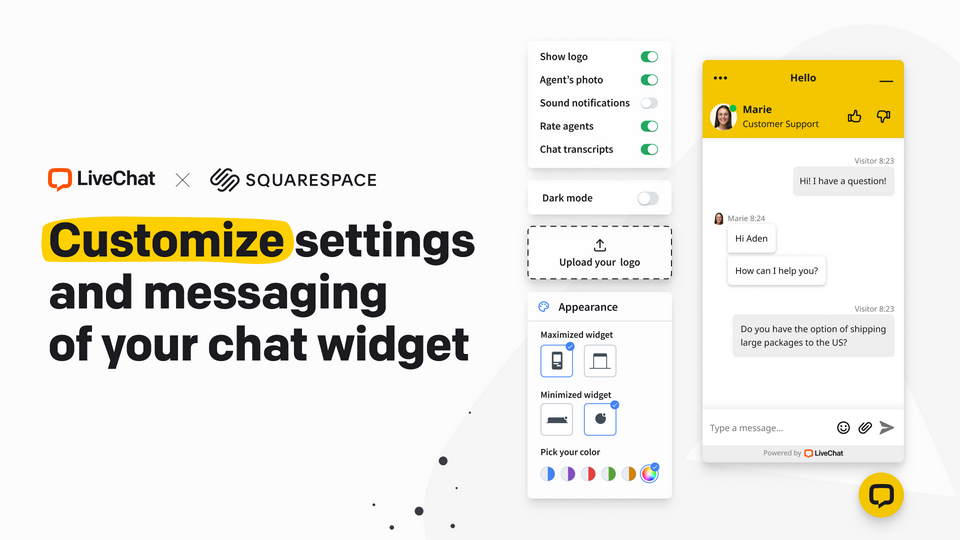
Logo, colours, agent photo, greeting and the maximised and minimised shapes, so it matches the site.
Agents answer from the desktop or mobile app. Set availability and an offline form so out-of-hours chats still leave a contact.
The fourth step is the one that decides whether this works. A widget nobody answers damages trust more than having no widget at all.
Pricing
Read from LiveChat's own pricing page on 29 August 2026. Every figure is per person per month — the distinguishing feature of this product's cost, and the one most likely to catch out a growing team.
$19/agent/mo
billed yearly · $25 monthly
Most chosen
$49/agent/mo
billed yearly · $59 monthly
$79/agent/mo
billed yearly · $89 monthly
Quoted
contact sales
The trial is 14 days with no credit card. AI is priced separately: Text, Inc.'s AI agent product — the same platform marketed at chatbot.com — starts at $19/user/mo billed annually (Essential) or $79/user/mo (Growth), on top of your LiveChat seats, so an automated first line of support is a second subscription rather than an included feature.
Work the seat maths before the plan maths. Three people on Team is $147/mo billed annually — more than most of the other extensions in this catalogue cost in a year.
Reporting
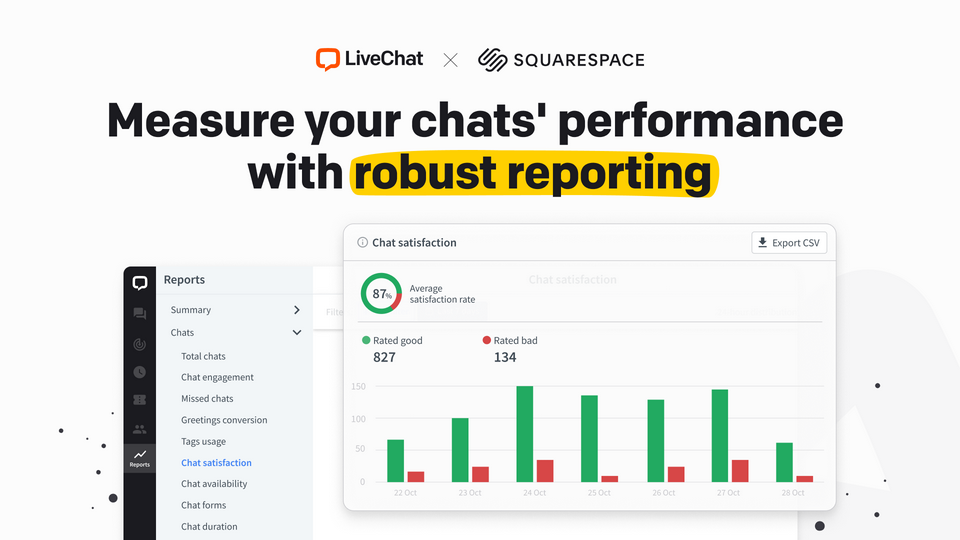
The reason to prefer this over a free chat widget is the measurement. LiveChat scores chat satisfaction, counts missed chats, tracks how often a proactive greeting converts, and reports agent availability and chat duration — so "should we keep doing this" is a question with an answer.
Integrations
| Connects to | What for | Note |
|---|---|---|
| Squarespace | Official app listing for installing the widget | Install path only — it does not read your store |
| Messenger, WhatsApp | Answer social messages in the same inbox | Channel add-ons |
| Mailchimp, HubSpot, Salesforce | Push chat contacts into marketing and CRM | Among 200+ integrations |
| Zapier | Anything else | Also covers webhooks |
| Slack | Notify a team channel of new chats | |
| ChatBot / Text AI Agent | Automated first-line answers | Separate paid products |
| Google Ads, Analytics | Attribute chats to campaigns |
From LiveChat's marketplace and pricing pages, 29 August 2026. Availability of channels varies by plan; SMS and Apple Messages for Business are Business and above.
Worth knowing
Per-seat pricing is the honest objection. Most of the extensions in this catalogue charge per site; LiveChat charges per person answering. For a one-person business that is $19/mo billed annually and perfectly reasonable. For a team of four on Team it is $196/mo, and at that point the question is whether chat earns its keep against a well-staffed inbox.
The second constraint is that it is platform-agnostic. Nothing in LiveChat knows what a Squarespace product is, what an order is, or whether the person chatting has one. If you wanted chat that reads your store, this is not it.
And the Starter plan's 60-day chat history matters more than it sounds. If you ever need to look up what was promised to a customer four months ago, that plan cannot tell you.
Evidence
No Squarespell customer reviews yet.
Sign in to write a review We will bring you straight back here.
Nobody has reviewed this here yet. Be the first, we only publish reviews left on Squarespell in this section.
Before you subscribe
For anything about your own account, ask LiveChat — their help centre
Yes. LiveChat publish an official Squarespace app in their own marketplace, and the widget can also be added by pasting their snippet into Squarespace code injection.
It is an install path rather than a deep integration — the widget appears on your Squarespace site, but LiveChat does not read your products, orders or customers.
Per agent, per month. Starter is $19 per agent billed annually ($25 monthly), Team $49 ($59), Business $79 ($89), and Enterprise is quoted.
This is the most important thing to understand about the cost: it scales with the number of people answering chats, not with the number of sites.
Yes — 14 days with full features and no credit card required.
Starter keeps 60 days of chat history, tracks up to 100 visitors and allows one recurring campaign. Team makes history and campaigns unlimited, raises visitor tracking to 400 and adds basic reporting.
Business adds a work scheduler, staffing prediction, advanced reporting, 1,000-visitor tracking, and SMS and Apple Messages for Business. Enterprise adds SSO, HIPAA compliance and a white-label widget.
Not in the LiveChat subscription. The same company (Text, Inc.) sells a separate AI product — marketed at both chatbot.com and text.com, same platform, same pricing — from $19/user/mo billed annually.
If automated answers are the reason you are looking, budget for two subscriptions.
You set agent availability, and offline chats fall back to a form so the enquiry still reaches you. That is a fallback rather than a substitute — a widget that is usually offline sets a poor expectation.
Yes. The widget takes your logo, colours and agent photo, has maximised and minimised styles and a dark mode, and full customisation is available from the Team plan.
Chat satisfaction ratings, missed chats, greetings conversion, agent availability, chat duration and tag usage. Missed chats is usually the number that decides whether the widget is helping or hurting.
Yes. Squarespell is an approved Text, Inc. Partner Program affiliate and this link carries our referral token. The price you pay is set by LiveChat and does not change because you came from here.
No. The badge says Untested because no compatibility test has been recorded against it.
Every figure here — plan prices, history limits, visitor tracking, trial length — was read from LiveChat's own pricing and marketplace pages on 29 August 2026.
Ready when you are
The trial is the right way to judge this: put the widget live for two weeks, staff it properly, and look at the missed-chat count before you commit to a seat.
Start a LiveChat trial (opens in a new tab)Priced per agent from $19/mo billed annually. Squarespell earns a commission if you subscribe through this link, at no cost to you. It never affects ranking.
Affiliate link. Affiliate link: Squarespell may earn a commission if you buy. It never changes our rank or verdict.More like this
Free plan available
Free plan available
$18.99/mo
$1/mo minimum