Kava: Free Multi-Purpose WordPress ThemeFree
 WordPress · Theme
Browse by platform
View allBrowse by goal
View allFresh inventory
Kava: Free Multi-Purpose WordPress ThemeFreeWordPress · Theme CrocoBuilder: AI-Native Dynamic Frontend Builder for WordPress$79WordPress · PluginAffiliate link
 WordPress Form Builder Plugin for Gutenberg, Elementor, and Bricks$49WordPress · PluginAffiliate link
 JetStyleManager – Gutenberg Block Styles PluginFreeWordPress · Plugin
 JetGridBuilder – FREE Elementor Grid PluginFreeWordPress · Plugin
 JetBlog Plugin for Elementor$43WordPress · PluginAffiliate link
Search results
Listing checked checked Aug 2026 How verification works We checked the creator, the product page, the platform and the pricing. We have not installed it ourselves.
 By Eventually
, see everything Eventually publishes
By Eventually
, see everything Eventually publishes
 Squarespace
Sell tickets to workshops, classes and retreats through your own Squarespace checkout — no redirect, no per-ticket fee.

Overview
Squarespace is genuinely good at selling products. It was never built to sell events — things with a date, a capacity, a guest list and a door somebody has to be checked in at. Squarespace Scheduling handles one-to-one appointments; a forty-seat supper club or a six-week pottery course is a different shape entirely, and there is nothing native for it.
That gap is why so many Squarespace businesses end up on Eventbrite: not because they want a marketplace, but because they need a ticket. The cost of that detour is a redirect away from the site at the moment of purchase, a percentage of every sale, and an attendee list that lives on somebody else's platform.
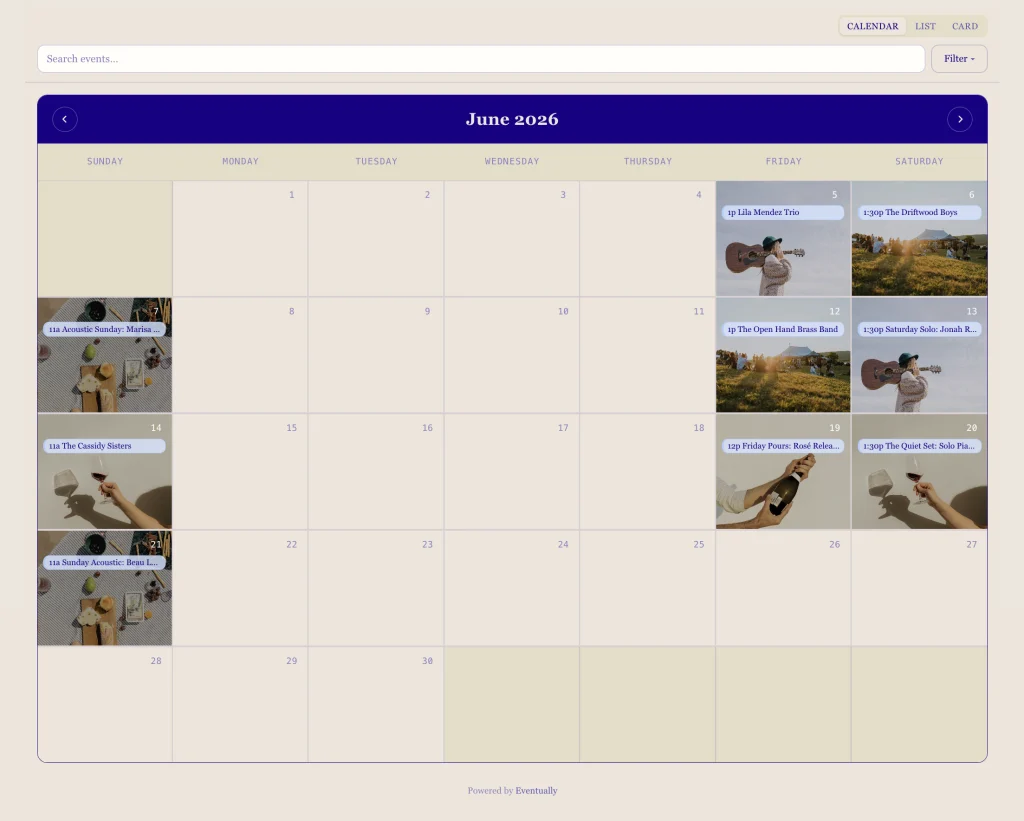
Eventually is a ticketing and registration layer that embeds into Squarespace Commerce instead of replacing it. Browsing the calendar, choosing a ticket and paying all happen on your own domain, through the Squarespace Payments account you already have. It is not a plugin in the technical sense — it is a hosted service that renders through an embed snippet in a Code Block.
It extends Squarespace Commerce. It does not replace it: the same store, the same payouts, the same order records as everything else you sell.
How it works
The difference between Eventually and most ticketing software is where the checkout happens. Eventbrite and Ticket Tailor take the buyer to their domain to pay. Eventually layers onto the payment infrastructure your site already has.
Name, date, ticket tiers and capacity, set in the Eventually dashboard — or described to Evie in a sentence and reviewed.
Eventually generates a ready-made embed for a single event or for the whole calendar.
Any Squarespace page: the homepage, a dedicated events page, or a specific service page.
It inherits your theme's type and colour automatically, with documented CSS selectors when you want it exact.
Cart, payment and confirmation run through your Squarespace Commerce store and Squarespace Payments account. No external redirect.
Setup is copy-and-paste rather than development work, and Eventually put a first simple event at roughly fifteen minutes. The sensible way to confirm it end to end is to publish a $0 or $1 ticket, buy it with your own email address, and watch the confirmation and the calendar invite arrive.
Feature highlights
Read from Eventually's pricing and features pages on 27 August 2026. The plan a feature arrives on matters more than the feature list itself — several of the things people assume are standard start at Growth.
| Feature | What it does | From |
|---|---|---|
| Evie (AI setup) | Drafts a full event listing from one sentence | Free |
| Calendar widget | Calendar, list, cards, combined, carousel or single event | Free |
| Custom CSS | Documented selectors for exact brand matching | Free |
| QR check-in | Scan tickets at the door with a live attendee count | Free |
| Attendee dashboard | Guest list with CSV import and export | Free |
| Calendar invites (.ics) | Automatic, attached to confirmations | Free |
| Discount codes | Percentage or fixed, per event | Free |
| Paid tickets | Charging for a ticket at all | Essentials |
| Multiple ticket types | Early bird, general, VIP, member pricing | Essentials |
| Recurring events & series | Set a weekly class up once, not every week | Essentials |
| Custom registration fields | Per-guest questions asked at checkout | Essentials |
| Waitlists | Capture overflow when an event sells out | Essentials |
| Editable email templates | Confirmation, reminder and thank-you in your voice | Essentials |
| Branding removal | Drop the "Powered by Eventually" line | Essentials |
| Klaviyo integration | Sync attendee data into email marketing | Growth |
| Zapier & webhooks | Push attendees into a CRM or anything else | Growth |
| Gated & access-code tickets | Member-only events and private pre-sales | Growth |
| Week view | A seventh calendar layout | Growth |
| Timed pre-sale release | Schedule exactly when tickets go live | Pro |
| Migration support | They do the import, including from Shopify | Pro |
| Personal onboarding call | Setup walked through with you | Pro |
Feature availability by plan, as published by Eventually.
If you only need free RSVPs and check-in, the Free plan genuinely covers it. The moment you charge for a ticket you need Essentials or higher.
AI setup
The genuinely tedious part of event software is not the selling, it is the forms. Every event means a title, a date, a start and end time, a capacity, one or more ticket tiers with their own prices, and a description written twice — once for the calendar and once for the confirmation email.
Evie takes that as a sentence. "Rug tufting workshop Saturday, eight seats, $120, beginners welcome" comes back as a drafted event with the title, date, capacity, ticket types and description filled in, for you to review and publish. Eventually put it at ninety seconds against an hour of form-filling, and it is included on every tier including the free one.
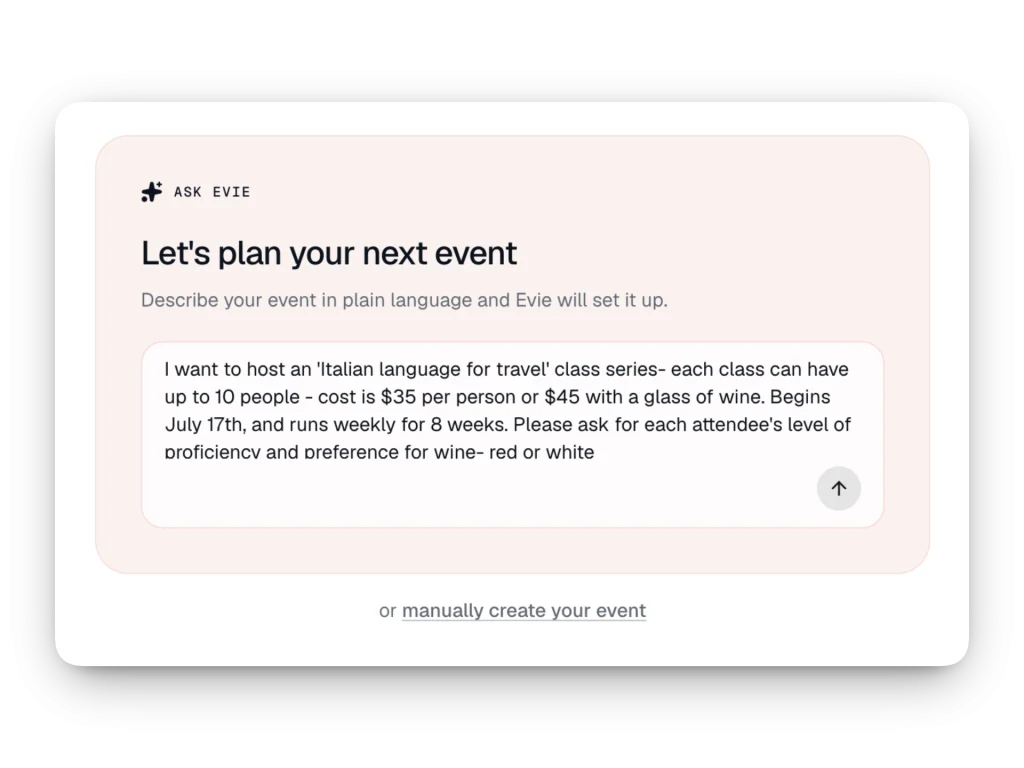
There is a second, less obvious piece: Eventually ships an MCP server, so an AI assistant can operate the product directly rather than through a chat box bolted onto the dashboard. That is unusual — Eventually claim no other Squarespace events tool has one — and it is worth knowing about if you already work with an assistant that supports MCP.
Attendees
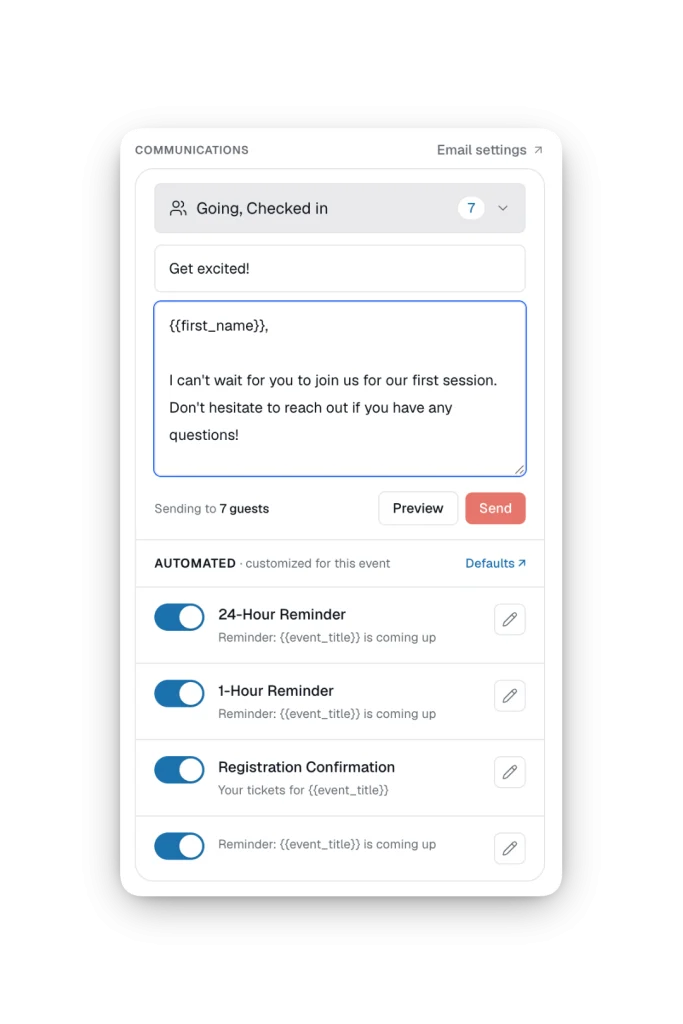
The strongest argument for keeping ticketing on your own site is not the fee. It is that the attendee relationship stays yours. On a marketplace, the person who bought a ticket to your class is the marketplace's customer, and what you get is a name in an export.
Eventually collects per-guest data at the point of purchase rather than chasing it afterwards: four tickets means four names, four email addresses and four sets of answers to whatever you need to ask — dietary requirements, experience level, who they are coming with. Those answers sit in an attendee dashboard with CSV import and export, and on Growth and above they can be pushed straight into Klaviyo, or anywhere else via Zapier and webhooks.
Pricing
Read from Eventually's own pricing page on 27 August 2026. Monthly prices are shown first; annual billing works out at roughly two months free. Payment processing fees are charged by Squarespace, not by Eventually.
$0
Free forever
$19/mo
or $190/yr — $16/mo
Most popular
$49/mo
or $490/yr — $41/mo
$169/mo
or $1,690/yr — $140/mo
Every tier is limited to one connected site, Pro included — the constraint most likely to catch out a designer running events for several clients, who needs a subscription per site. Beyond the plans, Eventually quote per project for done-for-you setup and for custom development.
Squarespell readers get 10% off any paid plan with the code in the panel at the top of this page. It does not apply to the free tier, which is already free.
Comparison
"Better" depends on the job. Eventually wins on native checkout, flat pricing and brand consistency. Eventbrite wins if you genuinely rely on its marketplace to reach people who have never heard of you.
| Eventually | Eventbrite | Ticket Tailor | |
|---|---|---|---|
| Checkout location | Your own domain | Redirects off site | Redirects off site |
| Fee model | Flat monthly, from $19 | 3.7% + $1.79 per ticket, plus 2.9% processing per order | Approx. $0.65–$0.85 per ticket |
| Branding | Yours | Theirs | Theirs |
| Public discovery marketplace | No | Yes | No |
| QR check-in | Yes | Yes | Yes |
| Squarespace-native | Yes | No | No |
| Best for | Recurring Squarespace events | Reaching a new audience | Infrequent paid events |
Eventbrite's fees were checked against Eventbrite's own organiser pricing page on 27 August 2026. Ticket Tailor's figure is carried over from squarespell.com and has not been re-verified — Ticket Tailor block automated checks — so confirm it before relying on it.
The arithmetic is what decides it for most people, and it turns entirely on volume. Eventually's own worked example: a studio running two paid classes a week at fifteen students pays around $2,000 a year in fees on a platform charging six to seven per cent, against $190 a year on Essentials billed annually.
Per-ticket and percentage fees scale with your success while your underlying costs do not, which is why flat pricing compounds in favour of high-frequency event businesses. Run the numbers the other way and the conclusion flips: for one or two paid events a year, a per-ticket model like Ticket Tailor's can genuinely cost less than any subscription, and that is the honest answer for that case.
Squarespace Scheduling — formerly Acuity — is not an alternative to this. It books one-to-one appointments; it does not sell capacity-limited tickets to an event.
Who it is for
Eventually was not built for the event industry. It was built for businesses that run events as one part of something bigger — which is most of the Squarespace catalogue.
Pottery, cooking, baking, yoga, language. Six-week courses, drop-in nights and waitlists — the recurring shape that breaks most ticketing tools.
Restaurants running supper clubs and chef collabs, cafés with open mics and book clubs, wineries with member tastings and ticketed pours.
Galas, fundraisers, donor events and member breakfasts, without a per-ticket fee coming out of the mission. Free events cost nothing at all.
Museums, botanic gardens, conferences and event spaces — member previews, timed entry, multi-day registration and availability calendars.
Workshops and retreats sitting alongside a regular class schedule, and small-group registration where privacy matters.
A standing answer for the client who asks for event ticketing. Note the one-site-per-plan limit: each client site needs its own subscription.
Integrations
| Connects to | How | From |
|---|---|---|
| Squarespace Commerce | Native — this is where the ticket is actually sold | Free |
| Squarespace Payments | Native — processes the card | Free |
| Squarespace domains & sites | Resellable inside Eventually under their Squarespace partnership | Free |
| Calendar apps | Automatic .ics invites on confirmation emails | Free |
| CSV | Import events from another platform, export attendees | Free |
| MCP-capable AI assistants | Eventually ships an MCP server | Free |
| Klaviyo | Native attendee sync | Growth |
| Zapier & webhooks | Anything else, including CRMs | Growth |
| Stripe | Inline checkout — announced, not yet shipped | Announced |
From Eventually's pricing comparison and features pages, 27 August 2026.
Worth knowing
Eventually replaces the ticketing, not the marketing. A marketplace puts your event in front of people who have never heard of you; Eventually sells to the audience that already reaches your site. If discovery is the thing you are actually buying from Eventbrite, this is the wrong tool and you should keep paying for it.
The second constraint is scale on the cheaper plans. Every tier connects one site, and the guest cap per event is 25 on Free, 50 on Essentials and 100 on Growth. One 150-person evening a year puts you on Pro at $169/mo regardless of whether you need anything else it adds.
Third, the payment story is still moving. Squarespace Payments works today; Stripe inline checkout is announced with two different dates on two of Eventually's own pages. If your business depends on Stripe specifically, treat that as unshipped.
Two things Eventually do not publish and we could not verify: what happens to your event and attendee data if you cancel, and whether Mailchimp is natively supported. Both are worth an email before you commit.
Who makes it
Eventually Ticketing Inc. is Kelsey and Zack Gilbert-Kreiling, based in Chicago. Kelsey runs Week of the Website, a Squarespace agency operating since 2014 and one of Squarespace's Enterprise resellers and Professional Services Partners, with over a thousand sites behind it. Zack is the engineer, previously at Foursquare and Basecamp. They say they answer the support email themselves.
In July 2026 they announced a reseller partnership with Squarespace, which lets Eventually customers buy Squarespace domains and website subscriptions from inside Eventually — so an event business can go from nothing to a branded, ticket-selling site in one onboarding flow. It is a reasonable signal about how close to the platform the product sits, though Eventually are careful to note they are not affiliated with Squarespace.
Evidence
No Squarespell customer reviews yet.
Sign in to write a review We will bring you straight back here.
Nobody has reviewed this here yet. Be the first, we only publish reviews left on Squarespell in this section.
Before you sign up
Anything about your own account or a specific site is best asked of Eventually — their help centre
Not in the technical sense. It is a third-party hosted service that connects to Squarespace Commerce through an embeddable widget added in a Code Block, rather than something installed inside Squarespace's own plugin system.
That is also why it is filed here under Extensions rather than Plugins — you hold an account with Eventually and pay monthly, rather than owning a file.
No. It works inside your existing Commerce and payment setup rather than replacing it — an add-on layer for event-specific selling, not a second checkout. You can sell products and tickets on the same site through the same underlying store.
For paid tickets you need a Squarespace plan with Commerce and checkout capability, because that is what processes the payment.
Free events and RSVPs do not need Commerce. You also need admin permissions on the site you are connecting.
No. It is a flat monthly subscription — $19, $49 or $169 — regardless of how many tickets you sell.
Standard payment processing fees still apply through Squarespace Payments, exactly as they would on any other Squarespace sale. Those go to the processor, not to Eventually.
Yes, and it does not expire: three events a month, 25 guests per event, one seat, one site, with Evie, the calendar widget, QR check-in, the attendee dashboard and automated emails all included.
It covers free tickets and RSVPs only. Charging for a ticket needs Essentials at $19/mo, or $190 billed annually.
Essentials billed annually, at $190 a year — an effective $16 a month. Annual billing across all tiers works out at roughly two months free versus paying monthly.
No developer. Setup is copy-and-paste into a Squarespace Code Block, and Eventually put a first simple event at under fifteen minutes.
Test the whole flow before you announce anything: publish a $0 or $1 ticket, buy it with your own email, and confirm the receipt and calendar invite arrive.
It inherits your theme's type and colour automatically, and Eventually publish documented CSS selectors for exact brand matching. Their examples on live customer sites — a winery, a cooking school, a supper club — look like the sites they sit on rather than like a ticketing widget.
Anywhere you paste the embed: the homepage, a dedicated events page, or a specific service page. There is no limit on how many widgets a site can have, on any tier.
Yes — recurring events and series start on Essentials, and each occurrence can carry its own title and capacity, so a six-week course with a different topic each week works properly rather than as six unrelated events.
Capacity can be shared across a series or set per ticket type.
Yes, via custom registration fields on Essentials and above. They are per guest rather than per order, so four tickets means four sets of answers instead of one.
All three, from Essentials. Each ticket tier has its own price and description; waitlists capture overflow when an event sells out; access-code and gated tickets for member-only pre-sales start at Growth.
Klaviyo natively, and Zapier plus webhooks for everything else, both starting on the Growth plan at $49/mo. Calendar invites and CSV import and export are on every tier, and Eventually also ship an MCP server so an AI assistant can drive the product directly.
Mailchimp is not listed as a native integration in Eventually's own material. Bridge it through Zapier, or ask them.
Yes — upload a CSV and Eventually reads the source format automatically. Events arrive as drafts so you can check them before publishing.
Pro subscriptions include migration support, where Eventually do the import and reconcile guests from the old system for you.
No. Every plan, Pro included, connects a single site, so an agency running events for several clients needs a subscription per client. This is the limit most likely to change the maths for a designer.
Squarespace Payments processes the card today, which is what keeps the buyer on your domain.
Stripe inline checkout is announced but not shipped, and Eventually give it two different dates: Q3 2026 on their pricing comparison and Q4 2026 in their features FAQ. If you need Stripe specifically, ask them for a current date before committing.
Eventbrite charges 3.7% plus $1.79 per ticket, plus 2.9% payment processing per order — figures from their own organiser pricing page, checked 27 August 2026. Eventually charges a flat subscription and takes nothing per ticket.
Eventually's worked example: a studio running two paid classes a week at fifteen students pays roughly $2,000 a year in fees on a six-to-seven per cent platform, against $190 a year on Essentials annual. For one or two events a year, the gap narrows sharply and a per-ticket platform can be cheaper.
Squarespace Scheduling — formerly Acuity — books one-to-one appointments. It does not sell capacity-limited tickets to an event, which is a different problem.
Mindbody is a broad fitness and wellness class-scheduling platform rather than Squarespace-specific ticketing. If you already run your studio on Mindbody, this is not a like-for-like swap.
Eventually do not publish a data export and retention policy, and we have not tested one. Confirm it in writing with their support before migrating a live programme across.
Not yet, and the badge on this page says so. There is no recorded compatibility test against Eventually, so it reads "Untested" rather than "Verified".
Everything factual here — plan limits, prices, feature availability, integrations — was read from Eventually's own pages on 27 August 2026, and Eventbrite's fees from Eventbrite's.
Ready when you are
Start free for RSVPs and free events, or unlock paid ticketing on Essentials. No redirect at checkout, no per-ticket fee, no third-party ticketing site between you and your audience.
Create your first event (opens in a new tab)No credit card required to start on the free plan. Squarespell readers get 10% off any paid plan with code SPELL10.
Affiliate link. Affiliate link: Squarespell may earn a commission if you buy. It never changes our rank or verdict.From the Squarespell blog
You don’t need a developer. You need the right template, the right tools, and a clear strategy. This guide gives you all three. You built your…
More like this
Free plan available
$18.99/mo
$1/mo minimum