Member Content Pro: Show Members-Only Content on Public Squarespace Pages with Native Member Sites$59
 Squarespace · PluginSquarespell Original
Browse by platform
View allBrowse by goal
View allBrowse by goal
Fresh inventory
Recently added
Member Content Pro: Show Members-Only Content on Public Squarespace Pages with Native Member Sites$59Squarespace · PluginSquarespell Original Event Tickets: Sell Tickets on Squarespace Event Pages with Ticket Types, Seats Left and Native Checkout$59Squarespace · PluginSquarespell Original
 Wholesale Order Pad: Squarespace Wholesale Order Form with Bulk Add to Cart, Order by SKU and Reorder$85Squarespace · PluginSquarespell Original
 Squarespace Summary Block Pro: More Than 30 Items, Load More and Pagination$49Squarespace · PluginSquarespell Original
 Squarespace Delivery Area Checker: Postcode and ZIP Code Checker Plugin$49Squarespace · PluginSquarespell Original
 Order Rules: Squarespace Minimum Order, Quantity Limits and Pack Sizes Plugin$49Squarespace · PluginSquarespell Original
Search results
Matching products
Squarespace plugin
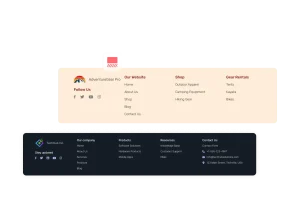
Create a mega footer that organizes navigation links, contact info, logos, social icons and improves usability and site structure.
Free plan available set by Common Ninja · Freemium
Buy from Common Ninja (opens the creator’s website in a new tab)You’ll complete your purchase on Common Ninja’s website: they take the payment, issue the licence and provide the support.
Affiliate link. Squarespell may earn a commission if you buy. It never changes our rank or verdict.
Commission does not affect how reviews or ratings are displayed.
The case Common Ninja make for it, on their own product page.
The Mega Footer plugin for Squarespace simplifies the user journey on your Squarespace store. By consolidating important links, icons, and social media connections in one place, it allows for a streamlined and organized browsing experience. This, in turn, can potentially lead to increased time spent on your store.
A neat and well-structured footer can significantly enhance the aesthetic appeal of your Squarespace store. The Squarespace Mega Footer helps create a visually pleasing and professional-looking space at the bottom of your webpage, adding to the overall attractiveness of your store.
Implementing the Squarespace Mega Footer plugin can contribute to SEO optimization. By organizing links and content efficiently, it helps in creating a structured layout that is favored by search engines, potentially improving your Squarespace store's visibility and ranking.
The Squarespace Mega Footer plugin facilitates a well-organized and clean layout by allowing you to segregate links and information into multiple columns. This functionality not only enhances the visual appeal but also aids in categorizing content in a manner that is easy to navigate. It's a practical way to ensure that your Squarespace store's footer is both user-friendly and aesthetically pleasing.
Showcase your brand's identity prominently with the Squarespace Mega Footer plugin's logo and media display feature. This functionality allows you to exhibit your logo and other pertinent images at the footer, adding a visual appeal and fostering brand recognition. It's a simple method to enhance your Squarespace store's professional look and create a lasting impression on visitors.
The Squarespace Mega Footer plugin facilitates seamless integration of social media links right at the footer of your Squarespace store. This feature allows for a centralized space where visitors can easily find and access your social platforms, encouraging better engagement and community interaction. It's a straightforward way to expand your online presence and foster a closer connection with your audience.
The Mega Footer plugin for Squarespace offers a variety of beautiful skins to choose from, significantly shortening the design process. This feature enables you to select a skin that aligns with your brand's aesthetics and the overall look and feel of your Squarespace store. It's a convenient way to maintain brand consistency while adding a touch of professionalism and visual appeal to your store's footer area.
With the Mega Footer plugin for Squarespace, you can effortlessly categorize and group your footer links under distinct titles. This functionality allows for a more organized and intuitive navigation experience, helping visitors to locate the information they're interested in without hassle. It's a thoughtful way to streamline content and enhance user satisfaction on your Squarespace store.
The Squarespace Mega Footer plugin makes adding links to both internal and external pages a breeze. This feature allows for seamless integration of various links, facilitating quick navigation to different sections of your Squarespace store or external resources. It's a simple yet effective tool to enhance the connectivity and resourcefulness of your store.
Keep your contact details readily accessible with the Squarespace Mega Footer plugin's address field feature. This section enables you to display essential contact details such as phone numbers, email addresses, and physical addresses prominently in the footer. It's a straightforward way to encourage communication and foster a sense of trust and transparency with your Squarespace store visitors.
The Mega Footer for Squarespace is crafted with user-friendliness at its core, promising effortless utilization and comprehension of its features. Its intuitive design promotes user engagement, ensuring that visitors can navigate through the plugin with ease, contributing to an improved overall Squarespace store experience.
With the Squarespace Mega Footer plugin, tailoring the appearance and ambiance of your footer is a breeze. Effortlessly modify elements like colors, fonts, and spacing to resonate with your brand or personal preference. Whether you're aiming for a contemporary, sleek layout or a more classic appearance, the Mega Footer plugin for Squarespace accommodates your needs. Offering a plethora of customization possibilities, it allows for fine-tuning every facet of your footer to achieve the ideal aesthetic for your project.
The Squarespace Mega Footer plugin is fully responsive, guaranteeing that your content maintains its optimal presentation on any device. This ensures that your compelling links and visually appealing layout will preserve their effectiveness and readability, whether accessed via desktop, tablet, or smartphone.
Similar to our other plugins, the Mega Footer plugin also offers the versatility to incorporate custom CSS, allowing for a genuinely customized appearance. Users proficient in coding can enhance the plugin's visual appeal, achieving their desired design style by integrating their own custom CSS code.
The Squarespace Mega Footer is straightforward to embed on Squarespace stores, requiring only basic technical knowledge. This means you can swiftly configure it without the necessity for extensive assistance or advanced skills, facilitating a smoother and quicker setup process.
You set the widget up on Common Ninja’s own site, and they give you a short piece of embed code. That code goes into a Squarespace page wherever you want the widget to appear. They state that nothing beyond pasting the code is required.
Adding embed code to a Squarespace page needs a plan that allows it, so it is worth checking what your plan includes before you start.
There is a free tier, with paid plans above it. Common Ninja set both, and the limits and prices are on their site: we do not restate the numbers here, because they change and a stale price is worse than no price.
No. The badge on this page says Untested, and it will keep saying that until somebody here runs it on a Squarespace site and writes up what happened.
Common Ninja publish a Squarespace page for this widget, so the steps above are theirs for Squarespace specifically.
No reviews yet. Share your experience.
Sign in to write a review We will bring you straight back here.
Squarespell All Access
All 48 plugins and every new one, worth $2,044 bought one by one. 14 days free, cancel anytime.
Start 14 days freeOr start free with 13 plugins, no cardFounding price until 1 December, kept for as long as you stay.