Founding priceAll 45 Squarespell plugins from $15/mo with All Access14 days free. Keep the founding price for as long as you stayEnds in10d08h46m14sSee plans
squarespell
Wholesale Order Pad: Squarespace Wholesale Order Form with Bulk Add to Cart, Order by SKU and Reorder to Pinterest (opens in a new window)

Squarespace 7.1 plugin

Wholesale Order Pad: Squarespace Wholesale Order Form with Bulk Add to Cart, Order by SKU and Reorder

Your whole store on one order form.

Price: $85

Choose your license

Instant download · Sold by Squarespell

Bundle & save

  • 2 plugins 10% off
  • 3 plugins 20% off
  • 4+ plugins 30% off

Automatically applied at checkout on Squarespell plugins.

Requires Squarespace 7.1 and the Core plan or higher (Code Injection).

  • One order form Every product and variant of your store pages
  • Add to cart Every line in one click, with a result for each
  • Phones Cards with large buttons and a sticky bar
  • Installation One paste in Code Injection, Footer

Your whole store on one order form.

A wholesale order form for your Squarespace store: every product and variant of your store pages in one table, cards on phones.

Good to know: Squarespace 7.1 only. Prices come from Squarespace; the pad never changes a price. The pad does not decide who sees it. A page password or a Member Site does that. Code Injection needs the Core plan or higher.

  • Add to cart with a result for every line

    Then the pad reads the cart back and marks every line: Added, or refused with Squarespace's own reason, such as "Sorry, we only have 4 of that item available." or "Sorry, that item is out of stock."

  • Order by SKU, saved lists and reorder

    Repeat last order: the last list sent to the cart from this browser, with its date.

  • Quote requests through your own form

    Squarespace sends the form to you as usual, by email and to your form storage.
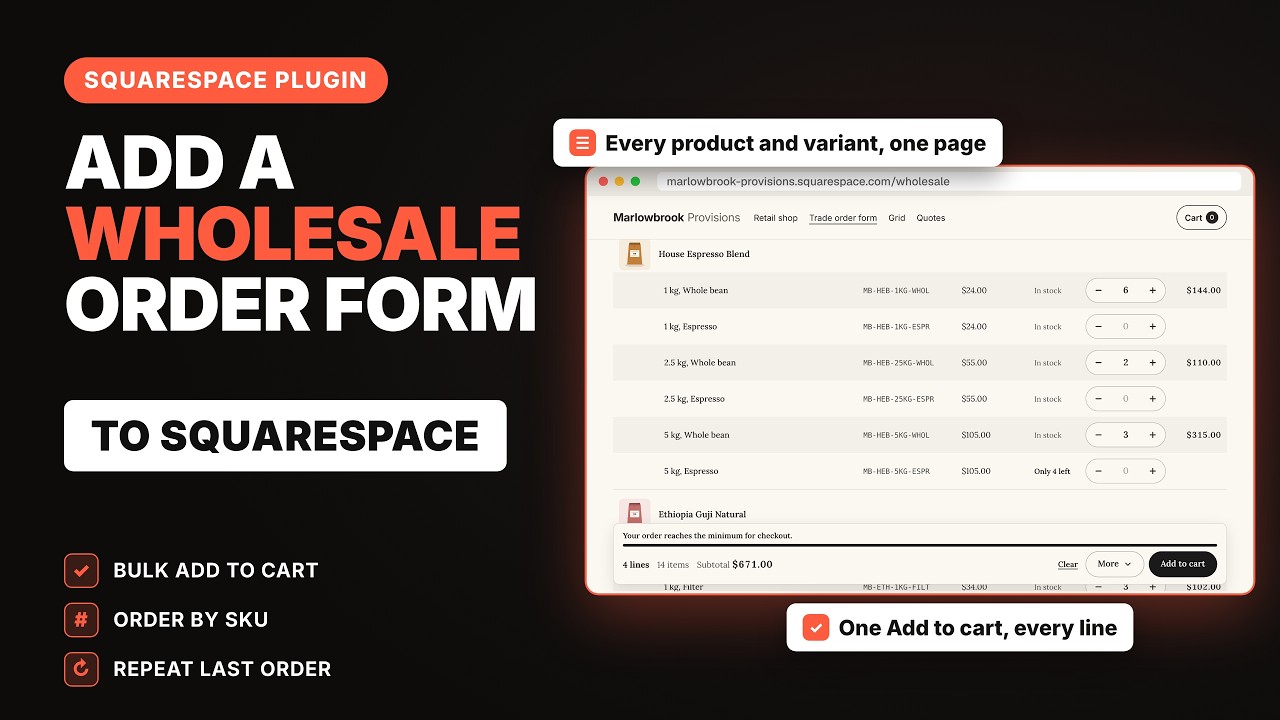
See how it looks on your site.

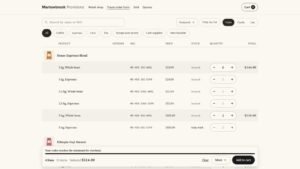
A Squarespace wholesale order form: variant rows with SKU, price, stock and quantity, Only 4 left on one line and a bar with the subtotal and Add to cart
Your whole store on one order form.
All features in detail

Your whole store on one order form.

A wholesale order form for your Squarespace store: every product and variant of your store pages in one table, cards on phones. Buyers type quantities or paste SKUs, see the subtotal, and press one Add to cart: each line goes into Squarespace's own cart, with a result for every line. Saved lists, Repeat last order and quote requests through your own form. One paste of code, one payment.

Squarespace has no order form: a trade buyer who orders twenty products opens twenty product pages. Wholesale Order Pad lists every product and variant of your store pages on one page, with quantity boxes and a live subtotal, and puts every line into Squarespace's own cart with one click. Orders still go through your normal checkout.

Owners on the Squarespace Forum have asked for years for a wholesale store with "the list of products" on one page, so trade buyers do not have to open every product page. Others recopy orders by hand, or want a way to take orders without payment. Squarespace has no order form, no bulk add to cart, no order by SKU and no reorder.

Wholesale Order Pad adds them to your own store. It reads your store pages from your own site, with every variant, price, sale price and stock level, and lists them on any page you choose. Buyers type quantities, and one Add to cart puts each line into Squarespace's own cart, one after another. Then it reads the cart back and tells the buyer exactly what went in, and why anything did not. Checkout, payments and order emails stay Squarespace's own.

You choose everything in a builder file that runs in your browser, with a sample store that runs your exact settings beside it. Then you paste one block of code into Code Injection, Footer, and type order-pad in a section's Anchor Link. Nothing is sent to another server.

What it does

  • Lists every product and variant of your store pages in one table, cards on phones
  • Adds every line to Squarespace's own cart with one Add to cart, and shows a result for each line
  • Shows each refused line with Squarespace's own reason, such as "Sorry, we only have 4 of that item available."
  • Lets buyers order by SKU: paste lines or open a CSV file
  • Keeps saved lists and Repeat last order in the buyer's browser
  • Sends a quote request through your own Form Block, with prices or without
  • Sets minimums, maximums and pack sizes per product, category or tag
  • Shows a size by colour grid for products with two options

One order form for your store

  • Every product of the store pages you choose, more than 200 too, in your store's order. Narrow it to categories (a category includes its sub categories) or tags, and leave out products you list.
  • A table on computers, with the columns you choose: image, product, options, SKU, price, stock, quantity and line total. Cards or a compact list if you prefer.
  • Cards on phones and in narrow sections, with large plus and minus buttons.
  • Products with options: one row per variant under the product, or one row per product with option pickers.
  • A size by colour grid for products with exactly two options: one row per size, one column per colour, a quantity in each cell, and the product's own count and total under it, such as "3 items, $114.00". Sold-out cells cannot be filled. In Table layout the grid product gets its own full-width block.
  • Sale prices with the original crossed out, "Only 4 left" for low stock, and sold-out lines dimmed or hidden.
  • Search by name, SKU, option value or tag, a category filter as buttons or a dropdown, sort by your store order, name, price or newest, and "Only my list" to see just the lines with a quantity.
  • Several pads on one site: name each section order-pad, or order-pad-trade for a second pad with its own store pages and settings.

Add to cart with a result for every line

  • One Add to cart for every line with a quantity. The lines go into Squarespace's own cart one after another, with "Adding 3 of 12" while it works, at about 0.7 seconds per line.
  • Then the pad reads the cart back and marks every line: Added, or refused with Squarespace's own reason, such as "Sorry, we only have 4 of that item available." or "Sorry, that item is out of stock."
  • A summary line, such as "3 of 4 lines added. 1 needs attention.", and Try again for the lines that need it. Lines that went in are cleared; the others keep their quantity, lowered to the stock that is left (a line whose last items are already in the cart goes back to 0).
  • The pad counts what is already in the buyer's cart: a line with 2 left and both in the cart says "All 2 left are in your cart" and takes no more; with some left it says, for example, "Only 1 more, 1 in your cart".
  • If the connection drops, the pad stops, says which lines were not tried, and adds nothing twice.
  • After adding: stay on the page with View cart and Checkout, go to the cart page, or open the cart.
  • The header cart count shows the new total.

Product details filled on the pad

  • Products with a form in Squarespace (for example "Name on label") show a Details area on the pad: text, text area and drop-down fields are filled there, one set for each line with a quantity.
  • A required field holds that line until it is filled, with a message under the field.
  • Subscriptions, gift cards, products with add-ons and products whose form has another field type are shown with their price and "Choose on the product page", because Squarespace sells them on their own pages.

Order by SKU, saved lists and reorder

  • Order by SKU: paste one line per product, "SKU, quantity", or with tabs, semicolons, "SKU x 3" or "3 x SKU". Or open a CSV file: the first two columns, or columns named SKU and Quantity. The file is read in the buyer's browser; nothing is uploaded. Unknown SKUs are listed.
  • Add the pasted quantities to the list, or replace it.
  • Saved lists: buyers name a list, save it, load it later (replace or add) and delete it.
  • Repeat last order: the last list sent to the cart from this browser, with its date.
  • Unfinished lists: quantities typed but not added come back when the buyer returns, with a short note that goes away by itself.
  • Download CSV of the current list, and Clear with Undo.

Quote requests through your own form

  • Add a Form Block to the page with a Text Area named Order list, and choose Request a quote, or Add to cart and Request a quote side by side.
  • Request a quote writes the list into that field (product, options, SKU, quantity, prices and the subtotal), hides the field and takes the buyer to your form. In the field's place the buyer sees a short summary of the list (lines, items, subtotal and the first lines), with Edit list to go back to the pad; it follows every change on the pad. Your form's other fields, such as name, email and company, stay as you made them.
  • Squarespace sends the form to you as usual, by email and to your form storage.
  • Hide prices for quote-only stores: no prices, totals or subtotal on the pad, in the quote or in the CSV.

Quantity rules and minimums

  • Minimum, maximum and pack size for all products, one product, a category or a tag. The first rule that matches a product wins.
  • Typed quantities are corrected to the next pack ("Changed to 12"), and a note under the quantity says why, such as "Packs of 6, Min 12".
  • Stock is always respected: the quantity never goes above what Squarespace has left, counting what is already in the buyer's cart.
  • Your own order minimum on the pad, an amount or a number of items, with a progress bar.
  • Squarespace's minimum order amount, when it is on in your store settings, shows on the pad as "Add $40.00 more to check out", counting what is already in the cart.

Wholesale setup made simple

  • The builder has a setup advisor with plain steps for a wholesale area only trade buyers can open: a Member Site with a store page inside it, or a simple page password, and what each one means.
  • Wholesale prices: Squarespace has one price per variant, so trade prices live in their own products, for example in a wholesale store page. The advisor shows how, and the pad lists that page.
  • Store page mode: the pad can also show on a store page itself, above Squarespace's product grid or instead of it.

Words, look and phones

  • Every word buyers see or hear can be changed in the builder, under Words. Words in curly brackets, like {n} and {remaining}, are filled in for you.
  • Language sets for German, French, Spanish, Italian and Dutch pages, used when the page language matches. Have them checked by a native speaker before you switch them on.
  • The pad takes your section's font and colours, light or dark, and the colour of your site's primary button, or your own colour. Three styles: Clean, Lined and Boxed.
  • A sticky summary bar with lines, items and the subtotal, at the bottom on phones.
  • Buttons are at least 44 pixels high with a visible focus ring, every quantity box is labelled with its product and options, results are announced to screen readers, the whole pad works with the keyboard, and the page never scrolls sideways on phones.

Light on your pages

  • No library and no file from another server: one block of code in your Footer, about 104 KB (about 32 KB compressed).
  • Your store is read once and kept for 10 minutes in the visitor's browser.
  • While you edit a page in Squarespace, the pad shows a quiet placeholder in its section; when you click Exit, it comes back.
  • Pasted twice by mistake, it still runs once.
  • Owner test mode: add ?sqwop-debug to the page address while logged in to see the products loaded, the products sent to their own page and why, the rules, the form fields and whether the quote form was found. Visitors never see it.

Change settings later

Open the builder again (it remembers your settings in that browser), make the change, click Copy code and paste it over the old Wholesale Order Pad code in Code Injection, Footer. The builder can also save your settings to a file.

Your license key

Your key is in the order email and under My Account, Licenses on squarespell.com. You enter it once in the builder, together with the address of your website. The code you copy then works on that website.

  • A Single License works on one website at a time. To move it, deactivate the old website under My Account, Licenses, click "Use another website or key" in the builder, activate the new one and copy the code again.
  • A Multi-Use License works on unlimited websites. You activate each one in the builder and copy its code.
  • Your site's built-in squarespace.com address always works, so you can install before your domain is connected.

One payment

You pay once. There is no monthly fee, no limit on products, orders or buyers, and nothing switches off.

Who it is for

  • Coffee roasters, tea merchants, bakeries and food makers who sell to cafes, shops and restaurants
  • Brands with a retail shop and trade customers on one site
  • Makers whose buyers reorder the same cases every week
  • Stores that take quote requests instead of payments
  • Designers building Squarespace sites for clients (the Multi-Use License covers unlimited websites)

One paste in your Footer.

  1. Step 1: Activate

    Open the builder file. Enter your license key and your website address, then click Activate.

  2. Step 2: Choose

    Choose your store pages, rows, buttons and rules, and check them in the preview.

  3. Step 3: Paste

    Click Copy code. In Squarespace open Pages, Custom Code, Code Injection, paste it into the Footer box and click Save.

  4. Step 4: Name a section

    Edit the page for the order form, open a section's settings and type order-pad in its Anchor Link.

Code Injection needs the Core plan or higher. Check your site in a private window. The PDF guide included with the plugin shows every step with screenshots.

What’s included and compatibility

What’s included

  • The Wholesale Order Pad builder (one HTML file that runs in your browser), with a live preview on a sample store
  • An illustrated PDF installation guide
  • Your license key
  • Support by email at info@squarespell.com

For coffee roasters, tea merchants, bakeries and food makers who sell to cafes, shops and restaurants, brands with a retail shop and trade customers on one site, makers whose buyers reorder the same cases every week, stores that take quote requests instead of payments, and designers building Squarespace sites for clients.

Known limitations

  • Built for Squarespace 7.1. Squarespace 7.0 templates are not supported.
  • Prices come from Squarespace; the pad never changes a price. Wholesale prices need their own products, for example in a wholesale store page.
  • The pad does not decide who sees it. A page password or a Member Site does that.
  • Saved lists, unfinished lists and Repeat last order live in the buyer's browser, not in an account. Another device or browser starts empty.
  • Subscriptions, gift cards and products with add-ons are bought on their product pages. Product form fields other than text, text area and drop-down send the buyer to the product page. A digital product is added once per order.
  • Checkout runs no code. The pad's own minimums guide buyers on the pad; only Squarespace's minimum order amount is enforced at checkout.
  • Lines go into the cart one after another, about 0.7 seconds per line.
  • Code Injection needs the Core plan or higher (Squarespace: Core, Plus, Advanced and some legacy plans).
  • Tested in Chromium (Chrome) on a computer and at phone widths, on public Squarespace 7.1 template stores with real carts and on the hosted demo. Not tested in Safari on iPhone, in Firefox or on real phones (iPhone and Android).

Check compatibility

Squarespace version
7.1
Works with
Store pages: physical and service products, and digital products once per order; subscriptions, gift cards and add-ons link to their product pages
Layouts
Table, Cards and Compact list; cards on phones; size by colour grid
Ordering
Add to cart for every line, order by SKU (paste or CSV), saved lists, Repeat last order, Download CSV, quote requests
Installation
One paste in Code Injection, Footer, and the Anchor Link order-pad
Plugin version
1.0.0
Plan needed
Core or higher (Code Injection)
Coding knowledge
None. Everything is chosen in the builder.
Browser support
Tested in Chromium (Chrome) on a computer and at phone widths
Dependencies
None
License
Single License: Single Website. Multi-Use License: Unlimited Websites.
Support
info@squarespell.com

Squarespace 7.0 templates are not supported.

Good to know before you buy.

Answers to common questions about how the plugin works.

Does Squarespace have a wholesale order form?

No. Squarespace has no order form, no bulk add to cart, no order by SKU and no reorder. Wholesale Order Pad adds them to your store, and orders still go through Squarespace's own cart and checkout.

How do buyers add many products to the cart at once?

They type quantities on the pad and press Add to cart once. Every line goes into the cart, one after another, and the pad shows a result for each line.

What happens when a product is out of stock?

Sold-out lines are dimmed or hidden, and quantities never go above the stock left, counting what is already in the buyer's cart. If stock changed meanwhile, Squarespace refuses that line, the pad shows Squarespace's own reason on it, and the other lines still go in.

Can buyers order by SKU?

Yes. They paste one line per product, "SKU, quantity", or open a CSV file. The file is read in their browser; nothing is uploaded.

Can buyers reorder?

Yes. Repeat last order fills the pad with the last list sent to the cart from that browser, and buyers can save named lists. Both live in the buyer's browser, not in an account.

Can I take quote requests instead of payments?

Yes. Add a Form Block with a Text Area named Order list and choose Request a quote. The list goes into your form, and Squarespace sends it to you. Hide prices is there for quote-only stores.

How do I show wholesale prices?

Squarespace has one price per variant, so trade prices need their own products, for example in a wholesale store page. Point the pad at that page. The builder's setup advisor shows the steps.

How do I keep the wholesale pad for trade buyers only?

Put the page with the pad and its store page in a Member Site, or give them a page password. Squarespace decides who can open them; the pad reads the store with the buyer's own login.

Does it work with products that have options?

Yes. Every variant gets its own row, or one row per product has option pickers. Products with two options, such as size and colour, can show a grid.

What about products with a form, subscriptions and gift cards?

Text, text area and drop-down form fields are filled on the pad. Subscriptions, gift cards, products with add-ons and other form fields are bought on their product pages, and the pad links there.

Can I set minimums and pack sizes?

Yes: a minimum, maximum and pack size per product, category, tag or all products, plus your own order minimum. Squarespace's minimum order amount shows on the pad too.

Which plan do I need?

Squarespace 7.1 on the Core plan or higher, for Code Injection.

Is this a subscription?

No. One payment: $85 for a Single License, $145 for a Multi-Use License. No monthly fee.

Installation & troubleshooting 10 fixes
The order form does not show.
Check that the code is saved in the Footer box of Code Injection, that the section's Anchor Link is exactly order-pad, and that your address is activated. Look at the page logged out, in a private window.
"The products could not load."
The store page address in the builder is wrong, or the store page has a password the buyer has not entered. Check the address, for example /shop, and the owner test mode.
A product says "Choose on the product page".
Subscriptions, gift cards, products with add-ons and products with some form fields are bought on their own page. The owner test mode says which and why.
A line was not added.
The result on the line shows Squarespace's own reason, such as "Sorry, we only have 4 of that item available." Change the quantity and press Try again.
Request a quote does not show.
Add a Form Block on the same page with a Text Area named Order list, or the label you typed in the builder.
The prices are retail prices.
Prices come from Squarespace. For trade prices, list a wholesale store page with its own products.
It shows twice.
The code was pasted twice. Keep one Wholesale Order Pad block in the Footer and click Save.
My change in the builder does not show.
Click Copy code again, paste it over the old Wholesale Order Pad code in Code Injection, Footer, click Save and look at your site in a new private window.
"Wholesale Order Pad: not activated for" your address.
Only you see this note, while logged in. Activate that address in the builder, copy the code again and paste it over the old code.
"Could not reach squarespell.com".
The builder needs the internet once to activate. Check the connection and click Activate again. Your site never contacts squarespell.com.

Customer reviews

No reviews yet. Share your experience.

Ready to take orders by the case?

Wholesale Order Pad: Squarespace Wholesale Order Form with Bulk Add to Cart, Order by SKU and Reorder · Single License

Get the plugin $85 , Single License