Member Content Pro: Show Members-Only Content on Public Squarespace Pages with Native Member Sites$59
 Squarespace · PluginSquarespell Original
Browse by platform
View allBrowse by goal
View allBrowse by goal
Fresh inventory
Recently added
Member Content Pro: Show Members-Only Content on Public Squarespace Pages with Native Member Sites$59Squarespace · PluginSquarespell Original Event Tickets: Sell Tickets on Squarespace Event Pages with Ticket Types, Seats Left and Native Checkout$59Squarespace · PluginSquarespell Original
 Wholesale Order Pad: Squarespace Wholesale Order Form with Bulk Add to Cart, Order by SKU and Reorder$85Squarespace · PluginSquarespell Original
 Squarespace Summary Block Pro: More Than 30 Items, Load More and Pagination$49Squarespace · PluginSquarespell Original
 Squarespace Delivery Area Checker: Postcode and ZIP Code Checker Plugin$49Squarespace · PluginSquarespell Original
 Order Rules: Squarespace Minimum Order, Quantity Limits and Pack Sizes Plugin$49Squarespace · PluginSquarespell Original
Search results
Matching products
Squarespace 7.1 plugin
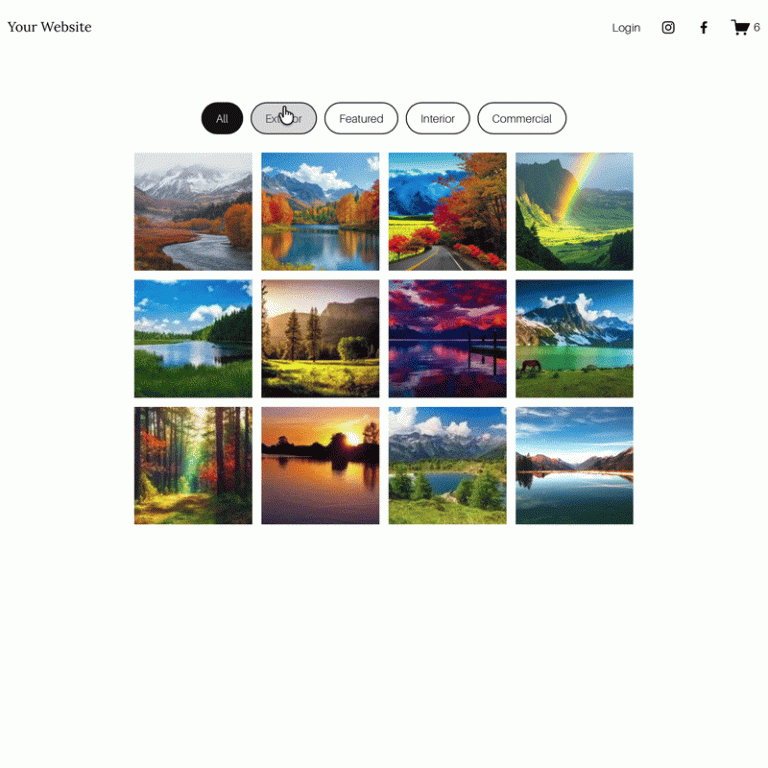
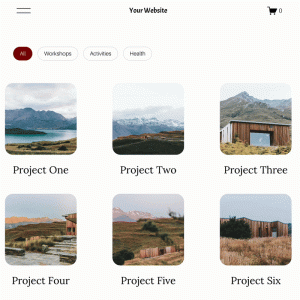
Looking for an easy way to add filters to Squarespace?
$59.99 set by The Square Genius · One-time
Buy from The Square Genius (opens the creator’s website in a new tab)You’ll complete your purchase on The Square Genius’s website: they take the payment, issue the licence and provide the support.
Affiliate link. Squarespell may earn a commission if you buy. It never changes our rank or verdict.
Commission does not affect how reviews or ratings are displayed.
The Genius Squarespace Filter Plugin helps you turn busy portfolio pages, blogs, event pages and galleries into a cleaner, easier to browse experience.
Visitors can quickly filter your content by category, topic, service, location, resource type or any labels you choose, instead of scrolling through everything.
Perfect for portfolios, blog archives, event listings, galleries (grid, masonry & strips only) resource hubs and larger content collections, this plugin gives your visitors a smoother way to explore your content without the cost or complexity of custom development.
NEW Advanced Dropdown Portfolio Filter Demo ➜
If you’ve ever wondered how to add a filter in Squarespace, you’ll know it’s not built in by default. That’s where this plugin comes in.
Unlike complicated third-party add-ons, this plugin is designed to feel natural inside Squarespace:
Quick install – no coding required.
4 plugin types – choose from portfolio pages, gallery blocks, blogs, or events.
Unlimited filters – add as many as you need.
Clean design – blends seamlessly with your site style.
Simple UX – your visitors can find exactly what they need in seconds.
Perfect for creatives, small businesses, or charities who want their Squarespace portfolio filters to look slick, professional, and user-friendly.
If you want step-by-step guidance for specific use cases, check out how to filter a Squarespace blog or add filters to a Squarespace events page
Boost engagement : Make it easier for users to explore your content.
Improve conversions : Let visitors quickly find products, posts, or projects that match their needs.
Scalable : Works whether you have 5 items or 500+.
Lightweight : Built for speed – no bloated scripts or unnecessary features.
Customisable : Change colours, styles, and layouts to fit your brand.
This plugin isn’t just another filter – it’s a smart way to make your Squarespace site work harder for you.
Before you buy
Agreed at The Square Genius’s checkout. Shown here because two of them decide whether the plugin will work for you at all.
By purchasing and downloading any plugin from this shop, you agree to the following terms: You cannot resell, redistribute, or share the plugin, whether for free or for profit. Plugins must not be copied or modified for resale.
I understand that all plugins purchased from The Square Genius are compatible only with Squarespace 7.1, and require the business/core plan or above.
I understand that this is a digital product with instant access. By purchasing, I give express consent to receive the plugin immediately and acknowledge that I lose my right to cancel once access begins. I understand refunds are not offered once the plugin has been accessed, downloaded, delivered or made available, unless the product is faulty or not as described.
I understand that some plugins have specific limitations, including Squarespace plan requirements, page type requirements, category or tag setup, URL structure, gallery block settings, or other conditions listed on the product page.
It’s a simple, no-code plugin that adds filtering options to your Squarespace website. You can use it on portfolios, blogs, or events so visitors can sort through your content easily.
You can install it on as many portfolio, blog, galleries or event pages as you need. Note: the plugin does not work on product pages
This plugin is only compatible with Squarespace 7.1 sites.
Installation is quick and beginner-friendly. Copy and paste the provided code into your site, then customise the filters to match your categories. Full instructions are included.
You can also follow our step-by-step walk-through in the blog guides for filtering blogs and filtering events .
I designed the Genius Squarespace Filter Plugin to be the most user-friendly and straightforward option. Unlike bulky alternatives, it’s lightweight, customisable, and blends beautifully into any Squarespace site design.
Universal Filter is a powerful option for advanced filtering across different data types. The Genius Squarespace Filter Plugin is designed for Squarespace users who want a simpler copy and paste setup for portfolios, blogs, gallery blocks and event pages, with friendly instructions and tutorial support.
Not at all. The plugin is designed for non-coders. If you can copy and paste, you can set it up. I’ve also included tutorial videos to help you set it up in no time!
No – the plugin is lightweight and optimised for speed, so your pages load quickly and smoothly.
No reviews yet. Share your experience.
Sign in to write a review We will bring you straight back here.
Squarespell All Access
All 48 plugins and every new one, worth $2,044 bought one by one. 14 days free, cancel anytime.
Start 14 days freeOr start free with 13 plugins, no cardFounding price until 1 December, kept for as long as you stay.