Member Content Pro: Show Members-Only Content on Public Squarespace Pages with Native Member Sites$59
 Squarespace · PluginSquarespell Original
Browse by platform
View allBrowse by goal
View allBrowse by goal
Fresh inventory
Recently added
Member Content Pro: Show Members-Only Content on Public Squarespace Pages with Native Member Sites$59Squarespace · PluginSquarespell Original Event Tickets: Sell Tickets on Squarespace Event Pages with Ticket Types, Seats Left and Native Checkout$59Squarespace · PluginSquarespell Original
 Wholesale Order Pad: Squarespace Wholesale Order Form with Bulk Add to Cart, Order by SKU and Reorder$85Squarespace · PluginSquarespell Original
 Squarespace Summary Block Pro: More Than 30 Items, Load More and Pagination$49Squarespace · PluginSquarespell Original
 Squarespace Delivery Area Checker: Postcode and ZIP Code Checker Plugin$49Squarespace · PluginSquarespell Original
 Order Rules: Squarespace Minimum Order, Quantity Limits and Pack Sizes Plugin$49Squarespace · PluginSquarespell Original
Search results
Matching products
Squarespace plugin
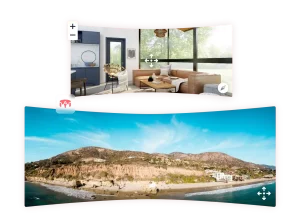
Create immersive 360 virtual tours with interactive hotspots that let visitors explore spaces, view details clearly, and experience panoramic environments seamlessly.
Free plan available set by Common Ninja · Freemium
Buy from Common Ninja (opens the creator’s website in a new tab)You’ll complete your purchase on Common Ninja’s website: they take the payment, issue the licence and provide the support.
Affiliate link. Squarespell may earn a commission if you buy. It never changes our rank or verdict.
Commission does not affect how reviews or ratings are displayed.
The case Common Ninja make for it, on their own product page.
The Squarespace Virtual Tour plugin creates a dynamic environment on your website by enabling the display of 360 panoramic images. Visitors can interact with the 360 panoramas, thus inviting them to spend more time exploring your content. The interactive nature of the Virtual Tour plugin fosters a deeper connection between your Squarespace store and its visitors, enhancing their overall engagement.
Managing your 360 panoramic images is a breeze with the Virtual Tour plugin for Squarespace. The intuitive interface allows for the hassle-free addition and modification of hotspots and settings to meet your preferences. The streamlined content management ensures that keeping your virtual tours updated and engaging remains a straightforward task.
By offering a virtual tour plugin, your Squarespace store becomes more accessible to those who may not be able to visit in person. The Squarespace Virtual Tour plugin ensures that the experience of browsing 360 panoramic images is smooth and enjoyable. This increased accessibility broadens your website’s appeal and inclusivity, allowing more people to explore what you have to offer virtually.
The Squarespace Virtual Tour plugin enables the seamless addition of hotspots over your 360 panoramic images. Hotspots are interactive icons that, when clicked, can reveal more information about a particular area or feature captured in the image. This feature not only enhances the informative value of the 360 panorama but also enriches the interactive experience for your Squarespace store visitors.
Providing detailed information is made easy with the Virtual Tour plugin for Squarespace. You can add a title, description, and the image author’s name to each 360 panoramic image displayed This feature allows for a structured display of information, making it straightforward for visitors to learn more about each panorama, thus adding a layer of professionalism and context to your visual content.
Dive deeper into the visual experience with the [paltform] Virtual Tour plugin’s drag and zoom functionality. Visitors can effortlessly drag the image in any direction (left, right, up, or down) to explore the panorama at their own pace. Additionally, the zoom feature allows for a closer examination of details, creating a more interactive and engaging viewing experience on your Squarespace store.
The Virtual Tour plugin for [paltform] is your gateway to endless customization. It provides you with the flexibility to adjust colors, fonts, and spacing, enabling a total personalization of your virtual tour. Each detail can be meticulously adjusted to resonate with your Squarespace store’s distinctive design and branding.
The Squarespace Virtual Tour offers the ability to control the direction of rotation for your 360 panoramas, providing a more tailored viewing experience. The animation settings are easily adjustable, allowing for a smooth and aesthetically pleasing exploration of your virtual space. This feature ensures that the display of your 360 panoramic images aligns with your desired presentation and user interaction objectives.
The Virtual Tour plugin enriches your 360 panoramic images by allowing the addition of web-linked hotspots. Each hotspot can be configured to redirect visitors to a specified webpage, offering a straightforward pathway to more information or related content. This functionality enhances the user's navigational experience, creating a more interconnected and informative virtual tour.
Designing your perfect virtual tour becomes a simple task with the Squarespace Virtual Tour plugin. You won't need any coding knowledge; thanks to its user-friendly drag-and-drop interface, customization is smooth and quick, allowing you to bring your envisioned tour to life effortlessly.
Engineered for optimal responsiveness, the Squarespace Virtual Tour plugin ensures your virtual tours maintain their visual appeal on any device. In a time where mobile optimization is crucial, this feature is key to delivering a consistent user experience regardless of the device being used.
Consistent with the spirit of customization, the Squarespace Virtual Tour plugin offers custom CSS capabilities. This feature unlocks the freedom to add a personal touch, paving the way for more creative virtual tour designs that stand out.
Embedding the virtual tour you've designed into your Squarespace store is straightforward. It's as simple as copying and pasting a single line of code. Additionally, any adjustments made within the widget are instantly reflected on your Squarespace store, keeping your virtual tours up-to-date without any extra hassle.
You set the widget up on Common Ninja’s own site, and they give you a short piece of embed code. That code goes into a Squarespace page wherever you want the widget to appear. They state that nothing beyond pasting the code is required.
Adding embed code to a Squarespace page needs a plan that allows it, so it is worth checking what your plan includes before you start.
There is a free tier, with paid plans above it. Common Ninja set both, and the limits and prices are on their site: we do not restate the numbers here, because they change and a stale price is worse than no price.
No. The badge on this page says Untested, and it will keep saying that until somebody here runs it on a Squarespace site and writes up what happened.
Common Ninja publish a Squarespace page for this widget, so the steps above are theirs for Squarespace specifically.
No reviews yet. Share your experience.
Sign in to write a review We will bring you straight back here.
Squarespell All Access
All 48 plugins and every new one, worth $2,044 bought one by one. 14 days free, cancel anytime.
Start 14 days freeOr start free with 13 plugins, no cardFounding price until 1 December, kept for as long as you stay.