Member Content Pro: Show Members-Only Content on Public Squarespace Pages with Native Member Sites$59
 Squarespace · PluginSquarespell Original
Browse by platform
View allBrowse by goal
View allBrowse by goal
Fresh inventory
Recently added
Member Content Pro: Show Members-Only Content on Public Squarespace Pages with Native Member Sites$59Squarespace · PluginSquarespell Original Event Tickets: Sell Tickets on Squarespace Event Pages with Ticket Types, Seats Left and Native Checkout$59Squarespace · PluginSquarespell Original
 Wholesale Order Pad: Squarespace Wholesale Order Form with Bulk Add to Cart, Order by SKU and Reorder$85Squarespace · PluginSquarespell Original
 Squarespace Summary Block Pro: More Than 30 Items, Load More and Pagination$49Squarespace · PluginSquarespell Original
 Squarespace Delivery Area Checker: Postcode and ZIP Code Checker Plugin$49Squarespace · PluginSquarespell Original
 Order Rules: Squarespace Minimum Order, Quantity Limits and Pack Sizes Plugin$49Squarespace · PluginSquarespell Original
Search results
Matching products
Squarespace plugin
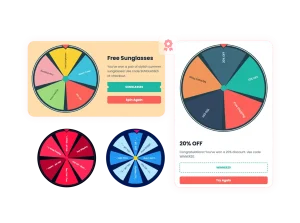
Add an interactive spinning wheel to offer prizes, capture leads, and drive user engagement through gamified rewards.
Free plan available set by Common Ninja · Freemium
Buy from Common Ninja (opens the creator’s website in a new tab)You’ll complete your purchase on Common Ninja’s website: they take the payment, issue the licence and provide the support.
Affiliate link. Squarespell may earn a commission if you buy. It never changes our rank or verdict.
Commission does not affect how reviews or ratings are displayed.
The case Common Ninja make for it, on their own product page.
By offering discounts or coupons through the Spinning Wheel plugin, you're incentivizing your Squarespace store's visitors to make a purchase. This can effectively convert casual browsers into paying customers, thereby increasing your sales conversion rate.
The Squarespace Spinning Wheel plugin provides an interactive and fun way to engage your Squarespace store's visitors. Instead of just browsing through your store, visitors get to participate in a game-like experience, making them more likely to stay longer and explore what you offer.
The interactive and game-like nature of the Spinning Wheel plugin for Squarespace can make shopping on your site a more enjoyable experience. This positive impression can improve your brand's reputation and encourage your Squarespace store's users to return and recommend your store to others.
With the Spinning Wheel plugin for Squarespace, collecting leads becomes a breeze. Before visitors spin the wheel for enticing offers, you can set it up so that they need to provide their email addresses. This simple interaction makes gathering contact information straightforward and non-intrusive, helping you grow your email list for future marketing campaigns.
Highlight your best offers with customizable prize colors. The Squarespace Spinning Wheel plugin lets you set individual colors for each prize segment. This feature can be used to make your most attractive prizes stand out, encouraging visitors to engage and boosting the excitement around your promotional activities.
Celebrate your Squarespace store's visitors' wins with customized messages delivered right after their successful spin. The Spinning Wheel for Squarespace allows you to display a tailored message indicating their prize. Plus, you can incorporate a clickable button and a link in the message, directing winners toward their prize or your chosen destination, and enhancing user interaction.
Cater to your Squarespace store's unique style and layout with the Spinning Wheel plugin's flexible display options. Whether you want it to pop up when visitors land on your site, nestle into a side panel, or sit static on your webpage, you can choose the most engaging and seamless way to integrate the Spinning Wheel into your user experience.
Add an aesthetic touch to your website with the Squarespace Spinning Wheel plugin's selection of beautiful color skins. Choose from a variety of hues that best match your brand, speeding up the design process and ensuring a consistent and attractive look and feel across your Squarespace store. This plugin not only enhances user engagement but does so while maintaining your brand's unique style.
Keep your offers exclusive and exciting with the Squarespace Spinning Wheel plugin's ability to set a maximum spin limit for each user. This feature lets you regulate how often visitors can spin the wheel, preventing overuse and maintaining the allure of your deals and discounts.
The Squarespace Spinning Wheel plugin is designed to complement your store's design, not clash with it. With multiple layout options at your disposal, you can select the one that best suits your [platformstore's aesthetic and functionality. Whether you want the wheel next to the email field, alongside a content section, or under a catchy title, you can arrange it to create a seamless and engaging user experience.
Dictate when the Squarespace Spinning Wheel plugin makes its appearance with the adjustable timing feature. You can opt to have the widget show up right when the page loads, after a specific time delay, or just when a visitor is preparing to exit. This functionality provides you with a tactical advantage in optimizing visitor engagement.
Designing your ideal Squarespace spinning wheel is a breeze with our user-friendly interface. Forget about the need for coding knowledge – our simple, intuitive interface allows you to customize your spinning wheel just the way you want it, all with just a few easy clicks. Customizing your interactive widget has never been easier or more accessible.
With the Spinning Wheel plugin for Squarespace, you gain total control over your plugin's design. Every element – from colors and fonts to spacing – can be tweaked to mirror your brand's aesthetics perfectly. Enjoy the freedom to construct a design that not only embodies
The Squarespace Spinning Wheel plugin is built with responsiveness in mind, guaranteeing your plugin looks great and functions well on any device. As mobile compatibility becomes increasingly important, this feature ensures your users enjoy a smooth and seamless experience, regardless of whether they're on a desktop, tablet, or smartphone.
A Spinning Wheel plugin isn't just user-friendly, it's also developer-friendly. If you're comfortable with code, you can use custom CSS to tailor the appearance and behavior of the Squarespace spinning wheel to your exact specifications. This feature gives you the ultimate control to make the widget perfectly aligned with your brand and Squarespace store style.
Incorporating the Spinning Wheel plugin you've designed with our widget into your Squarespace store is as easy as a copy-and-paste job. Moreover, any modifications you make to the plugin will automatically reflect on your store, ensuring your spinning wheel is always current and engaging, without requiring any additional work.
You set the widget up on Common Ninja’s own site, and they give you a short piece of embed code. That code goes into a Squarespace page wherever you want the widget to appear. They state that nothing beyond pasting the code is required.
Adding embed code to a Squarespace page needs a plan that allows it, so it is worth checking what your plan includes before you start.
There is a free tier, with paid plans above it. Common Ninja set both, and the limits and prices are on their site: we do not restate the numbers here, because they change and a stale price is worse than no price.
No. The badge on this page says Untested, and it will keep saying that until somebody here runs it on a Squarespace site and writes up what happened.
Common Ninja publish a Squarespace page for this widget, so the steps above are theirs for Squarespace specifically.
No reviews yet. Share your experience.
Sign in to write a review We will bring you straight back here.
Squarespell All Access
All 48 plugins and every new one, worth $2,044 bought one by one. 14 days free, cancel anytime.
Start 14 days freeOr start free with 13 plugins, no cardFounding price until 1 December, kept for as long as you stay.