Member Content Pro: Show Members-Only Content on Public Squarespace Pages with Native Member Sites$59
 Squarespace · PluginSquarespell Original
Browse by platform
View allBrowse by goal
View allBrowse by goal
Fresh inventory
Recently added
Member Content Pro: Show Members-Only Content on Public Squarespace Pages with Native Member Sites$59Squarespace · PluginSquarespell Original Event Tickets: Sell Tickets on Squarespace Event Pages with Ticket Types, Seats Left and Native Checkout$59Squarespace · PluginSquarespell Original
 Wholesale Order Pad: Squarespace Wholesale Order Form with Bulk Add to Cart, Order by SKU and Reorder$85Squarespace · PluginSquarespell Original
 Squarespace Summary Block Pro: More Than 30 Items, Load More and Pagination$49Squarespace · PluginSquarespell Original
 Squarespace Delivery Area Checker: Postcode and ZIP Code Checker Plugin$49Squarespace · PluginSquarespell Original
 Order Rules: Squarespace Minimum Order, Quantity Limits and Pack Sizes Plugin$49Squarespace · PluginSquarespell Original
Search results
Matching products
Squarespace plugin
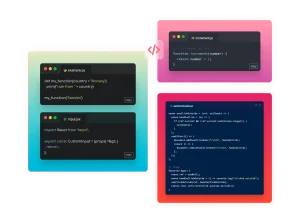
Display clean code snippets with syntax highlighting to improve technical content and help developers scan examples quickly.
Free plan available set by Common Ninja · Freemium
Buy from Common Ninja (opens the creator’s website in a new tab)You’ll complete your purchase on Common Ninja’s website: they take the payment, issue the licence and provide the support.
Affiliate link. Squarespell may earn a commission if you buy. It never changes our rank or verdict.
Commission does not affect how reviews or ratings are displayed.
The case Common Ninja make for it, on their own product page.
For developers, students, and enthusiasts, our Squarespace Code Snippets plugin enhances visual learning by presenting code samples with syntax highlighting and line numbering. Ignite your passion for coding and create an engaging learning experience that sets you apart.
Enrich your technical content without sacrificing clarity. Embed code snippets seamlessly on your Squarespace store, enhancing explanations and making them easy to follow. Perfect for programming concepts and real-world examples.
The Code Snippets plugin for Squarespace showcases your programming expertise with visually appealing displays. Share multiple code snippets, and captivate your audience with interactive showcases.
Our Code Snippets plugin for Squarespace offers a diverse selection of visually appealing themes to match your preferred coding environment. Choose from a range of stylish themes, including dark and light modes, or even create your custom theme. Tailor your code presentation on your Squarespace store to your liking and create an immersive coding experience that reflects your unique style and preferences.
With our Code Snippets plugin for Squarespace, you can showcase multiple code snippets in a clean and organized manner. Effortlessly toggle between snippets using intuitive tabs or present them in a list layout for easy comparison.
Our Code Snippets plugin for Squarespace comes equipped with a powerful AI code assistant to supercharge your development process. Get intelligent code suggestions and context-aware recommendations, enhancing your productivity.
With the Code Snippets plugin for Squarespace, you have complete control over the look and feel of your Squarespace store design. You can easily customize various elements such as the colors, fonts, and spacing to match your brand or personal style. Whether you want to create a sleek, modern design or a more traditional look, the Squarespace Code Snippets has you covered. With its wide range of customization options, you can easily tweak and adjust every aspect of your design to get the perfect look for your project.
Our Code Snippets plugin for Squarespace comes equipped with built-in formatting options to ensure clean and consistent code presentation.
The [paltform] Code Snippets plugin incorporates advanced syntax highlighting, making your code visually distinct and easier to read on your Squarespace store.
Our Code Snippets Widget supports various file extension types and displays the corresponding file icon for each extension.
The Squarespace Code Snippets plugin is easy to use and requires no coding knowledge. Our intuitive dashboard with the drag-and-drop feature will enable you to customize the Squarespace plugin any way you’d like to with just a few simple clicks.
The Squarespace Code Snippets Code snippets is a valuable tool for any website. Not only is it fully responsive, meaning it will adjust seamlessly to fit the screen size of any device, but it also has a sleek and modern design that will enhance the overall look of your Squarespace store. In a world where more and more people are accessing the internet through their phones and tablets, it is crucial to have a store that is optimized for mobile viewing. The Code Snippets plugin for Squarespace will allow you to do just that, giving you an edge over competitors.
Our advanced editor is a powerful tool that gives you complete control over the appearance of the Code Snippets for Squarespace. With this feature, you can easily customize every aspect of the Squarespace store's look and feel, from the colors and fonts to the layout and positioning. But if you're feeling particularly creative, you can take your customization to the next level by editing the CSS directly. This gives you the ability to make even more advanced changes to the Squarespace plugin, allowing you to make it your own. Whether you want to make a few simple tweaks or go all out with advanced customizations, our advanced editor has you covered.
To embed the Code Snippets plugin on your Squarespace store, simply copy and paste the provided code snippet into the HTML of your webpage. Additionally, the Squarespace plugin is designed to be self-updating, meaning that any changes you make to the Code Snippets Editor will be reflected automatically on your Squarespace store without the need for any additional manual updates.
You set the widget up on Common Ninja’s own site, and they give you a short piece of embed code. That code goes into a Squarespace page wherever you want the widget to appear. They state that nothing beyond pasting the code is required.
Adding embed code to a Squarespace page needs a plan that allows it, so it is worth checking what your plan includes before you start.
There is a free tier, with paid plans above it. Common Ninja set both, and the limits and prices are on their site: we do not restate the numbers here, because they change and a stale price is worse than no price.
No. The badge on this page says Untested, and it will keep saying that until somebody here runs it on a Squarespace site and writes up what happened.
Common Ninja publish a Squarespace page for this widget, so the steps above are theirs for Squarespace specifically.
No reviews yet. Share your experience.
Sign in to write a review We will bring you straight back here.
Squarespell All Access
All 48 plugins and every new one, worth $2,044 bought one by one. 14 days free, cancel anytime.
Start 14 days freeOr start free with 13 plugins, no cardFounding price until 1 December, kept for as long as you stay.