Member Content Pro: Show Members-Only Content on Public Squarespace Pages with Native Member Sites$59
 Squarespace · PluginSquarespell Original
Browse by platform
View allBrowse by goal
View allBrowse by goal
Fresh inventory
Recently added
Member Content Pro: Show Members-Only Content on Public Squarespace Pages with Native Member Sites$59Squarespace · PluginSquarespell Original Event Tickets: Sell Tickets on Squarespace Event Pages with Ticket Types, Seats Left and Native Checkout$59Squarespace · PluginSquarespell Original
 Wholesale Order Pad: Squarespace Wholesale Order Form with Bulk Add to Cart, Order by SKU and Reorder$85Squarespace · PluginSquarespell Original
 Squarespace Summary Block Pro: More Than 30 Items, Load More and Pagination$49Squarespace · PluginSquarespell Original
 Squarespace Delivery Area Checker: Postcode and ZIP Code Checker Plugin$49Squarespace · PluginSquarespell Original
 Order Rules: Squarespace Minimum Order, Quantity Limits and Pack Sizes Plugin$49Squarespace · PluginSquarespell Original
Search results
Matching products
Squarespace plugin
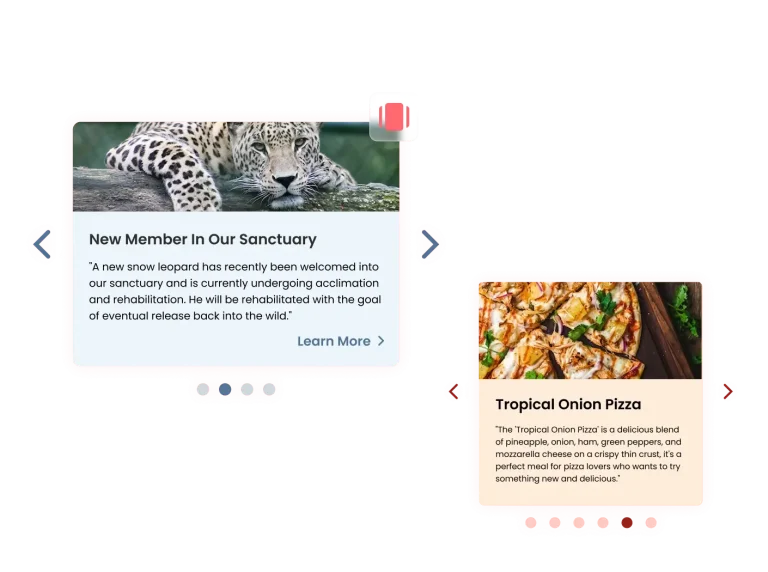
Add customizable content cards to your site to display structured information clearly with flexible layout and design options.
Free plan available set by Common Ninja · Freemium
Buy from Common Ninja (opens the creator’s website in a new tab)You’ll complete your purchase on Common Ninja’s website: they take the payment, issue the licence and provide the support.
Affiliate link. Squarespell may earn a commission if you buy. It never changes our rank or verdict.
Commission does not affect how reviews or ratings are displayed.
The case Common Ninja make for it, on their own product page.
Once you define your card structure, you can easily replicate it to create multiple entries without starting from scratch. This speeds up content creation and ensures a uniform design across your listings, saving valuable time and effort.
The Card Builder supports a wide range of scenarios: from service listings to team member profiles or event details. Its flexible field setup means you can tailor the widget to fit your specific needs, reducing your reliance on multiple plugins or workarounds.
Presenting information in a structured card format helps visitors quickly scan and absorb key details. Whether you're showcasing products, services, or profiles, consistency improves readability and keeps users engaged longer on your site. A clean layout also supports better user flow, reducing bounce rates.
Choose from a variety of visually appealing skins to quickly match your site's branding without needing to design from scratch. These pre-made designs save time and effort while ensuring that your cards look polished and professional. Whether your site is modern, playful, or classic, there's a skin to complement it.
The Card Builder widget offers several layout options to ensure it fits seamlessly with your website’s design. Whether you're going for a grid, list, or a more unique structure, you can select the layout that best supports your content and aesthetic goals. This versatility helps you present your information clearly and attractively.
You can customize nearly every aspect of the Card Builder widget: from fonts and colors to spacing and alignment. This allows you to create a card style that fits your website’s visual identity perfectly. It’s an ideal solution for tailoring the appearance without compromising on functionality.
Add a Variety of Field Types The Card Builder widget supports a broad selection of field types, making it easy to create cards that fit your content needs. You can include elements such as title, subtitle, description, image, price, rating, and location, among others. This flexibility allows you to build detailed and well-structured cards that suit a wide range of use cases.
You can add clickable fields like buttons, links, phone numbers, emails, and coupon code buttons. These interactive elements encourage user engagement by making it easier for visitors to take action directly from the card. Whether it’s starting a call, sending an email, or copying a coupon, these fields help drive meaningful interactions.
With the Card Builder, you can place multiple fields side by side within the same row, offering more layout control. This feature helps create compact and visually balanced cards, especially when displaying shorter pieces of information. It's ideal for combining related fields like phone and email, or price and rating, into a single, clean line.
The Card Builder widget is built with simplicity in mind, so no coding skills are required to get started. The intuitive editor makes it easy to add fields, rearrange content, and fine-tune the design with just a few clicks. It’s accessible for beginners while still powerful enough for advanced users.
The Card Builder is designed to look great on all screen sizes, including desktops, tablets, and smartphones. This ensures your cards remain readable and well-structured, providing a smooth user experience across all devices. Mobile optimization is built-in, so there’s no extra work needed on your part.
For those who want deeper control, the widget includes an option to add custom CSS. This feature is perfect for developers and designers who want to apply unique styles or fine-tune the layout beyond the standard settings. It gives you complete creative freedom to make the cards your own.
Embedding the Card Builder on your site is as simple as pasting a single line of code. Once it’s live, any changes made in the editor are automatically updated on your website. This keeps maintenance hassle-free and ensures your content is always up to date.
You set the widget up on Common Ninja’s own site, and they give you a short piece of embed code. That code goes into a Squarespace page wherever you want the widget to appear. They state that nothing beyond pasting the code is required.
Adding embed code to a Squarespace page needs a plan that allows it, so it is worth checking what your plan includes before you start.
There is a free tier, with paid plans above it. Common Ninja set both, and the limits and prices are on their site: we do not restate the numbers here, because they change and a stale price is worse than no price.
No. The badge on this page says Untested, and it will keep saying that until somebody here runs it on a Squarespace site and writes up what happened.
Common Ninja list Squarespace among the platforms they serve, but publish no Squarespace page for this widget in particular.
No reviews yet. Share your experience.
Sign in to write a review We will bring you straight back here.
Squarespell All Access
All 48 plugins and every new one, worth $2,044 bought one by one. 14 days free, cancel anytime.
Start 14 days freeOr start free with 13 plugins, no cardFounding price until 1 December, kept for as long as you stay.