Member Content Pro: Show Members-Only Content on Public Squarespace Pages with Native Member Sites$59
 Squarespace · PluginSquarespell Original
Browse by platform
View allBrowse by goal
View allBrowse by goal
Fresh inventory
Recently added
Member Content Pro: Show Members-Only Content on Public Squarespace Pages with Native Member Sites$59Squarespace · PluginSquarespell Original Event Tickets: Sell Tickets on Squarespace Event Pages with Ticket Types, Seats Left and Native Checkout$59Squarespace · PluginSquarespell Original
 Wholesale Order Pad: Squarespace Wholesale Order Form with Bulk Add to Cart, Order by SKU and Reorder$85Squarespace · PluginSquarespell Original
 Squarespace Summary Block Pro: More Than 30 Items, Load More and Pagination$49Squarespace · PluginSquarespell Original
 Squarespace Delivery Area Checker: Postcode and ZIP Code Checker Plugin$49Squarespace · PluginSquarespell Original
 Order Rules: Squarespace Minimum Order, Quantity Limits and Pack Sizes Plugin$49Squarespace · PluginSquarespell Original
Search results
Matching products
Squarespace plugin
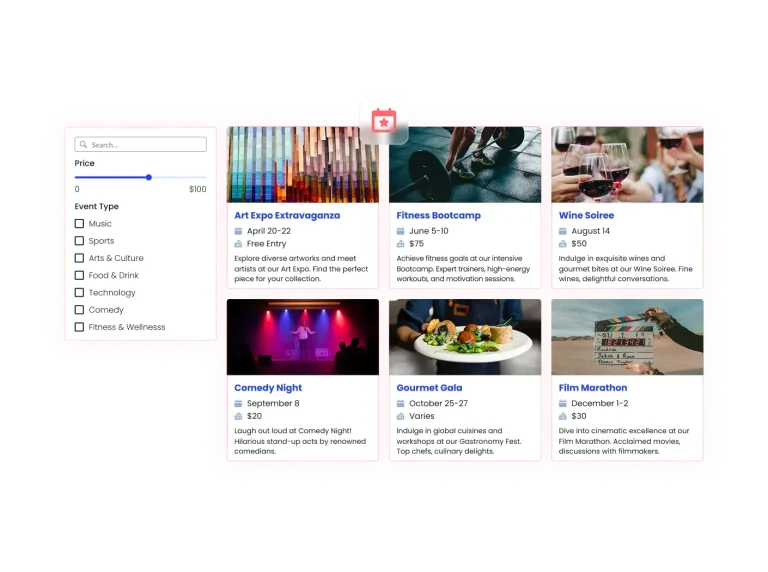
Add an events calendar to your site so visitors can view upcoming activities, improving engagement and event visibility.
Free plan available set by Common Ninja · Freemium
Buy from Common Ninja (opens the creator’s website in a new tab)You’ll complete your purchase on Common Ninja’s website: they take the payment, issue the licence and provide the support.
Affiliate link. Squarespell may earn a commission if you buy. It never changes our rank or verdict.
Commission does not affect how reviews or ratings are displayed.
The case Common Ninja make for it, on their own product page.
With a calendar plugin on your Squarespace store, you can effortlessly organize and display crucial events, appointments, or timeframes, allowing your visitors to stay in the loop and well-coordinated. Moreover, by providing a clear view of upcoming activities, it empowers your visitors to plan ahead, potentially increasing their participation and engagement with your content or services.
An interactive calendar can improve user engagement by encouraging users to explore upcoming events, subscribe to event notifications, or even book appointments directly from your Squarespace store. Truly, lively calendars can foster user involvement by prompting them to discover events, opt for notifications, or directly schedule appointments on your Squarespace store.
A well-organized calendar shows your professionalism and sense of order, enhancing your brand's reputation and creating trust among your Squarespace store users. A well-maintained calendar not only exudes professionalism and a sense of order but also enhances your brand perception and instills trust among your Squarespace store audience.
With color customization options, the Calendar plugin for Squarespace lets you design attractive calendars that sync with your Squarespace store's branding or personal taste. This flexibility not only enhances the aesthetic appeal of your Squarespace store's but also aids in creating a consistent and immersive user experience that resonates with your brand.
The Calendar plugin for Squarespace provides media integration, permitting you to embellish your calendar by incorporating images into events, thus delivering a visually stimulating experience. This multimedia approach not only makes your Squarespace calendar more engaging but also provides a richer context for your events, thereby enhancing the overall user experience.
With the Calendar plugin's configurable default view, you can opt for the initial display mode (month, week, or day) that best caters to your Squarespace store's needs, guaranteeing a uniquely tailored user experience. This attribute assures that your users are directly provided with the most suitable view, increasing usability and ensuring that your Squarespace store can satisfy diverse user inclinations.
The Squarespace Calendar boasts a selection of stunning skins, giving you the freedom to select your ideal look without dedicating a lot of time to complex customization. These pre-designed skins not only reduce your workload but also provide a professional and aesthetically appealing look, increasing the charm of your Squarespace store without necessitating intricate design tasks.
With the Squarespace Calendar plugin, you can simply toggle events to "All Day," making it easy to handle and present full-day events without having to stipulate a set time. This function simplifies the process of highlighting important happenings, making it more straightforward for your users to identify and plan around all-day events.
With the Squarespace Calendar's ability to add links, you can enhance interactivity by attaching URLs to specific dates or events, providing additional information, or redirecting users to relevant pages. This function not only enriches your event details but also acts as a navigational tool for directing your visitors to more resources or actions, ultimately boosting user engagement and satisfaction.
The Calendar plugin for Squarespace extends full RTL support, accommodating users who write from right to left. Enhance your user engagement by reaching more people globally. This inclusivity-focused feature extends the reach of your Squarespace store, making it more user-friendly and accessible to an international audience, thus championing diversity and inclusivity.
The Squarespace Calendar plugin is designed for easy use and doesn't demand any knowledge of coding. Thanks to our intuitive dashboard and its drag-and-drop functionality, you can effortlessly customize the Calendar plugin with a few simple clicks. This user-friendly layout enables even those lacking technical expertise to customize the plugin to their preference, making it a valuable tool for boosting your Squarespace store's functionality and appeal.
The Squarespace Calendar plugin features full customization options so you can edit the design to fit your needs. Revamp the colors, change up the fonts, adjust the spacing – you're in control! This extent of customization lets you build a unique and personalized calendar that perfectly mirrors your brand identity, thereby improving the overall look and user interaction on your Squarespace store.
The Squarespace Calendar is fully responsive and will look great on any device. In a world where mobile is king, this feature sets you a step ahead of your competition. This optimal responsiveness ensures a frictionless user experience on all devices, granting you an upper hand in today's mobile-centric digital environment.
The custom CSS feature of the Squarespace Calendar plugin gives you the ultimate power to dictate the look and ambiance of your calendar. This advanced customization option allows you to modify the Squarespace plugin's design elements such as colors, fonts, and layout to perfectly match your Squarespace store's aesthetics, providing a truly personalized and seamless user experience.
The Calendar plugin can be easily embedded on your Squarespace store by simply copying and pasting a single line of code. With every change you apply, the Calendar plugin will automatically update. This hassle-free integration and automatic updating make the process more straightforward and ensure that your Squarespace store always features the most recent and relevant content.
You set the widget up on Common Ninja’s own site, and they give you a short piece of embed code. That code goes into a Squarespace page wherever you want the widget to appear. They state that nothing beyond pasting the code is required.
Adding embed code to a Squarespace page needs a plan that allows it, so it is worth checking what your plan includes before you start.
There is a free tier, with paid plans above it. Common Ninja set both, and the limits and prices are on their site: we do not restate the numbers here, because they change and a stale price is worse than no price.
No. The badge on this page says Untested, and it will keep saying that until somebody here runs it on a Squarespace site and writes up what happened.
Common Ninja publish a Squarespace page for this widget, so the steps above are theirs for Squarespace specifically.
No reviews yet. Share your experience.
Sign in to write a review We will bring you straight back here.
Squarespell All Access
All 48 plugins and every new one, worth $2,044 bought one by one. 14 days free, cancel anytime.
Start 14 days freeOr start free with 13 plugins, no cardFounding price until 1 December, kept for as long as you stay.