Member Content Pro: Show Members-Only Content on Public Squarespace Pages with Native Member Sites$59
 Squarespace · PluginSquarespell Original
Browse by platform
View allBrowse by goal
View allBrowse by goal
Fresh inventory
Recently added
Member Content Pro: Show Members-Only Content on Public Squarespace Pages with Native Member Sites$59Squarespace · PluginSquarespell Original Event Tickets: Sell Tickets on Squarespace Event Pages with Ticket Types, Seats Left and Native Checkout$59Squarespace · PluginSquarespell Original
 Wholesale Order Pad: Squarespace Wholesale Order Form with Bulk Add to Cart, Order by SKU and Reorder$85Squarespace · PluginSquarespell Original
 Squarespace Summary Block Pro: More Than 30 Items, Load More and Pagination$49Squarespace · PluginSquarespell Original
 Squarespace Delivery Area Checker: Postcode and ZIP Code Checker Plugin$49Squarespace · PluginSquarespell Original
 Order Rules: Squarespace Minimum Order, Quantity Limits and Pack Sizes Plugin$49Squarespace · PluginSquarespell Original
Search results
Matching products
Squarespace 7.1 plugin
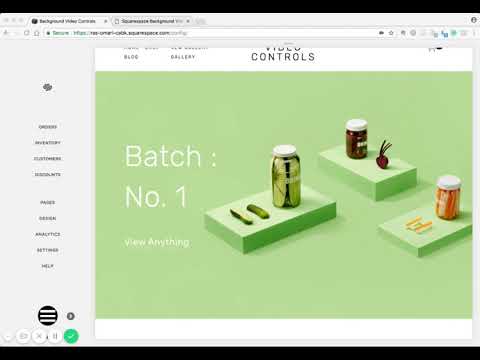
Add a Play/Pause and Mute/Unmute to your background videos.
Choose your licence
Buy from SQPlugins – Solo licence (opens the creator’s website in a new tab)You’ll complete your purchase on SQPlugins’s website: they take the payment, issue the licence and provide the support.
Commission does not affect how reviews or ratings are displayed.
Before you buy
The plugin supports both versions of Squarespace 7.0 and 7.1 and works on all templates except Montauk .
Fully customizable, you can hide buttons, change colors, size, position without special knowledge.
Note: We removed the unmute option from the plugin instructions because in most cases a video will not work ( default browser settings don't allow autoplay video with sound )!
Yes.
Yes, with the Agency License, which covers unlimited websites, including sites you build for clients. The Solo License covers one website that you own or run.
Once purchased you'll get a zip file with instructions and the plugin files. The instructions walk you through how to install it.
No, you will not need to access Developer Mode.
SQPlugins does not list a setup service. The developer answers questions directly through sqplugins.com/support, and SQPlugins publishes installation guides in its Plugins FAQ (sqplugins.com/faq).
We removed this option from the plugin instructions because in most cases the video will not work (default browser settings don't allow autoplay video with sound). You can try this code:
<!– Plugin Background Video Controls –>
<link href="/s/plugin-background-video-controls.css" rel="stylesheet">
<script src="/s/plugin-background-video-controls.js"></script>
<script>pluginBackgroundVideoControls({"unmute":"true"});</script>
<!– end Plugin Background Video Controls –>
No reviews yet. Share your experience.
Sign in to write a review We will bring you straight back here.
Squarespell All Access
All 48 plugins and every new one, worth $2,044 bought one by one. 14 days free, cancel anytime.
Start 14 days freeOr start free with 13 plugins, no cardFounding price until 1 December, kept for as long as you stay.