Member Content Pro: Show Members-Only Content on Public Squarespace Pages with Native Member Sites$59
 Squarespace · PluginSquarespell Original
Browse by platform
View allBrowse by goal
View allBrowse by goal
Fresh inventory
Recently added
Member Content Pro: Show Members-Only Content on Public Squarespace Pages with Native Member Sites$59Squarespace · PluginSquarespell Original Event Tickets: Sell Tickets on Squarespace Event Pages with Ticket Types, Seats Left and Native Checkout$59Squarespace · PluginSquarespell Original
 Wholesale Order Pad: Squarespace Wholesale Order Form with Bulk Add to Cart, Order by SKU and Reorder$85Squarespace · PluginSquarespell Original
 Squarespace Summary Block Pro: More Than 30 Items, Load More and Pagination$49Squarespace · PluginSquarespell Original
 Squarespace Delivery Area Checker: Postcode and ZIP Code Checker Plugin$49Squarespace · PluginSquarespell Original
 Order Rules: Squarespace Minimum Order, Quantity Limits and Pack Sizes Plugin$49Squarespace · PluginSquarespell Original
Search results
Matching products
Squarespace 7.1 plugin
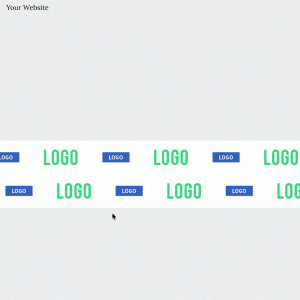
Add a smooth, professional scrolling logos carousel to your Squarespace website with this powerful and easy to install plugin.
$30 set by The Square Genius · One-time
Buy from The Square Genius (opens the creator’s website in a new tab)You’ll complete your purchase on The Square Genius’s website: they take the payment, issue the licence and provide the support.
Affiliate link. Squarespell may earn a commission if you buy. It never changes our rank or verdict.
Commission does not affect how reviews or ratings are displayed.
If you want to showcase partner logos, sponsors, press features, or client brands, this plugin transforms a standard Squarespace gallery into a beautiful auto scrolling logo carousel that instantly elevates your website.
Designed specifically for Squarespace 7.1, the plugin creates seamless scrolling logos on Squarespace with customisable speed, layout and hover interactions.
Simple installation with full guide.
(This plugin is only compatible with Squarespace 7.1 sites.)
Many websites want to display trusted brands they work with. But static logos can feel flat and take up a lot of space.
This Squarespace scrolling logos carousel solves that problem by creating a smooth moving row of logos that continuously scrolls across the screen.
It is perfect for:
Instead of a static grid, your logos become a dynamic visual feature that adds movement and credibility to your site.
Before you buy
Agreed at The Square Genius’s checkout. Shown here because two of them decide whether the plugin will work for you at all.
By purchasing and downloading any plugin from this shop, you agree to the following terms: You cannot resell, redistribute, or share the plugin, whether for free or for profit. Plugins must not be copied or modified for resale.
I understand that all plugins purchased from The Square Genius are compatible only with Squarespace 7.1, and require the business/core plan or above.
I understand that this is a digital product with instant access. By purchasing, I give express consent to receive the plugin immediately and acknowledge that I lose my right to cancel once access begins. I understand refunds are not offered once the plugin has been accessed, downloaded, delivered or made available, unless the product is faulty or not as described.
I understand that some plugins have specific limitations, including Squarespace plan requirements, page type requirements, category or tag setup, URL structure, gallery block settings, or other conditions listed on the product page.
You can add scrolling logos to Squarespace by installing this plugin and using a standard Squarespace image gallery. Simply upload your logos to the gallery and the plugin converts it into a smooth scrolling logos carousel automatically.
The plugin adds auto scroll functionality, hover interactions and layout controls so your logos display in a clean, professional carousel.
Yes. The scrolling logos Squarespace plugin is designed specifically for Squarespace 7.1 websites.
It integrates with the standard Squarespace gallery block and transforms it into a smooth auto scrolling logo carousel without needing complex setup.
Yes. The logos in the carousel can be clickable.
You can use the standard Attach Link option inside the Squarespace gallery to add either external or internal links to each logo. This means visitors can click a logo and be taken directly to a partner website, sponsor page, case study, or any page on your own site.
Because the plugin works with the native Squarespace gallery, linking your scrolling logos carousel in Squarespace works exactly the same way it normally would.
Yes. The plugin allows you to adjust the carousel speed so you can make the scrolling logos move faster or slower depending on your design preferences.
This helps you match the animation to the style and pace of your website.
Yes. This plugin includes an option to display two rows of scrolling logos.
You can also reverse the direction of the second row so the logos move in opposite directions, creating a more dynamic visual effect on your Squarespace website.
Yes. The plugin includes a pause on hover feature.
When visitors hover over the scrolling logos carousel, the animation pauses so they can clearly view the logos.
You can also enable a subtle zoom on hover effect to make the logos feel more interactive.
Yes. The plugin includes customisation options that allow you to adjust logo sizing, padding and spacing between logos.
This makes it easy to create a scrolling logos Squarespace carousel that fits perfectly with your website layout.
No reviews yet. Share your experience.
Sign in to write a review We will bring you straight back here.
Squarespell All Access
All 48 plugins and every new one, worth $2,044 bought one by one. 14 days free, cancel anytime.
Start 14 days freeOr start free with 13 plugins, no cardFounding price until 1 December, kept for as long as you stay.