Event Tickets: Sell Tickets on Squarespace Event Pages with Ticket Types, Seats Left and Native Checkout$59
 Squarespace · PluginSquarespell Original
Browse by platform
View allBrowse by goal
View allBrowse by goal
Fresh inventory
Recently added
Event Tickets: Sell Tickets on Squarespace Event Pages with Ticket Types, Seats Left and Native Checkout$59Squarespace · PluginSquarespell Original Wholesale Order Pad: Squarespace Wholesale Order Form with Bulk Add to Cart, Order by SKU and Reorder$85Squarespace · PluginSquarespell Original
 Squarespace Summary Block Pro: More Than 30 Items, Load More and Pagination$49Squarespace · PluginSquarespell Original
 Squarespace Delivery Area Checker: Postcode and ZIP Code Checker Plugin$49Squarespace · PluginSquarespell Original
 Order Rules: Squarespace Minimum Order, Quantity Limits and Pack Sizes Plugin$49Squarespace · PluginSquarespell Original
 Bundle Builder: Squarespace Product Bundles Plugin, Build a Box and Buy Together$59Squarespace · PluginSquarespell Original
Search results
Matching products
Squarespace plugin
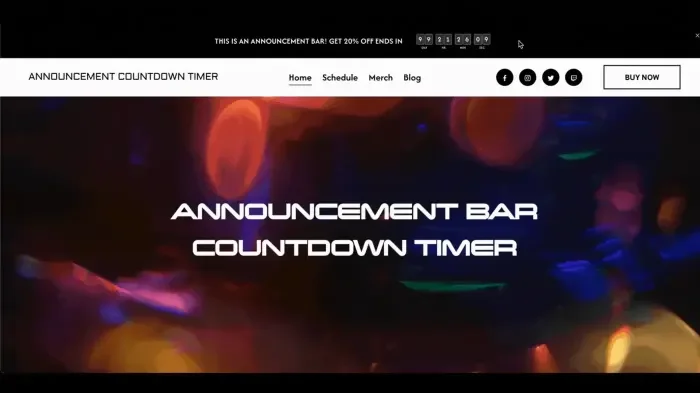
A countdown in your Squarespace announcement bar for launches, sales, events and shipping cut-offs, visible on every page. $25 one-time.
Price: $25
Instant download · Sold by Squarespell
Bundle & save
Automatically applied at checkout on Squarespell plugins.

Use cases
The bar sits at the top of every page, so the deadline follows visitors wherever they go.
Count down to the moment a product goes on sale or a course opens, so visitors know when to come back.
Show how long a discount has left while shoppers browse, not only on the product page.
Count down to a live date and link the bar to the booking or sign-up page.
Tell shoppers how long they have to order for delivery before a holiday.
Compared
Squarespace's help centre, checked 16 September 2026.
Holds items in a shopper's cart for 5, 10, 15 or 20 minutes during checkout. Plus and Advanced plans, version 7.1 only. It cannot count down to a date you choose.
Counts down to a date and time you set, in the announcement bar on every page, with your own colours and wording. It needs Code Injection (Core, Plus or Advanced plan).
Squarespace 7.1 has a reserved cart countdown for checkout on the Plus and Advanced plans, which holds items for 5 to 20 minutes. It does not count down to a launch, sale or event date. This plugin does that, in the announcement bar.
A plan with Code Injection: Core, Plus or Advanced (checked 16 September 2026). Code Injection is not included on Basic.
Yes. Squarespell also offers a free countdown timer plugin that places a countdown block on a page rather than in the announcement bar. See the Squarespace Countdown Timer Plugin listing.
No reviews yet. Share your experience.
Sign in to write a review We will bring you straight back here.
How to add Countdown Timer in Announcement Bar · Single License
Squarespell All Access
All 47 plugins and every new one, worth $1,985 bought one by one. 14 days free, cancel anytime.
Start 14 days freeOr start free with 13 plugins, no cardFounding price until 1 December, kept for as long as you stay.