Member Content Pro: Show Members-Only Content on Public Squarespace Pages with Native Member Sites$59
 Squarespace · PluginSquarespell Original
Browse by platform
View allBrowse by goal
View allBrowse by goal
Fresh inventory
Recently added
Member Content Pro: Show Members-Only Content on Public Squarespace Pages with Native Member Sites$59Squarespace · PluginSquarespell Original Event Tickets: Sell Tickets on Squarespace Event Pages with Ticket Types, Seats Left and Native Checkout$59Squarespace · PluginSquarespell Original
 Wholesale Order Pad: Squarespace Wholesale Order Form with Bulk Add to Cart, Order by SKU and Reorder$85Squarespace · PluginSquarespell Original
 Squarespace Summary Block Pro: More Than 30 Items, Load More and Pagination$49Squarespace · PluginSquarespell Original
 Squarespace Delivery Area Checker: Postcode and ZIP Code Checker Plugin$49Squarespace · PluginSquarespell Original
 Order Rules: Squarespace Minimum Order, Quantity Limits and Pack Sizes Plugin$49Squarespace · PluginSquarespell Original
Search results
Matching products
Squarespace plugin
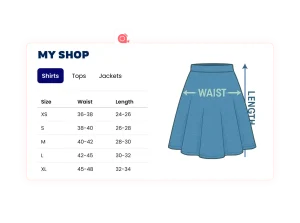
Add a flexible size chart with visual guides and category tabs to help users choose accurate measurements while shopping.
Free plan available set by Common Ninja · Freemium
Buy from Common Ninja (opens the creator’s website in a new tab)You’ll complete your purchase on Common Ninja’s website: they take the payment, issue the licence and provide the support.
Affiliate link. Squarespell may earn a commission if you buy. It never changes our rank or verdict.
Commission does not affect how reviews or ratings are displayed.
The case Common Ninja make for it, on their own product page.
Accurate sizing information means fewer surprises when orders arrive. By offering a clear and consistent measurement guide, businesses can significantly reduce the volume of returns due to incorrect sizing. This saves time, money, and hassle for both store owners and customers.
Displaying an easy-to-read sizing table or fit chart helps demonstrate that your store is detail-oriented and customer-focused. Visitors appreciate transparency, and knowing exactly what to expect in terms of fit builds trust and improves satisfaction.
A visually clean and well-organized measurement guide adds polish to your product pages. The Size Chart widget’s sleek design and customization options ensure it fits seamlessly into your website, contributing to a cohesive and professional brand appearance.
Easily display size charts for different product categories (e.g., shirts, shoes, shorts) using intuitive tab navigation. This allows your customers to toggle between sizing tables without leaving the page, streamlining their shopping experience.
Showcase clear measurement illustrations (like where to measure chest, waist, or foot length) using built-in example images. These visuals make the sizing process easier for users to understand at a glance. You can also upload your own custom images to match your product line and brand style.
The Size Chart widget offers a variety of layout styles to fit seamlessly into your website’s design. Choose from table formats, tabbed views, or sectioned layouts depending on your needs and the complexity of your sizing information. This flexibility ensures that your sizing table looks professional and stays user-friendly across different devices and design themes.
Easily match your size chart to your brand identity with a wide selection of beautifully designed skins. The Size Chart widget lets you pick a style that aligns with your overall website aesthetics, saving time on customizations while keeping your pages visually cohesive. No matter if your site is bold, minimalist, or playful, there’s a skin ready to fit perfectly.
Enhance clarity with visuals that show how to measure chest, waist, inseam, foot length, and more. These illustrations help users take accurate measurements, reducing errors and helping them find the perfect fit.
Update your size chart directly within the preview using intuitive inline editing. This allows you to click and modify sizing values on the spot without switching views or navigating away. It’s a fast and efficient way to keep your sizing table accurate and up to date.
Tailor the table headers and accompanying text for each product type to match your brand tone and product line. This feature ensures your sizing table communicates clearly to your audience and stays on-brand.
The Size Chart widget is built with simplicity in mind, making it easy for anyone to set up and customize: no coding skills required. With a straightforward, user-friendly editor, you can quickly create, update, and manage your sizing tables. This approachability saves time and empowers all users to maintain professional-looking charts effortlessly.
Personalize every element of the Size Chart widget to reflect your unique brand voice and visual style. You can adjust colors, fonts, spacing, and more to create a sizing guide that feels completely integrated with your website. With this level of flexibility, your size chart won’t just be functional: it’ll enhance the overall customer experience.
Designed for full responsiveness, the Size Chart widget ensures a seamless viewing experience across all devices. Whether your visitors are shopping on a desktop, tablet, or mobile phone, your sizing table will adjust elegantly to fit the screen. This adaptability is key to maintaining a smooth and professional shopping experience everywhere.
For those who want even greater control, the Size Chart widget supports custom CSS styling. This option is perfect for developers and advanced users who want to fine-tune every aspect of the sizing table’s appearance and behavior. It opens up unlimited possibilities to ensure your size chart is truly one-of-a-kind
Adding the Size Chart widget to your site is quick and easy, requiring only a single line of embed code. Once installed, any updates you make within the editor are automatically reflected on your live site. This means you can keep your sizing information fresh and accurate with minimal effort.
You set the widget up on Common Ninja’s own site, and they give you a short piece of embed code. That code goes into a Squarespace page wherever you want the widget to appear. They state that nothing beyond pasting the code is required.
Adding embed code to a Squarespace page needs a plan that allows it, so it is worth checking what your plan includes before you start.
There is a free tier, with paid plans above it. Common Ninja set both, and the limits and prices are on their site: we do not restate the numbers here, because they change and a stale price is worse than no price.
No. The badge on this page says Untested, and it will keep saying that until somebody here runs it on a Squarespace site and writes up what happened.
Common Ninja list Squarespace among the platforms they serve, but publish no Squarespace page for this widget in particular.
No reviews yet. Share your experience.
Sign in to write a review We will bring you straight back here.
Squarespell All Access
All 48 plugins and every new one, worth $2,044 bought one by one. 14 days free, cancel anytime.
Start 14 days freeOr start free with 13 plugins, no cardFounding price until 1 December, kept for as long as you stay.