
Member Content Pro: Show Members-Only Content on Public Squarespace Pages with Native Member Sites$59Squarespell OriginalSquarespace 7.1 plugin
Member Content Pro: Show Members-Only Content on Public Squarespace Pages with Native Member Sites
Members-only content on every page.
Price: $59
Instant download · Sold by Squarespell
Bundle & save
- 2 plugins 10% off
- 3 plugins 20% off
- 4+ plugins 30% off
Automatically applied at checkout on Squarespell plugins.
Requires Squarespace 7.1, a member site in Squarespace and the Core plan or higher (Code Injection).
- Member sections Sections of your member page, shown in place for members
- Plan and price Read from your member site's own paywall
- Phones The member section keeps its own phone layout
- Installation One paste in Code Injection, Footer
Members-only content on every page.
Show members-only sections on the public pages of your Squarespace site.
Good to know: Squarespace 7.1 only. It needs a member site in Squarespace. Showing or hiding sections with members-only or non-members, and hiding prices, only hides them from view. Code Injection needs the Core plan or higher.
-
Member sections on public pages
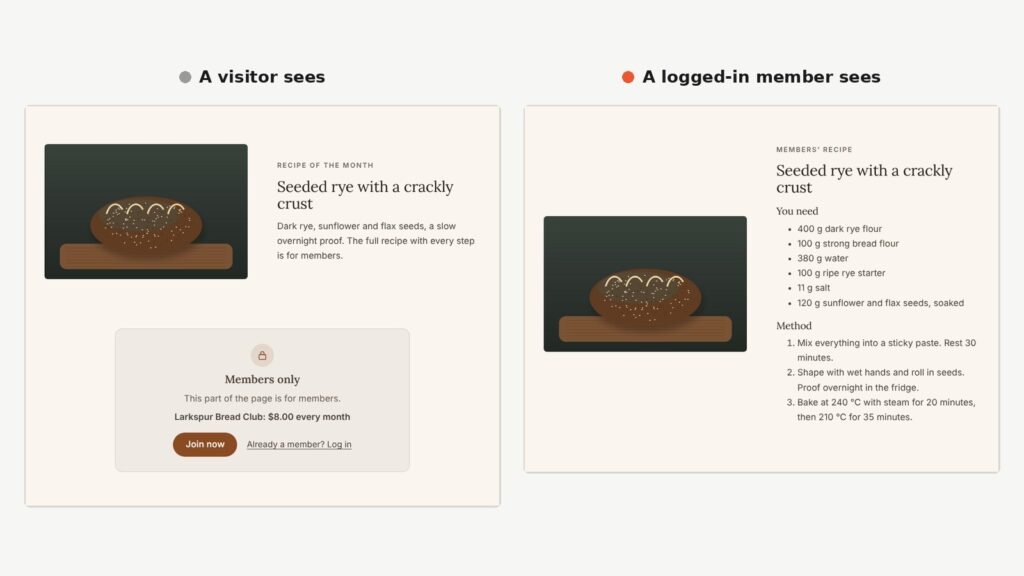
On any public page, give a section the Anchor Link member-bonus. Members see your bonus section there. Everyone else sees this public section, for example a teaser.
-
The members-only card
The plan name and price are read from your member site's own paywall, so they always match what Squarespace charges.
-
Menu links, prices and greetings
Greeting: type {first-name} in any text, for example "Welcome back, {first-name}".
See how it looks on your site.
All features in detail
Members-only content on every page.
Show members-only sections on the public pages of your Squarespace site. Members see the full section, everyone else sees a teaser and a card with your plan, its price, Join and Log in. Show or hide sections, menu links and store prices for members, and greet members by their first name. Your memberships, plans and logins stay Squarespace's own. One paste of code, one payment.
Squarespace Member Sites lock whole pages. A public page cannot show one section to members and a teaser to everyone else. Member Content Pro does that with the member site you already have: members see the full section in place, everyone else sees your teaser and a card that tells them what membership costs.
Owners on the Squarespace Forum keep asking how to show a section only to logged-in members. Squarespace Member Sites lock whole pages: a public page cannot show one section to members and a teaser to everyone else, and the forum answer is that this is not possible natively.
Member Content Pro asks Squarespace whether each visitor may open a page of your member site. Squarespace answers yes for members and shows everyone else its paywall. For members, the plugin reads the section from your member page and shows it on the public page, in the place you choose. Everyone else sees your public section, a card with your plan and its price, Join now and "Already a member? Log in". The member content lives on your member page, so it is never part of the public page.
You choose everything in a builder file that runs in your browser, with a sample member site that runs your exact settings beside it, as a visitor or as a member. Then you paste one block of code into Code Injection, Footer, and give sections their Anchor Links in Squarespace's editor. Your memberships, plans, payments and logins stay Squarespace's own.
What it does
- Shows sections from your member page on any public page, only to members
- Shows everyone else your teaser and a card with your plan, its price, Join now and "Already a member? Log in"
- Reads the plan name and price from your member site's own paywall, so they always match what Squarespace charges
- Shows sections only to members, or only to visitors who are not members, set with Anchor Links
- Hides menu links from members or from everyone else
- Hides store prices and Add to Cart from visitors who are not members, with "Log in to see prices"
- Greets logged-in members by first name with {first-name} in any text
- Works with several member sites, each with its own sections
Member sections on public pages
- On your member page, give a section an Anchor Link, such as bonus (Edit Section, Anchor Link).
- On any public page, give a section the Anchor Link member-bonus. Members see your bonus section there. Everyone else sees this public section, for example a teaser.
- Inside a text, a line of its own such as [member bonus] shows the member section inside the text, in its phone layout.
- The member section keeps its own design: background, images, buttons and its phone layout.
- Visitors who are not members see the public section and a card, only the card, or nothing, as you choose.
- Several member sites, each with a name you choose: their sections are read from their own member page.
The members-only card
- The card shows "Members only", "This part of the page is for members.", your plan and its price, such as "Larkspur Bread Club: $8.00 every month", a Join now button and "Already a member? Log in".
- The plan name and price are read from your member site's own paywall, so they always match what Squarespace charges.
- Join goes to your member page, where Squarespace shows its own Sign up and Log In, or to your own Join page.
- The card sits in its own band after the section and takes that section's colours.
Show or hide sections for members
- members-only: only members see this section. Add -2, -3 for more than one on a page.
- non-members: only visitors who are not members see it, such as a Join the club section.
- members-only-gold and non-members-gold: the same for one member site, by the name you give it in the builder.
- This hides only: the section is still in the page's code. Use it for welcome messages and buttons, not for anything secret.
Menu links, prices and greetings
- Menu links: list the addresses that only members should see, such as your members area, and the ones only visitors who are not members should see, such as your Join page.
- Prices for members: on every store page or on the store pages you choose, visitors who are not members see "Log in to see prices" instead of prices, and a "Log in to see prices" button instead of Add to Cart on product pages.
- This hides prices from view. The price stays in the page's code and the checkout is not closed. To sell only to members, put the store page itself in your member site (Squarespace does that natively).
- Greeting: type {first-name} in any text, for example "Welcome back, {first-name}". Logged-in visitors see their first name from their Squarespace account; everyone else sees the word you set in Words.
Words, look and languages
- Every word visitors see can be changed in the builder, under Words. Words in curly brackets, like {plan}, {price} and {period}, are filled in for you.
- Language sets for German, French, Spanish, Italian and Dutch pages, used when the page language matches. Have them checked by a native speaker before you switch them on.
- The card and the price button take your section's font and colours, light or dark, and the colour of your site's primary button, or your own colour. Two styles: Card and Plain, with or without rounded corners.
- Buttons are at least 44 pixels high with a visible focus ring, the card works with the keyboard, and the page never scrolls sideways on phones.
Light on your pages
- No library and no file from another server: one block of code in your Footer, about 30 KB (about 11 KB compressed).
- Visitors who are not logged in to a customer account cost nothing: no request is made for them.
- For a logged-in visitor, Squarespace's answer is kept for 10 minutes in that browser tab, so moving between pages stays quick.
- While you edit a page in Squarespace, every section shows as it is; when you click Exit, the plugin runs again.
- Pasted twice by mistake, it still runs once.
- Analytics events: sqmem_unlocked, sqmem_locked and sqmem_join go to the Google Tag Manager dataLayer when one is on your site.
- Owner test mode: while logged in, add ?sqmem-debug to a page address to see each member site's answer and every member part of the page. Add ?sqmem-view=guest or ?sqmem-view=member to see the page as either. Visitors never see it.
Change settings later
Open the builder again (it remembers your settings in that browser), make the change, click Copy code and paste it over the old Member Content Pro code in Code Injection, Footer. New member sections need no new code: give them their Anchor Links. The builder can also save your settings to a file.
Your license key
Your key is in the order email and under My Account, Licenses on squarespell.com. You enter it once in the builder, together with the address of your website. The code you copy then works on that website.
- A Single License works on one website at a time. To move it, deactivate the old website under My Account, Licenses, click "Use another website or key" in the builder, activate the new one and copy the code again.
- A Multi-Use License works on unlimited websites. You activate each one in the builder and copy its code.
- Your site's built-in squarespace.com address always works, so you can install before your domain is connected.
One payment
You pay once. There is no monthly fee, no fee per member from us, no limit on members, sections or pages, and nothing switches off.
Who it is for
- Clubs, studios and coaches who sell memberships and want members-only parts on their normal pages
- Course and recipe sites that show a teaser to everyone and the full lesson or recipe to members
- Shops that show member prices only to logged-in members
- Sites with several member sites, such as Silver and Gold, that show each its own content
- Designers building Squarespace sites for clients (the Multi-Use License covers unlimited websites)
One paste in your Footer.
-
Step 1: Activate
Open the builder file. Enter your license key and your website address, then click Activate.
-
Step 2: Add your member site
Add your member site: a name, the address of one page inside it, and where Join should go. Choose what visitors see, menu links and prices, and check them in the preview.
-
Step 3: Paste
Click Copy code. In Squarespace open Pages, Custom Code, Code Injection, paste it into the Footer box and click Save.
-
Step 4: Anchor Links
Give sections their Anchor Links in Squarespace's editor: a section on your member page, and the section on a public page where members should see it.
You need a member site in Squarespace (Content & Memberships, Member site). Building one is free; selling memberships needs a website plan. Code Injection needs the Core plan or higher. Check your site in a private window. The PDF guide included with the plugin shows every step with screenshots.
What’s included and compatibility
What’s included
- The Member Content Pro builder (one HTML file that runs in your browser), with a live preview on a sample member site
- An illustrated PDF installation guide
- Your license key
- Support by email at info@squarespell.com
For clubs, studios and coaches who sell memberships, course and recipe sites that show a teaser to everyone and the full lesson or recipe to members, shops that show member prices, sites with several member sites, and designers building Squarespace sites for clients.
Known limitations
- Built for Squarespace 7.1. Squarespace 7.0 templates are not supported.
- It needs a member site in Squarespace. Memberships, plans, payments and logins are Squarespace's own; the plugin does not add a login of its own.
- Member sections are only as safe as your member page: they are read from it only for members. Showing or hiding sections with members-only or non-members, and hiding prices, only hides them from view.
- Hiding prices does not close checkout. To sell only to members, put the store page in your member site.
- A member section inside a text ([member bonus]) uses its phone layout.
- Members are recognised by Squarespace's customer account cookie. If members are not recognised on your site, switch on "Check every visitor" in the builder.
- The site owner, while logged in, may open every member page, so the owner sees the member view. Add ?sqmem-view=guest to see a visitor's view.
- Code Injection needs the Core plan or higher (Squarespace: Core, Plus, Advanced and some legacy plans).
- Tested in Chromium (Chrome) on a computer and at phone widths, on Squarespace 7.1 sites with real member sites and paywalls and on the hosted demo. Not tested in Safari on iPhone, in Firefox or on real phones (iPhone and Android).
Check compatibility
- Squarespace version
- 7.1
- Works with
- Squarespace Member Sites (one or several), any public page, store pages and product pages, header menus
- Member content
- Sections of your member page, shown in place for members
- Visitors
- Your public section, a card with your plan and price, only the card, or nothing
- Installation
- One paste in Code Injection, Footer, and Anchor Links on your sections
- Plugin version
- 1.0.0
- Plan needed
- Core or higher (Code Injection); a website plan to sell memberships
- Coding knowledge
- None. Everything is chosen in the builder and with Anchor Links.
- Browser support
- Tested in Chromium (Chrome) on a computer and at phone widths
- Dependencies
- None
- License
- Single License: Single Website. Multi-Use License: Unlimited Websites.
- Support
- info@squarespell.com
Squarespace 7.0 templates are not supported.
Good to know before you buy.
Answers to common questions about how the plugin works.
Can Squarespace show a section only to members?
Not on a public page. Squarespace Member Sites lock whole pages. Member Content Pro shows a section of your member page on a public page, only to members, and a teaser and a card to everyone else.
Do I need Squarespace Member Sites?
Yes. The plugin works with the member site you build in Squarespace (Content & Memberships, Member site). Building one is free; selling memberships needs a website plan.
Do members need a second login?
No. Members log in with Squarespace's own customer account. The plugin adds no login of its own.
Is the members-only content safe?
Member sections live on your member page and are read from it only for visitors Squarespace lets open that page. They are never part of the public page. Sections shown or hidden with members-only or non-members, and hidden prices, are only hidden from view.
Where does the price on the card come from?
From your member site's own paywall, the page Squarespace shows to visitors who are not members. When you change the plan in Squarespace, the card changes too.
Can I have several member sites or tiers?
Yes. Add each member site in the builder with its own name. Its sections are read from its own member page, and members-only-gold shows a section only to members of the site named gold.
Can I show menu links only to members?
Yes. List the addresses that only members should see, and the ones only visitors who are not members should see, such as your Join page.
Can I show prices only to members?
Yes. Visitors who are not members see "Log in to see prices" instead of prices and Add to Cart, on every store page or on the store pages you choose. This hides prices from view; it does not close checkout.
Can I greet members by name?
Yes. Type {first-name} in any text, for example "Welcome back, {first-name}". Logged-in members see their first name from their Squarespace account.
Does it slow my site down?
Visitors who are not logged in to a customer account cost no request. For logged-in visitors, Squarespace's answer is kept for 10 minutes in that browser tab. The code is about 30 KB with no library.
Which plan do I need?
Squarespace 7.1 on the Core plan or higher, for Code Injection, and a member site in Squarespace.
Is this a subscription?
No. One payment: $59 for a Single License, $129 for a Multi-Use License. No monthly fee.
Installation & troubleshooting 9 fixes
- Members see the card.
- Check the member page address in card 1 of the builder (the owner test panel says "HTTP 404" when it is wrong) and that the member section has exactly the Anchor Link after "member-". Members must be logged in to their customer account. If members still see the card, switch on "Check every visitor" in card 8 and copy the code again.
- Everyone sees the member section.
- You are logged in as the site owner, who may open every member page. Add ?sqmem-view=guest to the page address, or look at your site in a private window.
- A section shows to everyone.
- Sections with members-only or non-members are hidden after the plugin starts; check the Anchor Link spelling and that the code is in the Footer.
- No plan or price on the card.
- The member site needs a pricing plan, without one Squarespace has no price to show. The plan line can be switched off in card 2.
- Prices still show.
- Check the store page address in card 4, and that you are not a member yourself (the owner always is).
- It shows twice.
- The code was pasted twice. Keep one Member Content Pro block in the Footer and click Save.
- My change in the builder does not show.
- Click Copy code again, paste it over the old Member Content Pro code in Code Injection, Footer, click Save and look at your site in a new private window.
- "Member Content Pro: not activated for" your address.
- Only you see this note, while logged in. Activate that address in the builder, copy the code again and paste it over the old code.
- "Could not reach squarespell.com".
- The builder needs the internet once to activate. Check the connection and click Activate again. Your site never contacts squarespell.com.
Customer reviews
No reviews yet. Share your experience.
Sign in to write a review We will bring you straight back here.
Ready to welcome your members?
Member Content Pro: Show Members-Only Content on Public Squarespace Pages with Native Member Sites · Single License
Squarespell All Access
Every Squarespell plugin for $15 a month
All 47 plugins and every new one, worth $1,985 bought one by one. 14 days free, cancel anytime.
Start 14 days freeOr start free with 13 plugins, no cardFounding price until 1 December, kept for as long as you stay.





