Quiz Funnels for Squarespace: The Complete Lead Generation Playbook (Copy)
Quick Answer
A quiz funnel is a lead generation system built around an interactive quiz instead of a static form. A visitor answers a short series of questions, gets scored based on their answers, hits a lead gate to unlock their personalized result, lands on an outcome page tailored to that score, and is then dropped into a segmented email sequence based on how they scored. It turns a passive page visit into an active, self-qualifying conversation.
What Is a Quiz Funnel?
A quiz funnel is a structured sequence of pages, built around a short interactive quiz, that moves a visitor from anonymous traffic to a segmented, scored lead. Unlike a traditional landing page, which asks a visitor to read static copy and then fill out a form, a quiz funnel asks the visitor to participate. Each question the visitor answers reveals something about their needs, budget, stage, or preferences, and each answer contributes to a running score.
At the end of the quiz, the visitor reaches a lead-gate, typically a name and email field, that unlocks their personalized result. Once they submit their information, they see an outcome page tailored to their specific score or answer pattern. Behind the scenes, that score is used to segment the new lead into a list or tag, so the follow-up emails they receive actually match their situation instead of being generic.
The core distinction that matters for Squarespace site owners is this: a quiz funnel does the qualifying work before the sales conversation even starts. Instead of a business owner or salesperson manually sorting through a spreadsheet of form submissions trying to guess who's a good fit, the quiz has already done that sorting, because every visitor self-reported the information through their answers.
This is why quiz funnels show up so often in coaching, consulting, wellness, and e-commerce recommendation contexts. Anywhere a business needs to understand a lead's situation before pitching them the right offer, a quiz funnel replaces a guessing game with structured data.
Why Quiz Funnels Outperform Landing Pages for Squarespace
Static landing pages ask visitors to do something with almost no immediate reward: fill out a form, wait for a reply. Quiz funnels ask visitors to do something that gives them an immediate, personalized payoff: find out their result. That shift in psychology is well documented in interactive content research.
The Nielsen Norman Group has long studied engagement patterns on the web, and one of its recurring findings is that users are far more likely to complete an interaction when they can see incremental progress toward a specific, personally relevant outcome, rather than facing an open-ended task with no visible endpoint. A quiz gives visitors a progress bar, a question counter, and a promised payoff, all of which reduce the perceived effort of continuing.
Baymard Institute's research into form usability points in a similar direction. Long, single-step forms without context tend to see higher perceived friction and higher field-level hesitation compared to interactions broken into smaller, sequential steps with clear intent behind each step. A quiz, by design, is already broken into that kind of sequential structure, which is part of why quiz-based lead capture tends to feel lighter to visitors than a dense contact form asking for the same amount of information up front.
For Squarespace businesses specifically, this matters because most Squarespace sites are run by solo founders, small teams, coaches, and boutique e-commerce brands who don't have a dedicated conversion optimization team. A landing page with a generic "Get in Touch" form puts the entire burden of explaining fit on the copy. A squarespell quiz funnel puts that burden on the interaction itself. Visitors qualify themselves by answering questions, and the business receives a lead that's already been sorted by intent and readiness.
None of this means landing pages are obsolete. It means quiz funnels are a specific tool suited to a specific job: turning undecided browsers into engaged, segmented leads before a single sales conversation happens.
If you want to see the underlying comparison in more detail, including completion and reply rate patterns, this breakdown of what the data says about quiz vs. contact form lead quality is worth reading alongside this guide.
Quiz Funnel Structure, the 6 Stages
Every effective quiz funnel, regardless of industry, follows the same six-stage structure. Understanding this structure is the foundation for building one that actually converts, rather than one that just looks interactive.
Turn quiz takers into qualified leads.
Capture emails at 40% opt-in rates, score every lead automatically, and send personalised follow-ups that convert all without writing a single line of code.
Build your quiz, capture every lead
Add an email gate before or after results in one click. Visitors opt in at 40%+, more than 20× higher than a standard pop-up because they want to see their personalised outcome.
Know who's ready to buy
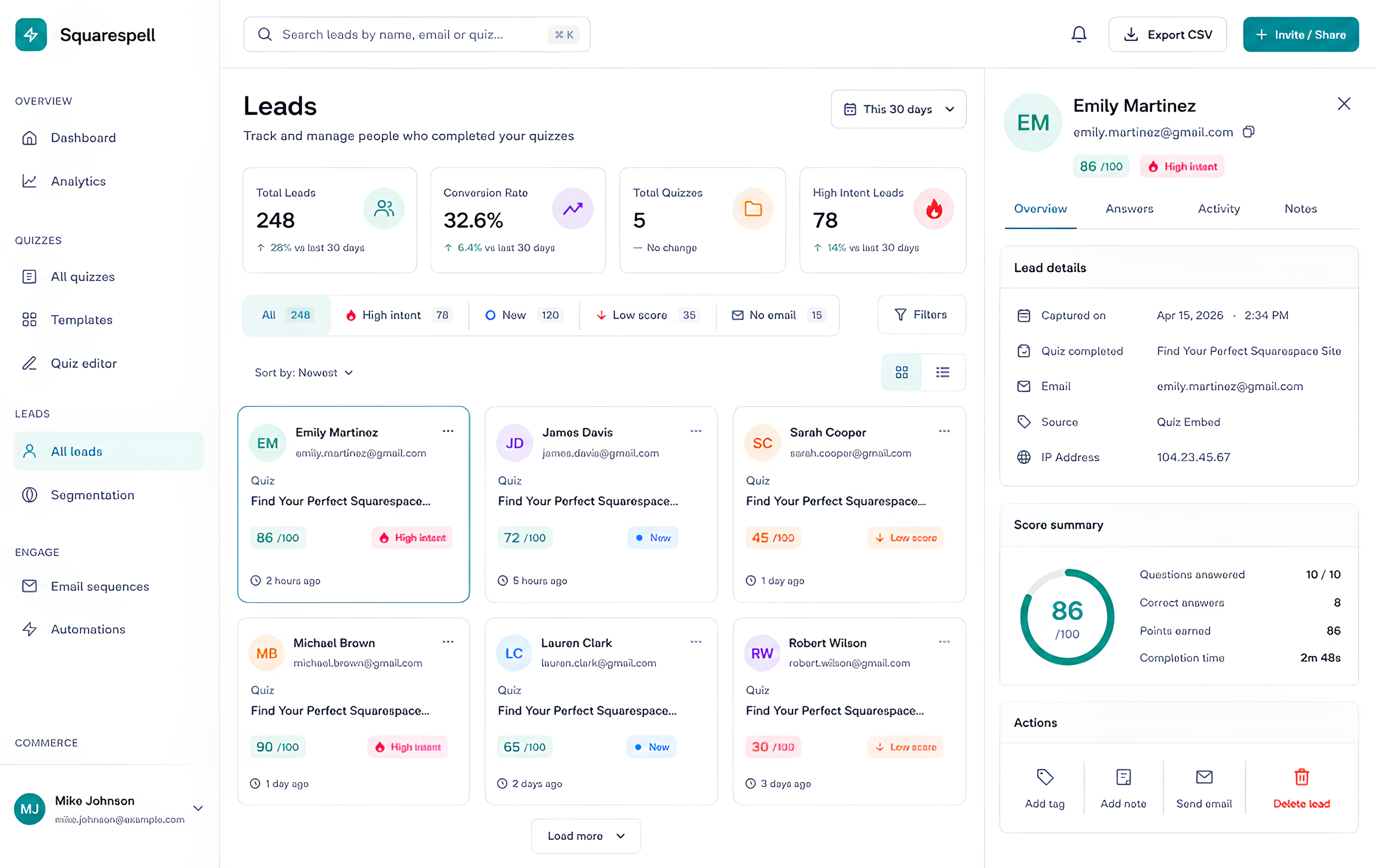
Every answer is a signal. Squarespell scores leads on fit, intent, and engagement so your hottest prospects surface automatically, no spreadsheets needed.
Follow up before they forget you
Personalised email sequences fire the moment someone finishes your quiz and referencing their result, their answers, and their intent. All on autopilot.
One quiz, infinite audiences
Quiz results become segments. Route "The Minimalist" to one campaign and "The Maximalist" to another. Your email tool receives the right tags automatically.
Test everything, optimise constantly
Run A/B tests on quiz titles, result pages, email subject lines, and CTAs. See which version converts best in real time and roll it out automatically.
standard forms
See exactly where leads convert and why
Track every stage of your funnel: views, starts, email captures, and sales. Know your ROI down to the individual question. Syncs automatically to Mailchimp, Klaviyo, HubSpot, and 30+ tools.
Visitor arrives. Someone lands on the quiz, either through an embedded block on a page, a popup trigger, or a floating tab, having come from organic search, social, ads, or an email link.
Quiz. The visitor answers a sequence of questions, typically 7 to 12, each designed to surface a specific piece of information about their needs, stage, or preferences.
Score. Each answer carries a point value, and those values are summed as the visitor progresses, producing a running numeric score by the final question.
Lead-gate. Before the personalized result is revealed, the visitor is asked for their name and email address to unlock it.
Outcome page. After submitting their information, the visitor sees a result page matched to their score band or answer pattern, along with a relevant next step or offer.
Follow-up. The lead is added to an email list or CRM tag corresponding to their score band, and receives a follow-up sequence written specifically for that segment.
The important thing about this structure is that it's not a suggestion, it's the mechanism that makes a quiz funnel outperform a plain contact form. Skip the scoring stage and you just have an interactive form. Skip the segmented follow-up stage and you've thrown away the most valuable part of the data you collected. Each stage feeds the next one.
For a deeper look at what happens after the score is calculated, see this guide on how to score and segment leads from your Squarespace quiz.
Question Count and Drop-Off Curves
One of the most common mistakes with quiz funnels is treating "more questions" as "more data" without accounting for attrition. Every additional question introduces a chance for a visitor to abandon the quiz before reaching the lead-gate, and that drop-off is not linear, it accelerates.
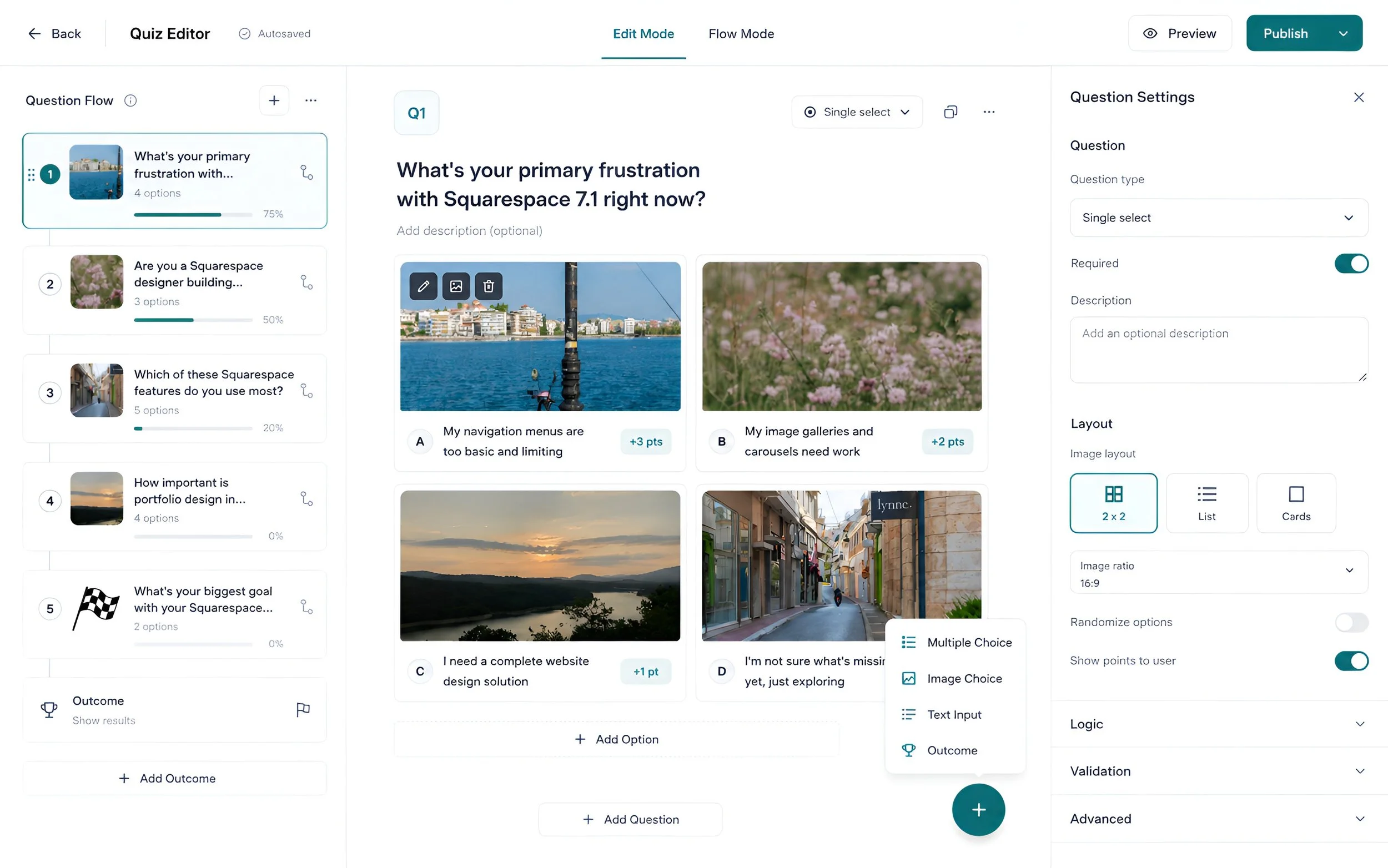
In practice, the sweet spot for a lead-generation quiz is 7 to 12 questions. Below 7 questions, the quiz often can't gather enough signal to produce a meaningfully differentiated score, which weakens both the personalization of the outcome page and the quality of the segmentation downstream. Above 12 questions, completion rates tend to decline sharply, because visitors start to feel like they're filling out a survey rather than getting a quick, personalized answer.
The pattern generally looks like this, described as a curve rather than exact figures, since actual numbers vary by traffic source, industry, and quiz design: completion rate declines gradually through the first 6 to 7 questions, as visitors are still oriented by the initial momentum and progress indicator. Between question 8 and question 12, the decline steepens, since this is the point where visitors start to weigh whether the remaining time investment is worth the promised result. Past question 12, drop-off tends to become sharp, and quizzes that run to 15, 18, or 20 questions frequently see a large share of visitors abandon before ever reaching the lead-gate at all.
The practical implication is straightforward: if a quiz needs more than 12 questions to gather sufficient information, it's usually a sign the quiz is trying to do too much in one funnel. A better approach is to keep the initial quiz tight, in the 7 to 12 range, and use the outcome page or follow-up sequence to gather additional detail once the lead is already engaged and has a relationship with the brand.
Question order matters here too. Front-loading easy, low-commitment questions (preferences, quick either-or choices) and saving anything that feels more personal or effortful for later in the sequence takes advantage of the fact that visitors who have already answered several questions are more likely to finish than those just starting out, a pattern consistent with the completion psychology described in Section 2.
Section 5: Scoring Logic
Scoring is what separates a quiz funnel from a quiz that's just entertainment. Every answer option in a well-built quiz carries a numeric weight, and those weights accumulate across the full set of questions to produce a total score by the time the visitor reaches the lead-gate.
The standard scoring bands used across quiz funnels are:
High: score of 70 or above. These are visitors whose answers indicate strong fit, urgency, or budget, the kind of lead a sales team or business owner wants to hear from immediately.
New: score between 40 and 69. These visitors show some fit or interest but aren't clearly ready, warranting a nurture sequence rather than an immediate sales push.
Low: score below 40. These visitors are early-stage, exploring, or a poor fit for the current offer, and are best served by longer-term, educational follow-up rather than a direct pitch.
| Priority band | Score range | Description |
|---|---|---|
| High priority | 70 and above | Leads with the strongest fit and intent, ready for immediate follow-up. |
| New | 40 to 69 | Leads showing moderate engagement, worth nurturing. |
| Low priority | Below 40 | Leads with minimal engagement or fit, lower follow-up priority. |
How weighting actually works in practice: each answer option on each question is assigned a point value during quiz setup, not just each question as a whole. For example, a question asking "How soon are you looking to get started?" might weight "This week" heavily toward the High band, "In the next few months" toward New, and "Just researching" toward Low. A question asking about budget range would follow the same logic, weighting higher budget ranges more heavily.
The key design principle is that no single question should be able to single-handedly push someone into the High band, and no single question should be able to disqualify someone into Low. Scoring should be distributed across the full quiz, so the final number reflects a pattern across several answers rather than one lucky or unlucky pick. This is also why the 7 to 12 question range from Section 4 matters for scoring accuracy: too few questions and there isn't enough spread of weighted answers to produce a reliable score; too many and the marginal accuracy gained isn't worth the completion rate lost.
Once a visitor crosses the lead-gate, their score should immediately determine two things: which outcome page variant they see, and which list, tag, or segment they're routed into for follow-up. Those two decisions are what turn a simple score number into a functioning lead qualification system.
Lead Gate Placement, Before or After Results?
This is one of the most debated design decisions in quiz funnel building, and the data-backed answer is: the lead-gate should sit after the quiz questions but before the personalized result is revealed, not before the quiz starts and not after the result is fully shown.
Placing the gate before the quiz even begins defeats the purpose of the format. Visitors haven't invested any time or curiosity yet, so asking for an email upfront turns the quiz into just another form with extra steps, and completion rates suffer close to what a standard contact form would see.
Placing the gate after the visitor has already seen their full result removes the incentive to submit information at all. Once someone has their answer, there's little reason for them to hand over an email address, since the curiosity that would have motivated that exchange has already been satisfied.
The middle position, gating access to the personalized result immediately after the last question and before that result is shown, works because it captures the moment of peak curiosity. The visitor has invested time answering questions, they know a personalized answer exists, and they haven't seen it yet. This is the same principle behind curiosity gaps used broadly in content marketing, applied specifically to the moment between quiz completion and result reveal.
A well-designed lead-gate at this stage should also be minimal, generally just a name and email field, since asking for more at this exact moment reintroduces the friction the quiz format was meant to avoid. Additional details, phone numbers, company size, and so on, are better collected either as an earlier quiz question (where they contribute to scoring) or in a follow-up step after the lead is already captured.
Build your first quiz funnel free, no credit card required.
Squarespace Specific Implementation
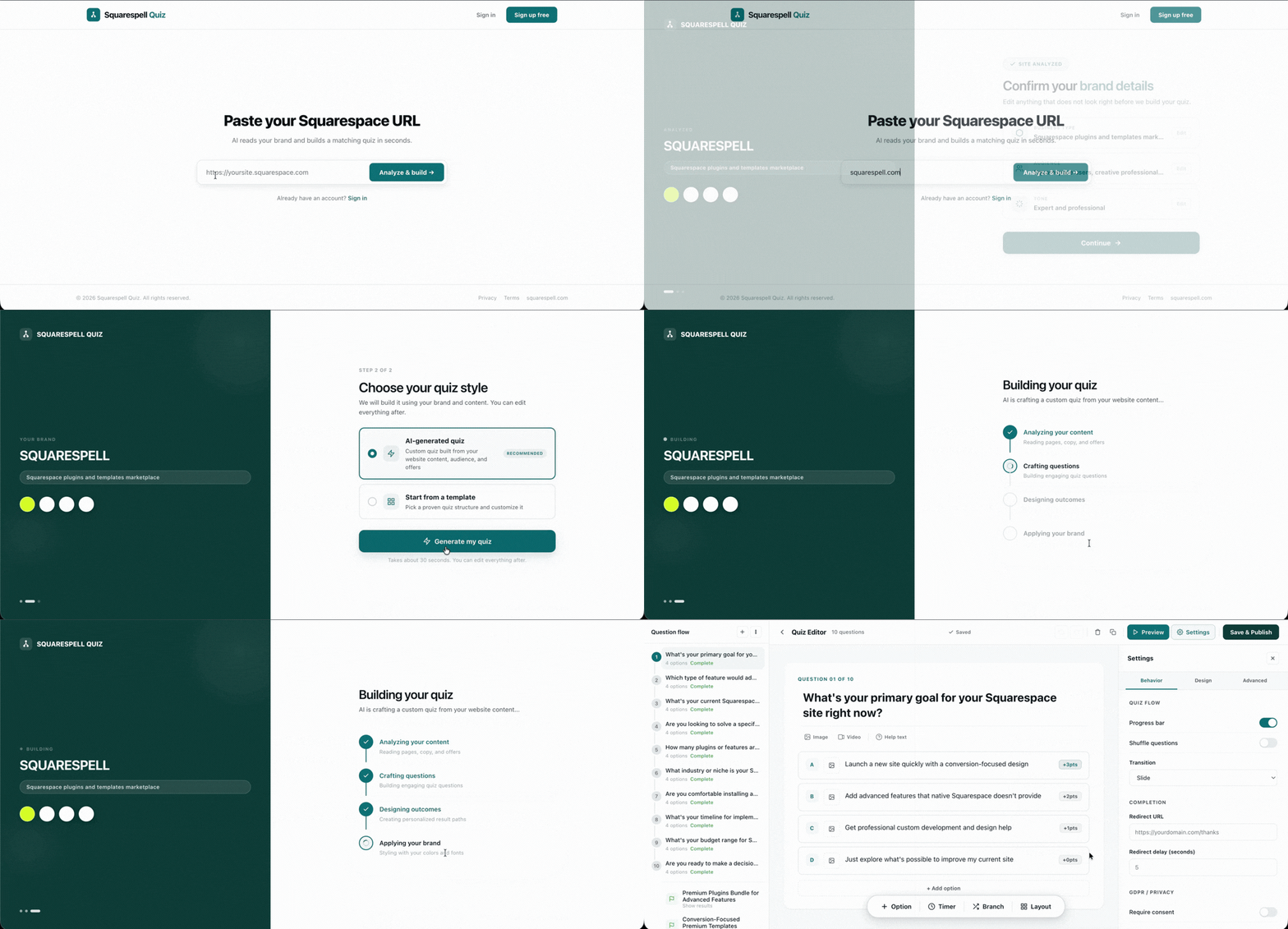
Building a quiz funnel from scratch, including brand-matched design, scoring logic, a lead-gate, and outcome pages, is normally a significant design and development project. On Squarespace specifically, Squarespell Quiz is built to remove nearly all of that manual work through an AI-driven setup process.
The process works in three steps. First, you paste your Squarespace site URL into Squarespell Quiz. The AI reads your existing brand, pulling your color palette, fonts, and existing copy directly from your live site, so the quiz it generates doesn't look like a bolted-on third-party widget, it looks like a native part of your site. Second, based on that brand read and your chosen quiz topic or template, the AI generates a fully branded interactive quiz complete with scored questions, a lead-gate, and outcome pages already structured around the six-stage funnel described in Section 3.
Third, you choose how the quiz appears on your site. Squarespell Quiz supports three embed modes:
Inline block: the quiz appears directly within a page's content, as part of the normal page flow, useful for dedicated quiz landing pages or blog-style content.
Popup: the quiz appears in a modal overlay triggered by a button click or a scroll/time-based trigger, useful for surfacing the quiz without dedicating a whole page to it.
Floating-tab snippet: a persistent tab, typically anchored to the side of the screen, that stays visible as visitors browse the site and opens the quiz on click, useful for sites that want the quiz available site-wide without being intrusive.
Once you've selected the embed mode that fits your page, you publish it the same way you'd publish any other Squarespace content update. There's no need to touch custom code injection for the core quiz experience, since the embed snippet handles the connection between your Squarespace page and the quiz itself.
Squarespell Quiz also ships with 16+ industry templates, covering common quiz-funnel use cases like service-business fit quizzes, product recommendation quizzes for e-commerce, and consultation-readiness quizzes for coaches, so most businesses can start from a structure that's already close to their use case rather than designing scoring logic from a blank page.
Pricing is straightforward and billed annually: Core at $9/mo, Pro at $16/mo, and Business at $29/mo. New accounts get a 14-day free trial of the Pro plan, with no credit card required, which is enough time to build a quiz, publish it live, and see actual completion and lead data before committing to a paid plan.
For a full breakdown of templates by industry, see 16 Squarespace quiz templates by industry, and if you run an e-commerce store on Squarespace specifically, this collection of product recommendation quiz examples for Squarespace stores is worth reviewing before you pick a starting template. Service businesses and coaches should also look at 27 quiz funnel ideas for coaches and service businesses for topic inspiration.
Connecting to Email Marketing
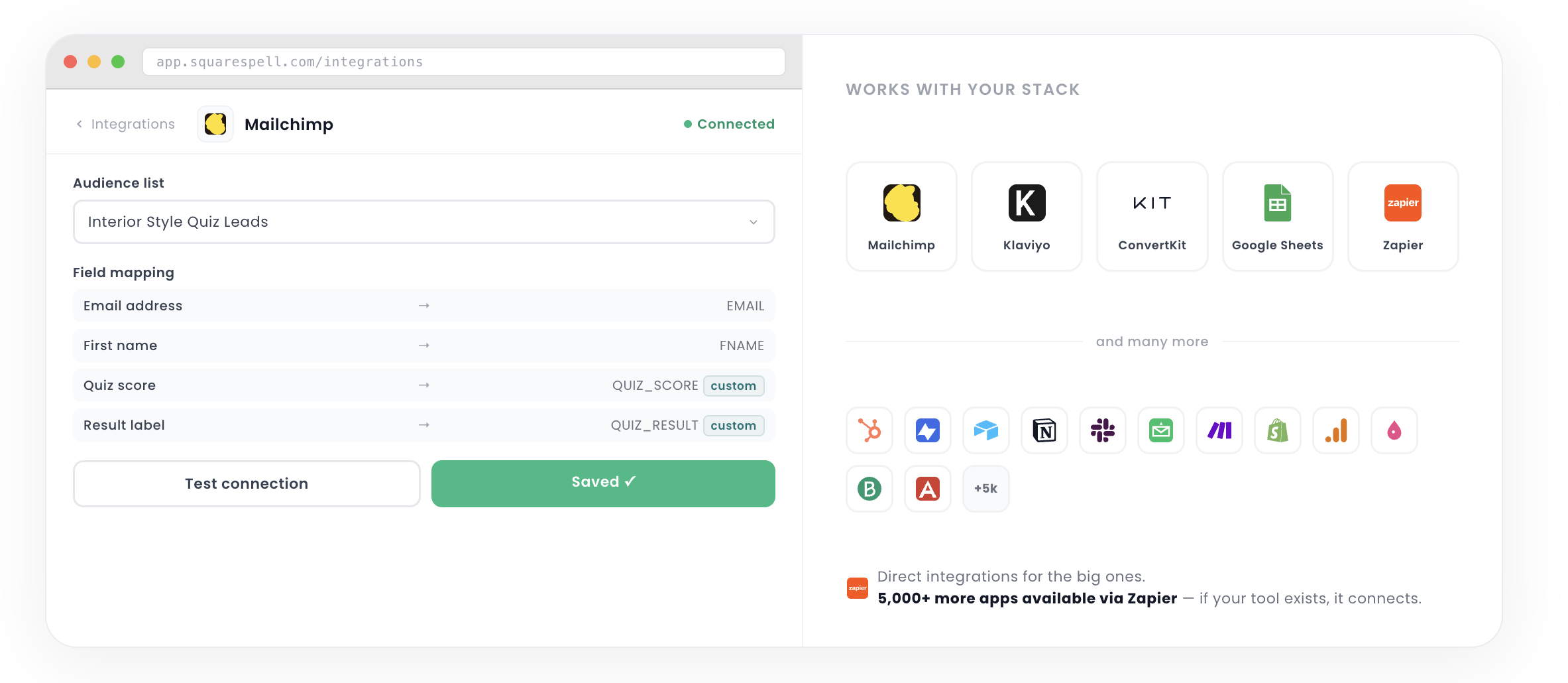
A quiz funnel's value compounds once the leads it captures flow automatically into your existing email marketing tools, rather than sitting in a spreadsheet that someone has to manually import. Squarespell Quiz connects to the tools most Squarespace businesses already run their email marketing through.
Direct integrations include Mailchimp, Klaviyo, ConvertKit, and Google Sheets, along with native Webhooks support for custom connections, and a Zapier integration that opens the door to over 5,000 apps, covering CRMs, SMS tools, Slack notifications, and virtually any other system a business might already have in place.
The practical setup pattern looks like this: when a visitor completes the quiz and crosses the lead-gate, their answers, score, and score band (High, New, or Low) are passed to the connected email tool at the same moment their contact information is captured. In Mailchimp or Klaviyo, this typically means the lead is added to a specific list or tagged based on their score band, which then triggers an automation sequence built for that segment. A High-scoring lead might trigger an immediate sales-oriented sequence with a booking link, while a New or Low-scoring lead is routed into a longer nurture sequence built around education and trust-building before any pitch.
This is also where the Zapier integration becomes useful for businesses running more complex stacks. A quiz completion event can simultaneously add a contact to an email list, post a notification to a Slack channel for the sales team, and create a new record in a CRM, all from the same quiz submission, without any manual data entry.
Getting this part right is arguably more important than the quiz design itself, since a perfectly scored lead that never reaches the right follow-up sequence is functionally the same as a lead that was never captured. For a detailed walkthrough of what those follow-up sequences should actually say to each score band, see quiz funnel email sequences for Squarespace leads.
What Metrics to Track
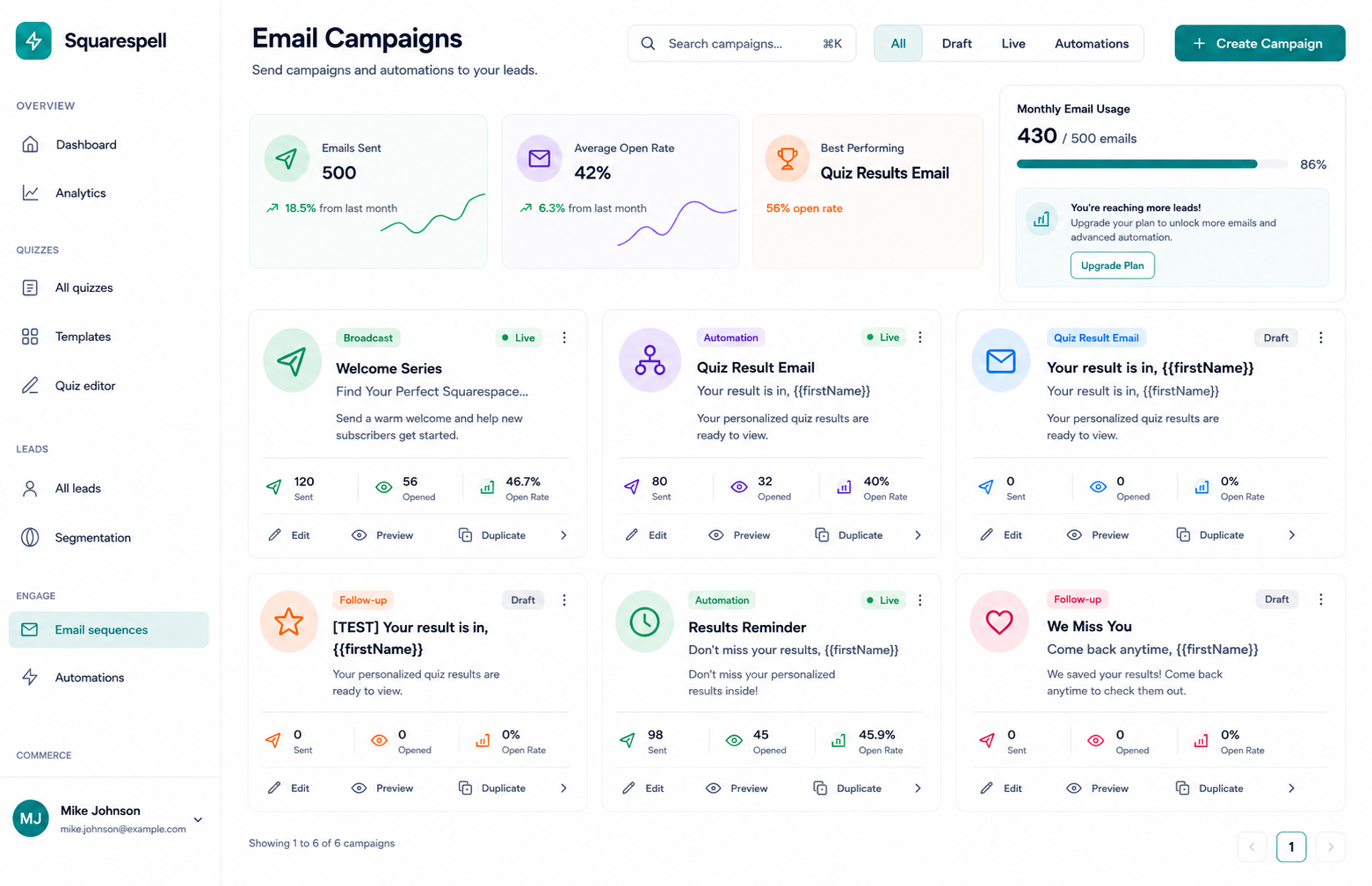
Once a quiz funnel is live, three metrics matter more than any others for understanding whether it's actually working, and each one tells you something different about where the funnel might need adjustment.
Completion Rate
Measures the percentage of visitors who start the quiz and make it all the way through to the final question, before the lead-gate. This is the clearest signal for whether the quiz itself, its length, question order, and pacing, is working as designed. A completion rate that drops sharply at a specific question number is a direct signal that a particular question is causing friction, whether because it feels invasive, confusing, or simply out of place given the questions before it.
Lead Rate
Measures the percentage of quiz-completers who go on to submit their name and email at the lead-gate. This metric isolates the effectiveness of the gate placement and the perceived value of the result being promised. A strong completion rate paired with a weak lead rate usually points to a gate that isn't creating enough curiosity, or a promised result that doesn't feel personalized enough to be worth an email address.
Score Distribution
Looks at how leads are spreading across the High, New, and Low bands over time. If nearly every lead is landing in Low, either the quiz's traffic source is mismatched with the offer, or the scoring weights need to be recalibrated so the bands actually differentiate visitors. If almost everyone scores High, the quiz likely isn't discriminating enough between genuinely ready leads and casual browsers, which undermines the entire point of scoring in the first place.
Tracking these three metrics together, rather than in isolation, is what turns a quiz funnel from a one-time build into an asset that improves over time. A business that reviews completion rate, lead rate, and score distribution monthly can make targeted adjustments, shortening a question, rewording a gate, rebalancing a weight, rather than guessing at what to change.
Frequently Asked Questions
-
A quiz funnel is a lead generation system that replaces a static form with an interactive quiz. Visitors answer scored questions, hit a lead-gate to unlock a personalized result, and are then segmented into follow-up email sequences based on their score.
-
A quiz generates leads by giving visitors a reason to exchange their contact information, curiosity about a personalized result, rather than asking for that information cold. Because the visitor has already invested time answering questions, the lead-gate feels like a small final step rather than the entire ask.
-
The ideal range is 7 to 12 questions. Fewer than 7 usually can't produce a reliably differentiated score, while more than 12 tends to see completion rates decline sharply as the quiz starts to feel like a survey rather than a quick, personalized experience.
-
Completion rate varies by industry, traffic source, and quiz length, but a well-designed 7 to 12 question quiz should retain the majority of visitors who start it through to the final question. Any sharp, question-specific drop in the completion curve is worth investigating directly.
-
Squarespell Quiz connects directly to Mailchimp, Klaviyo, ConvertKit, and Google Sheets, and supports Webhooks and Zapier for connections to over 5,000 additional apps. Leads are passed to these tools with their score and score band attached, so automations can trigger based on whether a lead is High, New, or Low.
-
A quiz funnel can replace a landing page in situations where the goal is to qualify and segment leads before a sales conversation, particularly for coaches, service businesses, and e-commerce recommendation use cases. In other contexts, a quiz funnel works best embedded within or alongside an existing landing page rather than as a full replacement.