How to Add a Language Switch to Your Squarespace Website (Without Monthly Fees)
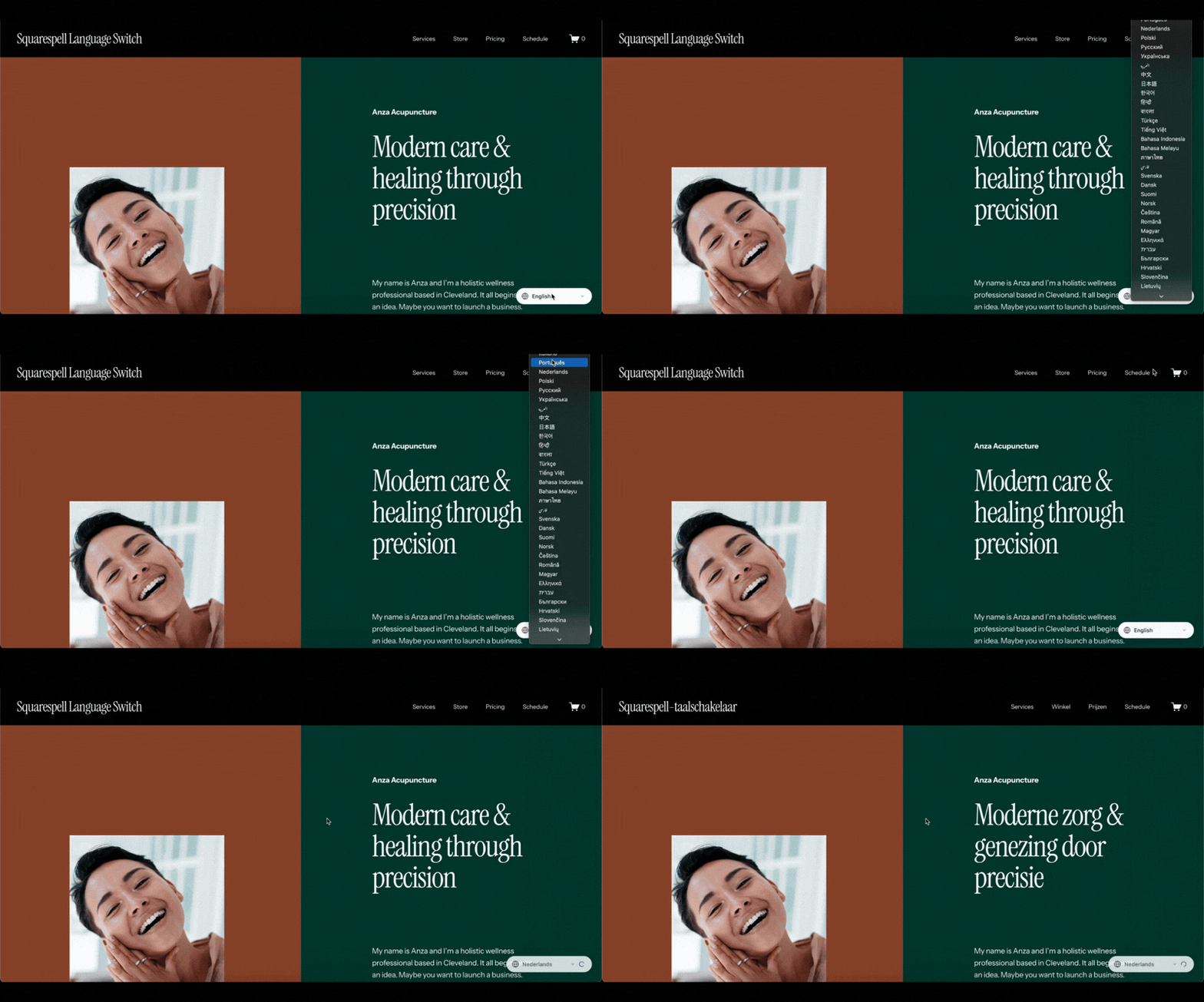
Building a multilingual website on Squarespace shouldn't require expensive monthly subscriptions or complicated third-party integrations. If you're looking to reach international customers, improve your SEO, or simply make your content accessible to speakers of different languages, you need a solution that's both powerful and sustainable.
The challenge? Most translation tools for Squarespace come with recurring costs, performance overhead, and limited control over how your multilingual content is delivered. For small businesses, agencies, and entrepreneurs, these monthly fees add up quickly often costing hundreds or even thousands of dollars per year for features that should be a one-time setup.
This guide explains how the Squarespell Language Switch Plugin solves this problem with a lightweight, one-time purchase solution that gives you complete control over your multilingual Squarespace website.
Why Multilingual Websites Matter for Your Business
Before diving into technical solutions, let's address why adding multiple languages to your Squarespace website is worth the investment.
SEO Benefits of Multilingual Content
Search engines like Google treat each language version of your content as a separate ranking opportunity. When you translate your Squarespace website into Spanish, French, or German, you're not just making your site accessible you're creating entirely new entry points for organic traffic.
Here's what happens when you add language switching:
Your site can rank for keywords in multiple languages
You capture search traffic from international markets
You reduce competition by targeting less saturated language markets
You signal to search engines that your content serves a global audience
For example, a business selling handmade jewelry might rank on page 3 for "handmade silver rings" in English. But translate that same content to German ("handgemachte silberringe"), and suddenly you're competing in a smaller pool with higher conversion potential.
Reaching International Customers
68% of global internet users prefer to browse websites in their native language. That's not a minor preference it's a dealbreaker. Even if your target customer speaks English as a second language, they're statistically more likely to purchase from a site that speaks to them directly.
A multilingual Squarespace website allows you to:
Expand into new geographic markets without opening physical locations
Build trust with customers who value localized experiences
Compete with local businesses on their home turf
Increase conversion rates by reducing language barriers
Trust and Conversion Rate Impact
When visitors land on your site and see content in their native language, something psychological happens: they feel understood. This isn't just feel-good marketing it's measurable in conversion data.
Studies show that multilingual websites experience 20-40% higher conversion rates compared to English-only sites serving the same audience. Why? Because language is trust. When you invest in translating your product descriptions, CTAs, and checkout process, you're signaling that you value that customer's business.
Accessibility and Inclusivity
Beyond revenue and SEO, offering multiple languages is simply the right thing to do. Accessibility isn't just about screen readers and alt text it's about making your content available to people regardless of the language they speak.
For organizations focused on education, non-profits, or community-building, a Squarespace language selector isn't optional it's essential infrastructure.
Common Problems with Existing Translation Tools
If you've researched how to create a multilingual website in Squarespace, you've probably encountered one of these solutions:
Subscription-based translation apps that charge $15–$50/month indefinitely
Third-party services that inject code and slow down your site
Manual duplicate sites that require managing multiple Squarespace accounts
Google Translate widgets that deliver low-quality, non-SEO-friendly translations
Each approach has significant drawbacks.
Subscription Fatigue
The SaaS model is everywhere, and while it works for some tools, translation is fundamentally a one-time setup problem. Once your site is translated, why should you pay forever?
Most subscription translation tools lock you into:
Monthly or annual billing that continues indefinitely
Price increases over time
Feature limitations on lower-tier plans
Dependency on the vendor staying in business
For a small business running a simple Squarespace site, paying $300–$600 per year for basic language switching is unsustainable especially when the actual technical cost of delivering translations is negligible.
Performance Issues
Many translation services work by injecting JavaScript into your Squarespace site. This external code:
Slows down page load times
Creates render-blocking resources
Adds unnecessary HTTP requests
Introduces potential conflicts with your theme
Every millisecond of delay impacts your SEO rankings and conversion rates. Google's Core Web Vitals explicitly penalize slow, JavaScript-heavy sites. If your translation tool is dragging down your Largest Contentful Paint (LCP) or Total Blocking Time (TBT), you're trading international reach for overall site performance.
Limited Customization
Off-the-shelf translation tools often restrict:
Where the language switcher appears
How it's styled
Which languages are supported
How translations are cached
What content gets translated
You're stuck with their design decisions, their language roster, and their technical architecture. If their priorities don't align with yours, you're out of luck.
Dependency on Third-Party Services
Perhaps the biggest risk: when you rely on an external translation service, your multilingual functionality lives on someone else's servers. If they:
Go out of business
Change their pricing
Introduce bugs
Experience downtime
Get acquired and shut down
...your entire multilingual infrastructure disappears overnight. You don't own the solution you're renting it.
Squarespell Language Switch Plugin: A Better Approach
The Squarespell Language Switch Plugin is designed to solve every problem outlined above. It's a one-time purchase code solution that integrates directly into your Squarespace site through the Code Injection feature no external dependencies, no monthly fees, no performance overhead.
One-Time Purchase Model
Pay once, own it forever. The plugin costs a fraction of what you'd pay for a year of subscription-based translation tools, and there are no recurring charges. Ever.
This pricing model makes sense because translation is fundamentally a setup task, not an ongoing service. Once your site content is translated and the switcher is in place, there's nothing to "maintain" month-to-month.
How It Works with Squarespace
The plugin is delivered as a single JavaScript file that you paste into your Squarespace site's Settings → Advanced → Code Injection → Footer section. From that moment on, it:
Scans your site's text content automatically
Translates visible elements using a multi-provider API system
Caches translations in the visitor's browser for instant loading
Displays a floating language selector widget
Remembers the user's language preference across pages
Because it's client-side code running directly on your site, there are no external servers, no third-party accounts to manage, and no ongoing dependencies.
Lightweight and Fast
The entire plugin weighs less than 50KB smaller than a single medium-resolution image. It's written in pure JavaScript with zero frameworks or libraries, meaning:
No React, Vue, or jQuery bloat
No render-blocking external scripts
No additional HTTP requests for assets
No impact on your Core Web Vitals scores
The code is designed to run after your page loads, so it never blocks your Squarespace site's initial paint. For returning visitors, translations load from localStorage cache instantly—faster than fetching them from a server would ever be.
SEO-Friendly Structure
Unlike many translation widgets that rely on JavaScript-only content swapping (which search engines struggle to index), this plugin works by:
Preserving the original HTML structure of your page
Replacing text nodes in-place without altering the DOM hierarchy
Storing original content so switching back to English is instant
Operating transparently to search engine crawlers
This means your translated content is indexable and crawlable, giving you the full SEO benefit of multilingual pages.
No Monthly Billing
It's worth repeating: there are no hidden fees, no "premium" tiers, no annual renewals. You purchase the plugin once from the Squarespell shop, install it, and it works indefinitely.
For agencies managing multiple client sites, this model is especially powerful. Buy once, deploy across every Squarespace site you manage, and never worry about per-site licensing or subscription tracking.
⭐⭐⭐⭐⭐ 347+ Five Star Reviews
41 languages supported (full names + codes)
4 RTL languages supported
~50,000 words/day via MyMemory API + unlimited Lingva fallback
3-provider waterfall (MyMemory → Lingva → Backup)
Instant cache loads (<16ms, localStorage)
Carousel-aware (Squarespace compatible)
SPA navigation support (pushState/popState patched)
Auto geo-detection & language switching
One-time purchase, fully self-hosted
Supported Languages
The Squarespell Language Switch Plugin supports 40 languages out of the box, covering the vast majority of global internet users. Here's what's included:
European Languages:
English, Spanish, French, German, Italian, Portuguese, Dutch, Polish, Russian, Ukrainian, Swedish, Danish, Finnish, Norwegian, Czech, Romanian, Hungarian, Greek, Bulgarian, Croatian, Slovak, Lithuanian, Latvian, Estonian, Catalan
Middle Eastern & South Asian:
Arabic, Hebrew, Persian (Farsi), Turkish, Urdu, Hindi, Bengali
East Asian:
Chinese (Simplified), Japanese, Korean, Thai, Vietnamese
Southeast Asian:
Indonesian, Malay, Filipino (Tagalog)
How Language Switching Works
When a visitor clicks the language selector, the plugin:
Saves their choice to the browser's localStorage
Scans the current page for all visible text elements
Checks the cache for previously translated strings
Fetches translations from the API for any uncached text
Writes the translated text to the DOM in real-time
Persists the preference across page navigation
The entire process happens in milliseconds for cached content. Even for brand-new pages with uncached text, translations stream in progressively the fastest strings appear first, slower ones fill in as they arrive.
RTL Language Support
Right-to-left languages like Arabic, Hebrew, Urdu, and Persian are fully supported. The plugin doesn't need special configuration for RTL it simply translates the text and lets the browser's native RTL rendering handle directionality.
Unlimited Language Selection
While the plugin ships with 40 pre-configured languages, the underlying architecture supports any language pair that the translation API recognizes. If you need a language not in the default list, it can be added by editing the configuration array in the code.
Translation Capacity and Performance
One of the most common questions: "How many words can this translate? Is there a limit?"
How the Multi-Provider System Works
The plugin uses a three-tier waterfall API system to ensure unlimited, uninterrupted translations:
Provider 1 (MyMemory):
50,000 characters per day when you add your email to the config
Best translation quality
Automatically falls through to Provider 2 if quota exceeded
Provider 2 (Lingva):
Unlimited translations
Google Translate quality
No API key required
Automatically falls through to Provider 3 if unavailable
Provider 3 (Lingva Backup):
Second Lingva instance for redundancy
Unlimited translations
Ensures service continuity
This means you'll never hit a hard limit. If one provider is temporarily unavailable or quota-exhausted, the system seamlessly switches to the next. For real-world Squarespace sites, this architecture provides effectively unlimited capacity.
How Cache Multiplies Your Capacity
Every translated string is stored permanently in the visitor's browser using localStorage. This means:
Repeat visitors see instant translations with zero API calls
Popular pages build up full translation caches quickly
You only "spend" API quota on genuinely new content
For a typical business website with 10-20 pages, the cache strategy means Provider 1's 50k daily limit can serve thousands of visitors—because most of them are hitting cached translations.
Translation Speed
Returning visitors (cached):
Instant translation (under 100ms)
Zero network requests
Synchronous paint from cache
First-time visitors (uncached):
Visible text starts appearing in 200-800ms
Full page translation completes in 1-3 seconds
Text appears progressively as API responses arrive
Performance Impact on Your Squarespace Site
Because the plugin runs after page load and stores everything client-side, there's essentially no performance penalty. Your Squarespace site loads exactly as fast as it always didthe plugin operates invisibly in the background after the initial HTML render.
See It in Action
DEMO LINK: [insert demo link here]
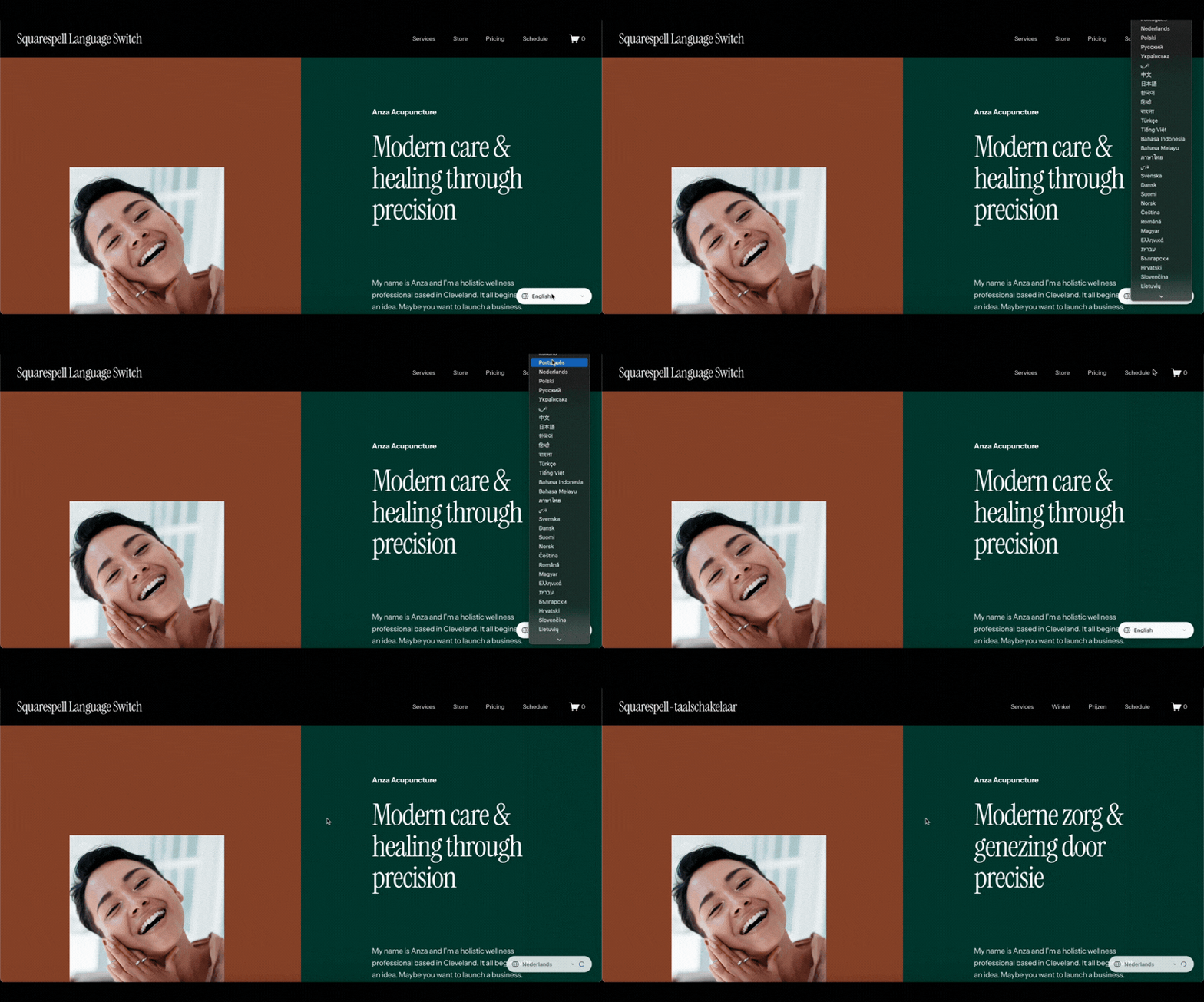
The demo site shows exactly how the language switcher appears on a live Squarespace website. You'll see:
The floating language selector pill in the bottom-right corner
Instant language switching when you select a new language
How text updates dynamically across headings, paragraphs, buttons, and navigation
How the plugin preserves your site's original layout and design
How language preference persists as you navigate between pages
Try switching between English, Spanish, French, and Arabic to see the RTL behavior in action. Notice how fast the translations appear—especially if you switch back to a language you've already loaded (everything is cached).
How the Plugin Works (High-Level Overview)
Understanding the conceptual mechanics helps you trust the solution without needing to review code yourself.
Step 1: Installation
You paste a single <script> block into your Squarespace site's Code Injection → Footer section. That's it. No accounts to create, no API keys to manage, no external dashboards.
Step 2: Automatic Detection
The plugin scans your page for translatable text using a sophisticated DOM walker that:
Identifies visible text nodes inside headings, paragraphs, buttons, and links
Skips technical elements like
<script>,<style>, and<code>tagsIgnores numbers, URLs, and symbols
Preserves HTML structure and styling
Step 3: Translation Engine
When a visitor switches languages, the plugin:
Checks the browser cache for existing translations
Sends uncached text to the API in efficient batches
Receives translations and writes them to the DOM
Saves results to cache for future visits
Step 4: Squarespace-Specific Handling
Squarespace uses dynamic content loading for certain blocks (like carousels, galleries, and summary sections). The plugin includes specialized logic to:
Watch for new content appearing on the page
Re-translate dynamically loaded sections
Handle Squarespace's Ajax-style navigation
Preserve translations during page transitions
Step 5: Persistence
Your visitor's language choice is saved in their browser, so if they navigate to another page or return days later the site automatically loads in their preferred language.
Why This Approach Is Better Long-Term
Let's compare the total cost and control of different approaches to adding multiple languages to Squarespace.
Ownership
Subscription tools: You rent access. If you stop paying, the feature disappears.
Squarespell Plugin: You own the code. Install it once, and it works indefinitely regardless of whether the company exists in 5 years.
Cost Savings
Subscription tools: $15-50/month = $180-600/year. Over 5 years, that's $900–$3,000.
Squarespell Plugin: One-time purchase. Total cost over 5 years: the initial price. No compounding fees, no surprise price hikes.
For agencies managing 10 client sites, the savings are exponential.
Performance
Subscription tools: External JavaScript, third-party servers, additional HTTP requests.
Squarespell Plugin: Runs entirely client-side after page load. Zero external dependencies. Leverages browser caching for instant repeat loads.
Control
Subscription tools: You get what they give you. Limited customization, fixed language lists, locked-in design choices.
Squarespell Plugin: You control the code. Want to adjust the styling? Edit the CSS. Want to add a language? Update the config. Want to change the switcher position? Modify the placement.
Scalability
Subscription tools: Often priced per site or per language. Scaling up means scaling costs.
Squarespell Plugin: Deploy across unlimited sites. Add unlimited languages. No marginal cost for growth.
Future-Proofing
Subscription tools: Dependent on vendor continuity, pricing stability, and feature support.
Squarespell Plugin: Self-contained. The code doesn't rely on external APIs for serving translations (only for fetching new ones). If the translation APIs change, the cached content still works. If Squarespell disappears, your plugin still functions.
Internal Resources
Looking for more ways to enhance your Squarespace site? Check out these related resources:
Squarespace Templates: Browse professionally designed Squarespace templates optimized for performance and SEO
Squarespace Plugins Collection: Explore other code-based enhancements for your Squarespace site, including SEO tools, analytics integrations, and design utilities
Visit the Shop: Purchase the Language Switch Plugin and other Squarespace tools with one-time pricing
Squarespell Services: Learn about our mission to make Squarespace more powerful without subscription bloat
Get Started with Multilingual Squarespace Today
If you've been putting off adding language switching to your Squarespace site because of cost, complexity, or performance concerns, the Squarespell Language Switch Plugin solves all three.
What You Get
40 languages supported out of the box (Arabic, Spanish, French, German, Chinese, Japanese, and 34 more)
One-time purchase with no recurring fees
Unlimited translations via multi-provider API system
Instant loading for returning visitors through browser caching
SEO-friendly architecture that preserves your content's indexability
Zero performance impact on your Squarespace site speed
Complete control over styling, placement, and behavior
Who This Is For
Small businesses expanding into international markets E-commerce stores targeting non-English speaking customers Agencies managing multilingual client sites Non-profits serving diverse communities Educators making content accessible globally Bloggers building international audiences
Why Now?
Every day you wait is another day of:
Lost international traffic
Missed SEO opportunities
Paying monthly fees for subscription tools
Limiting your market reach
The one-time cost of the Squarespell plugin is less than two months of most subscription translation tools—and it works forever.
Final Thoughts: Multilingual Websites Shouldn't Be a Luxury
Adding multiple languages to your Squarespace website should be simple, affordable, and sustainable. For too long, the only options were expensive subscriptions or complex manual workarounds.
The Squarespace Language Switch Plugin proves there's a better way: lightweight code, one-time pricing, and complete ownership. No vendor lock-in. No performance compromise. No subscription fatigue.