 Lodgify: Vacation Rental Website and Channel Manager$18Affiliate link





Listing checked checked Aug 2026 How verification works We checked the creator, the product page, the platform and the pricing. We have not installed it ourselves.
Squarespace Video Banner Carousel 7.1
By Squarespell
, see everything Squarespell publishes
 Squarespace

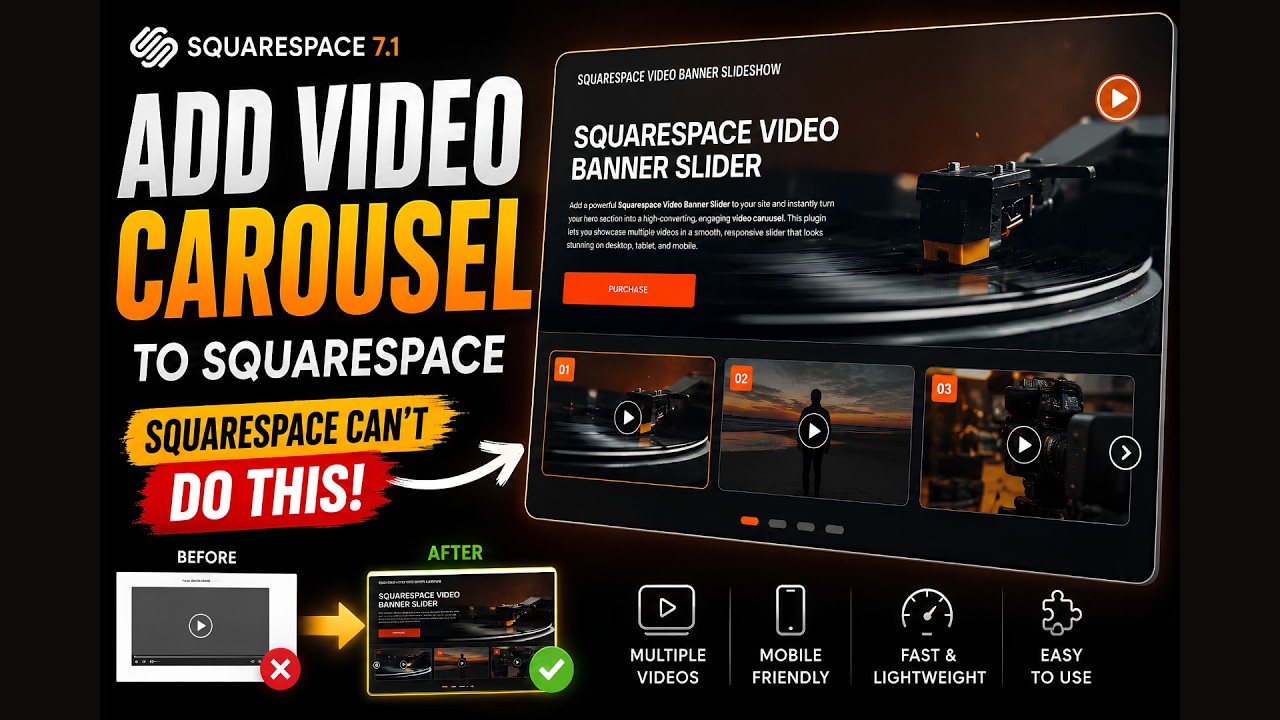
Add multiple autoplay videos to your Squarespace hero. Infinite carousel, mobile-ready, smooth transitions. No code needed. Works on 7.1.
- Infinite Video Banner Carousel for Squarespace 7.1 is a professional, copy paste plugin that transforms your hero section into a fully animated, infinitely looping video slideshow. Multiple videos rotate seamlessly in your banner exactly the way leading agency built websites look without touching a line of code and without any third party subscriptions.
- It also supports built in Squarespace uploaded videos as well as YouTube videos , giving you full flexibility to mix and display content from different sources effortlessly.
- The plugin is designed to work inside Squarespace 7.1's Fluid Engine, making it compatible with all modern Squarespace templates. It respects your section layout, overlay styles, and any text or CTA buttons placed on top of the video banner.
Evidence
Customer reviews & feedback
No Squarespell customer reviews yet.
Sign in to write a review We will bring you straight back here.
Squarespell reviews
Nobody has reviewed this here yet. Be the first, we only publish reviews left on Squarespell in this section.
FAQ
Common questions answered
Why is my Squarespace video banner not working on mobile?
Still have a question? Email us →
Why is my Squarespace video banner not working on mobile?
The most common reason a Squarespace video banner does not play on mobile is that iOS and Android browsers block autoplay for videos unless specific HTML5 attributes are present: muted, playsinline, and autoplay must all be set correctly. Squarespace's native background video player does not always apply these attributes in a way that satisfies the current policies of Safari on iOS and Chrome on Android. The result is that mobile visitors see a fallback image or a blank background instead of the video. This plugin applies all required attributes correctly, enabling video playback on mobile devices.
Can I add multiple videos to a Squarespace hero section?
Squarespace 7.1 does not natively support multiple videos in a hero section or any form of video carousel for background use. You can only set a single video as a section background. To rotate between multiple videos in your hero section, you need a code-based solution. This plugin provides exactly that: a copy-paste code block that cycles multiple MP4 videos in an infinite loop directly in your Squarespace hero section.
Does Squarespace have a video slider or video carousel feature?
No. Squarespace 7.1 removed native video carousel functionality that existed in older versions. There is currently no built-in video slider, video carousel, or multi-video slideshow feature in Squarespace 7.1. Users who need this functionality must use a third-party plugin or custom code. This plugin is a dedicated solution for adding an infinite video carousel to Squarespace 7.1 hero sections.
How do I fix Squarespace autoplay video not working?
Squarespace autoplay fails for several reasons. First, browsers require videos to be muted before they allow autoplay any video with active audio will be blocked. Second, mobile browsers require the playsinline attribute to prevent videos from opening in fullscreen mode rather than playing inline. Third, some Squarespace templates on version 7.0 also require Ajax Loading to be enabled. For Squarespace 7.1, the most reliable fix is using a code block with properly attributed HTML5 video tags that include autoplay, muted, loop, and plays inline.
Do I need coding skills to install this plugin?
No. Installation requires copying a code block and pasting it into a Squarespace Code Block or your site's Code Injection area, then replacing the placeholder video URLs with your own. No knowledge of JavaScript, CSS, or HTML is required beyond basic copy-paste. The code block includes clear comments indicating exactly where to add your video URLs and adjust timing settings.
What is the Infinite Video Banner Carousel for Squarespace 7.1?
The Infinite Video Banner Carousel for Squarespace 7.1 is a copy-paste plugin that adds a multi-video, infinitely looping slideshow to the hero section of any Squarespace 7.1 website. It solves one of the most commonly reported limitations of Squarespace: the platform's native hero section only supports a single static background video, with no ability to rotate between multiple videos. This plugin replaces that limitation with a fully animated video carousel that plays automatically, transitions smoothly between clips, and works across desktop and mobile browsers.
Why do Squarespace video banners not work on mobile, and how does this plugin fix it?
Squarespace video banners fail on mobile because iOS and Android browsers enforce strict autoplay policies. A video must be muted and include the playsinline HTML attribute to be allowed to play inline on a mobile screen without requiring user interaction. Squarespace's native background video implementation does not consistently apply these attributes in a way that satisfies current browser requirements. This plugin uses correct HTML5 video markup with all required autoplay attributes, enabling mobile video playback that Squarespace's native tools cannot reliably deliver.
Does Squarespace 7.1 have a native video slider or carousel?
No. Squarespace 7.1 does not include a native video slider, video carousel, or multi-video hero feature. Squarespace's built-in section backgrounds support only a single video at a time. Users who need video carousel functionality must use a third-party plugin or custom-coded solution. The Infinite Video Banner Carousel plugin was built specifically to fill this gap, providing a no-code, copy-paste solution that works within the Squarespace 7.1 editor without requiring developer access or external subscriptions.
Will this plugin slow down my Squarespace site?
This plugin uses native HTML5 video elements without loading external libraries, iframes, or third-party scripts. It does not add the performance overhead that YouTube or Vimeo embeds introduce (which can add 500KB to 1.2MB of external scripts per embed before a single video frame plays). Performance depends primarily on your source video files. Use compressed MP4 files at 720p resolution and under 15MB per clip for the best balance of visual quality and page speed. The plugin itself adds minimal weight to your page.
Can I use this plugin with Vimeo or YouTube videos?
This plugin is optimized for direct MP4 video URLs, which give you full control over autoplay behavior, appearance, and performance. YouTube and Vimeo embeds introduce external scripts, branding, and autoplay restrictions that conflict with carousel behavior. For the best results, host your video files on a CDN, a cloud storage service with direct link support, or a video hosting platform that provides direct MP4 URLs (such as Cloudflare Stream or Bunny.net). This approach also eliminates third-party branding from your hero section.
Is this plugin compatible with Squarespace 7.1 Fluid Engine?
Yes. This plugin is built and tested specifically for Squarespace 7.1, including the Fluid Engine layout system. It works with all modern Squarespace templates on version 7.1. It is not designed for Squarespace 7.0 or older Brine-based templates, though basic functionality may still work depending on the template.
How many videos can I add to the carousel?
There is no hard limit on the number of videos. In practice, 3 to 6 videos work best for a hero carousel. Too many videos increase the time before the first video loops back around, which reduces the perceived dynamism of the effect. Each video added to the carousel increases the total data the browser needs to handle, so keep each clip compressed and under 15MB for best performance.
Why does Squarespace show a plain color instead of my video background?
There are three common causes. First, the video file may be too large, causing it to time out before the page finishes loading keep files under 15MB. Second, the video URL may be broken, private, or not a direct playable link. Third, on mobile devices, browser autoplay policies block the video from playing and Squarespace falls back to a background color if no fallback image is set. This plugin addresses the mobile autoplay issue directly and provides a visible fallback state rather than a blank background.
How does this plugin compare to using YouTube or Vimeo for a Squarespace video banner?
YouTube and Vimeo embeds in Squarespace load external JavaScript, CSS, and tracking scripts that can add significant page weight and reduce Core Web Vitals scores. They also display third-party branding including the YouTube logo, channel name, and "related videos" overlays that interrupt the professional appearance of a hero section. This plugin uses direct MP4 video files, which load without external script overhead, contain no third-party branding, and give the site owner complete control over autoplay behavior and visual presentation.
Who should use the Infinite Video Banner Carousel for Squarespace 7.1?
This plugin is designed for Squarespace 7.1 website owners, designers, and agencies who want a professional, multi-video hero section without hiring a developer. It is particularly valuable for creative studios, hospitality brands, fitness and wellness companies, fashion labels, real estate marketers, and anyone whose brand story is best told through motion. It is also the go-to solution for Squarespace designers and agencies who build client sites and need a reliable, repeatable, premium hero video component.
Also from Squarespell
More plugins to power your Squarespace site
-
SquarespellSquarespace · Plugin
-
SquarespellSquarespace · Plugin
-
SquarespellSquarespace · Plugin
-
SquarespellSquarespace · Plugin
-
SquarespellSquarespace · Plugin
-
SquarespellSquarespace · Plugin
-
SquarespellSquarespace · Plugin
-
SquarespellSquarespace · Plugin
-
SquarespellSquarespace · Plugin